
 The 2026 Drupal Business Survey is open. Your response will help shape the future of the Drupal business ecosystem.
On this page
Tools for testing & debugging Rules
This is documentation for Drupal 7, which is no longer supported. Learn more and find resources for Drupal 7 sites
There are a number of tools available for tuning plugins and configurations. These tools can identify which parts of a process or config section require your attention.
Rules Debug Log
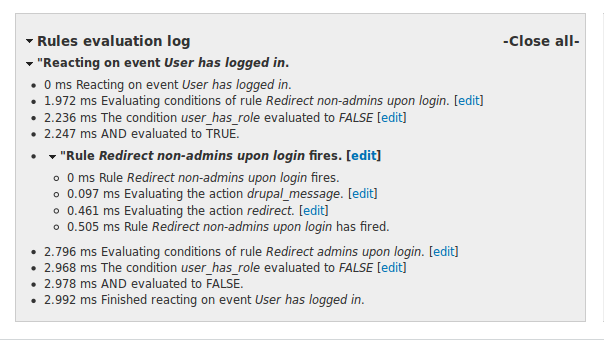
The Rules Debug Log is built into Rules and is available through the settings page. It's a useful complement for the configuration and programming of processes because it follows what rules are executed and displays that information in the help region.
For example, it can show what conditions are evaluated TRUE or FALSE, which variables were used, what order operations were executed, how long time each step takes, and more.
Viewing the Rules Debug Log output is a helpful way of pinpointing why something unexpected is happening. Clicking the [edit] link next to an event will take you to the Rules UI where you can fix the miss-configured rule.
You might want to set "Show debug information" to "Always" while you're working on a rules, and "In case of errors" while you're making other changes on your site.
Devel Rules

Devel Rules (sandbox) adds a helpful section in Rules for builders, developers, and inquisitive admins. This module can print a summary of all available Data types, Entity properties, Actions, Conditions, Events, and Components. This summary includes the name of the module providing it, the label, base function, and most importantly, the data types it provides and expects. This can be useful when determining the reasons why certain values are available in the data selector and why others aren't.
Debug Action
If variables are not behaving as you expect, you will find the Rules action Debug value useful (provided by the Devel module). It prints out a krumo dump of a variable that you choose, making it available for inspection. Potential improvements for this are in https://drupal.org/node/1085234
Help improve this page
You can:
- Log in, click Edit, and edit this page
- Log in, click Discuss, update the Page status value, and suggest an improvement
- Log in and create a Documentation issue with your suggestion
