
Configuring cron jobs with Media Temple Grid (gs) and DV servers
This is documentation for Drupal 7, which is no longer supported. Learn more and find resources for Drupal 7 sites
Through my experience and to my knowledge, cron jobs on Media Temple's Grid Servers must be run via an .sh file in the "/scripts" directory of your Drupal installation. This was confusing to me as I've always setup cron jobs in cPanel. Media Temple does not use cPanel. Following the steps to setup a cron job like 45 * * * * /usr/bin/wget -O - -q http://www.example.com/cron.php through a typical cPanel interface will not work in Media Temple's cron job creation tool.
Use the following steps to get cron jobs working on a Media Temple Grid Server:
- Log into your (mt) AccountCenter and go to your WebControl panel.
- Click on the "Cron Jobs" icon to enter the cron configuration page.
- Select the "Add a new cron job" button.
- Enter an email address for the "Output email". Note:Leave this blank if you don't want constant emails.
- Enter the following in the "command to run" text box:
curl http://www.example.com/cron.php
where "example.com" is your domain name. - Under "Scheduling Settings" select how often you want your cron job to run.
- Note the Media Temple will not allow a cron job to run more often than "every 5 minutes".
- To setup a cron job to run once an hour:
- Under the "minutes" entry, specify the minute value on which the cron job will start each hour.
- Then select the following radio boxes: hour, day, month, day of the week.
- To setup a cron job to run once an hour:
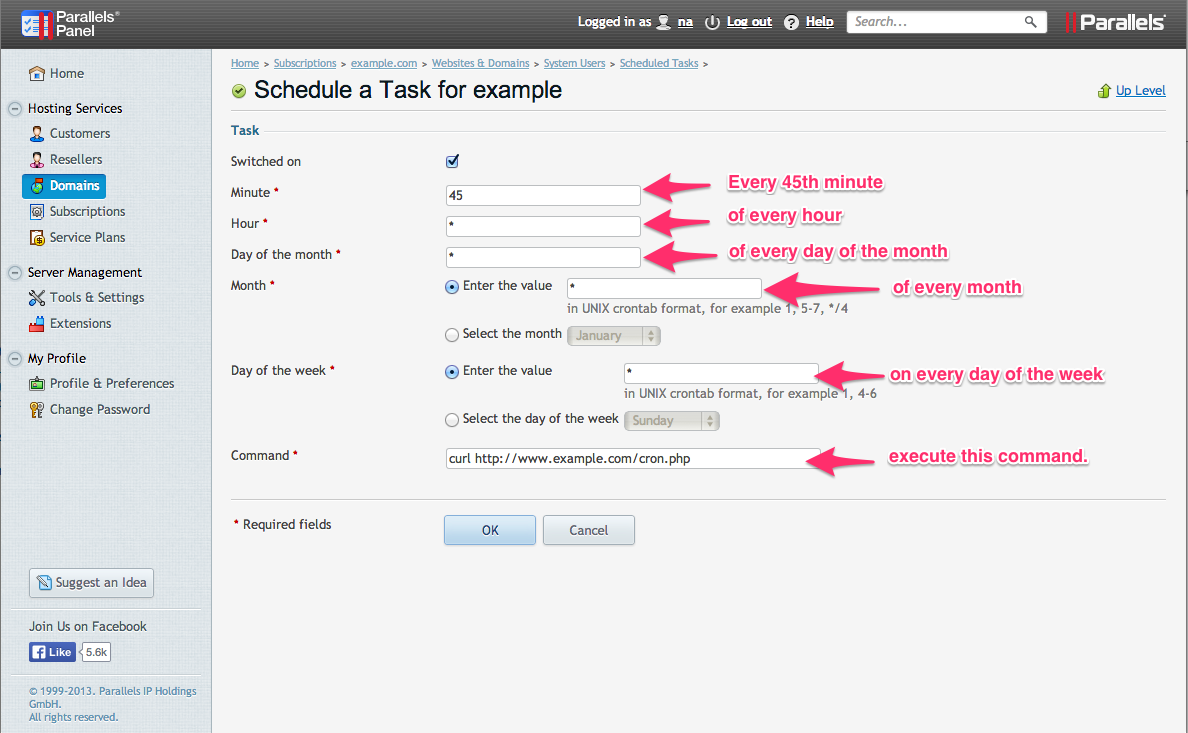
Setup Cron Jobs on Mediatemple DV Server on Drupal 7
We want cron to run every 10 minutes, but Drupal's cron only allows for 1 hour granularity.
- In the Drupal admin Go to Report > Status Report
- Copy your unique cron key url from the cron maintenance tasks section.
- In Mediatemple's plesk, open Websites & Domains > Scheduled Tasks > click your username > click Schedule New Task and enter this info:
Minute: */10
Hour: *
Day of Month: *
Month: *
day of Week: *
Command: curl http://yourdomain.com/cron.php?cron_key=1Vulq8M6-xW4cG0F8ewU5PeckY39_MW6...
For the command field I used "curl" and the url I copied in step 2.
Note about Chroot
If your FTP accounts are chrooted then cron will not run because curl command cannot run in the chrooted environment. In order to allow curl to run try these steps:
- SSH into your server as root or equivalent user.
- Run this command
- If you ever need to undo this setting (but it will stop cron from running again):
/usr/local/psa/bin/server_pref --update -crontab-secure-shell ""
/usr/local/psa/bin/server_pref --update -crontab-secure-shell /bin/bash
Reference on chroot and curl command: http://kb.parallels.com/en/115889
To Turn off cron email alerts:
Login to Plesk, go to Home > Subscriptions > domain.com > Websites & Domains > Scheduled Tasks > Settings
Help improve this page
You can:
- Log in, click Edit, and edit this page
- Log in, click Discuss, update the Page status value, and suggest an improvement
- Log in and create a Documentation issue with your suggestion
