Closed (fixed)
Project:
BlueMasters
Version:
7.x-1.x-dev
Component:
Code
Priority:
Normal
Category:
Bug report
Assigned:
Reporter:
Created:
24 May 2012 at 19:49 UTC
Updated:
31 May 2012 at 22:31 UTC
Jump to comment: Most recent file


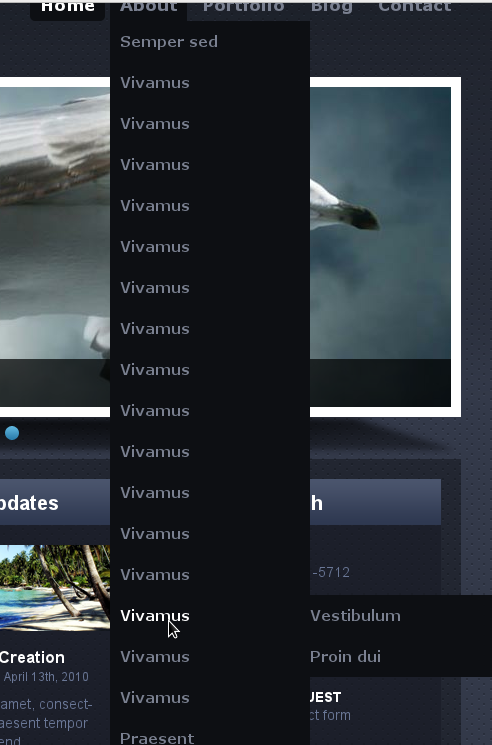
Hello, I am having an issue with the second level of the dropdown menu. I have a sub-menu with about a dozen items listed, and it goes so far as past the vertical height of the homepage slider.
However, when I try to mouse-over the items in the menu that are below the homepage slider, the menu just dissappears and folds back up into the navigation. In other words, I can not access the menu items that are located in the bottom half of the sub-menu (ex: Travel and Accomodations, Expo Brochure)
Is this perhaps an issue with the 'z-index' class? The dev site is on a client's server and locked, so unfortunately I can not provide access, but I can provide code snippets, if that helps.
Screenshot attached. Thanks!
| Comment | File | Size | Author |
|---|---|---|---|
| #1 | Menu limit.png | 116.88 KB | pwhiteside |
| Screen shot 2012-05-24 at 2.42.13 PM.png | 481.96 KB | sparkfactor |


Comments
Comment #1
pwhiteside commentedHi,
On my dev with this theme the same issue occurs on any menu item over the description block of the slide show, the description z-index is set to 101.
I have fixed this which may also help you with the following code, this sets the menu items to be 102.
I hope this helps.
Cheers, Phil.
Comment #2
sparkfactor commentedThanks!
It seemed to do the trick. Although, I had to drop it in the top-most level on the #navigation ul.menu to get it to take effect.
Comment #3
pwhiteside commented