

 Come together with the global Drupal community in Rotterdam, 28 Sept – 1 Oct 2026. Sessions, contribution, connection, and Early Bird savings until 8 June.
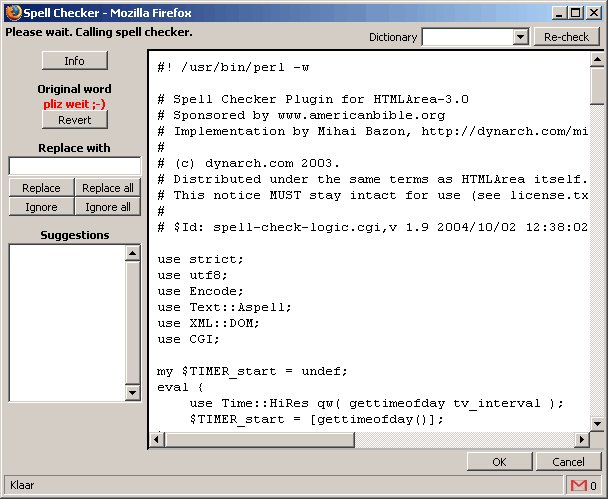
I have installed htmlarea.module and active the spelling checker. But when i editing a page and click in the spellingsbutton, i get a popup with in the javacode of the spelling checker. did i set something wrong?
Mad Maks
| Comment | File | Size | Author |
|---|---|---|---|
| spellcheck.png | 9.8 KB | Mad Maks |

Comments
Comment #1
gordon commentedThe Spell checker uses a perl backend to check the spelling, and your web server doesn't seem to be configured to run perl cgi scripts. Or in the SpellChecker plugin directory you need to copy the dot.htaccess to .htaccess so it will run perl cgi in that directory.
Comment #2
Mad Maks commentedAfter copy the dot.htacces to .htacces i get instead of the code this error:
and the log said:
what is going wrong?
Thanks
Comment #3
gordon commentedThis could be a combination of things. check the path to perl, theis script is looking for it in /usr/bin/perl, or it could be a problem with you apache2 configuration
Comment #4
Mad Maks commentedi have in usr/bin a file called perl, so the path in script is not right isn't it. But when i look in spell-check-logic.cgi i can't find a path. where can i find it?
Comment #5
gordon commentedit is on the first line
#!/usr/bin/perl
I am really guessing here, but make sure the cgi script is executable. This what could be stopping it.
Comment #6
Mad Maks commentedthe file usr/bin/perl has execute rights (755) so that is not the problem i think. Thanks for helping me!
p.s is a line not disabled (or a commend) as it starts with # in cgi scrips?
Comment #7
gordon commentedmake sure that the .cgi file is executable.
as the for first line is a special like that tells the shell which shell interperator to use, because it has a "#!" as the start of the line.
Comment #8
Mad Maks commentedit is excutable (755) :-(
Comment #9
gordon commentedHave you checked you error.log. Their is most likely something in there.
Comment #10
Mad Maks commentedComment #11
gordon commentedif you have a look in the spellchecker plugin directory at the file readme-tech.html, it tells you exactly what perl packages you require to run spell checker.
The following Perl modules are required:
* [2]Text::Aspell
* [3]XML::DOM
* [4]CGI
Of these, only Text::Aspell might need to be installed manually. The
others are likely to be available by default in most Perl
distributions.
_________________________________________________________________
References
2. http://search.cpan.org/search?query=Text%3A%3AAspell&mode=all
3. http://search.cpan.org/search?query=XML%3A%3ADOM&mode=all
4. http://search.cpan.org/search?query=CGI&mode=all
Comment #12
gordon commentedComment #13
(not verified) commented