

Closed (fixed)
Project:
Views Bulk Operations (VBO)
Version:
6.x-1.9
Component:
Core
Priority:
Normal
Category:
Bug report
Assigned:
Unassigned
Reporter:
Created:
23 Jul 2007 at 22:05 UTC
Updated:
14 Jul 2011 at 00:05 UTC
Jump to comment: Most recent file


Comments
Comment #1
infojunkieComment #2
(not verified) commentedComment #3
jdidelet commentedHi,
I have a bug who is the same type of this bug. Now after bulk operation, I keep my filter selection when I come back to my view page. But if my view (where I come back) has multiple pages and if I go on the second page, I lose my filter selection. I tested with the last version of vbo (6.x-1.x-dev).
Comment #4
jdidelet commentedComment #5
infojunkieDo you mean that your exposed filters are marked with "Remember the last settings" ? I wasn't able to reproduce this on my testing machine. Do you have a demo installation I can see?
Comment #6
jdidelet commentedHi,
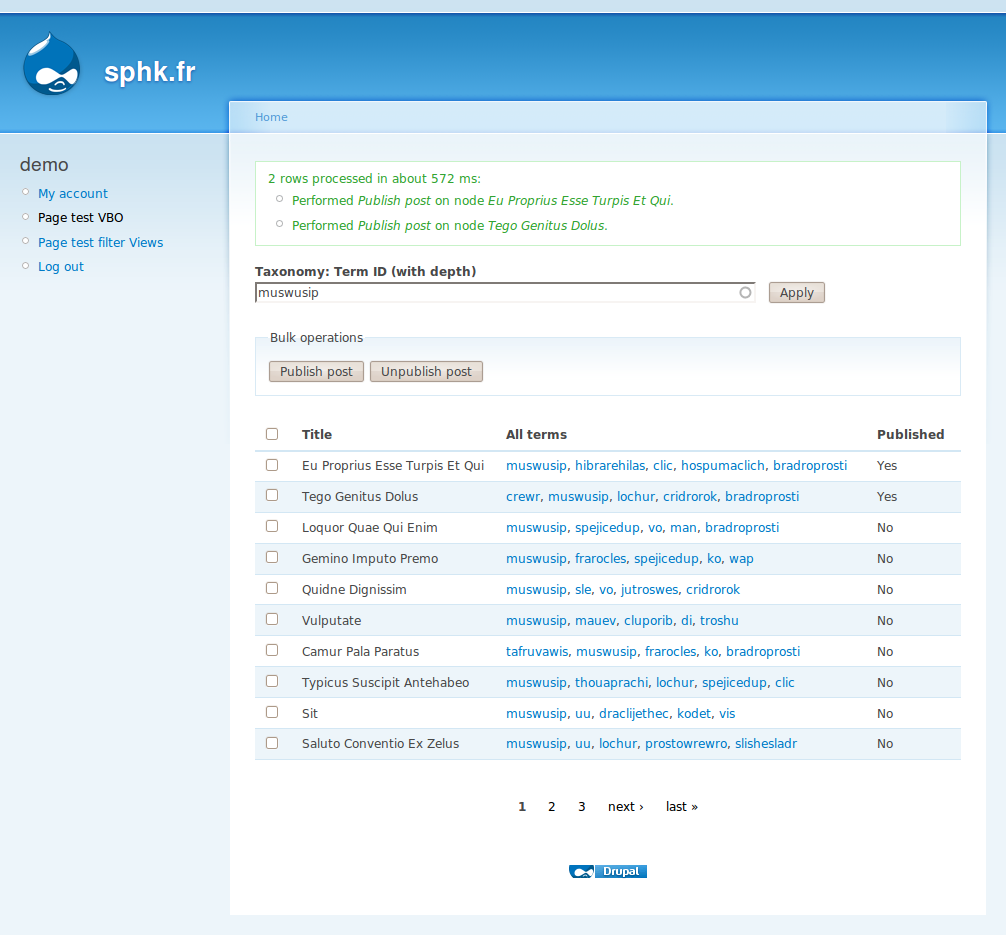
Sorry to come back only now. I created a test website for demo. You can go to http://sphk.fr/ and login with demo/demo (for login/password). After, click on "Page test VBO" in the menu at the left.
Here the process for reproduce the bug (I tested with drupal 6.15, views 2.8 and VBO 1.9):
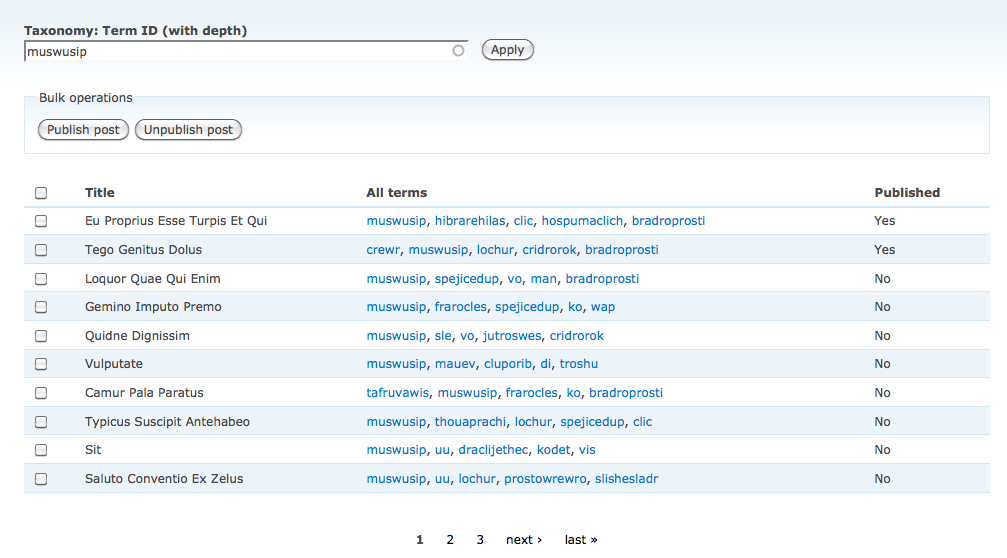
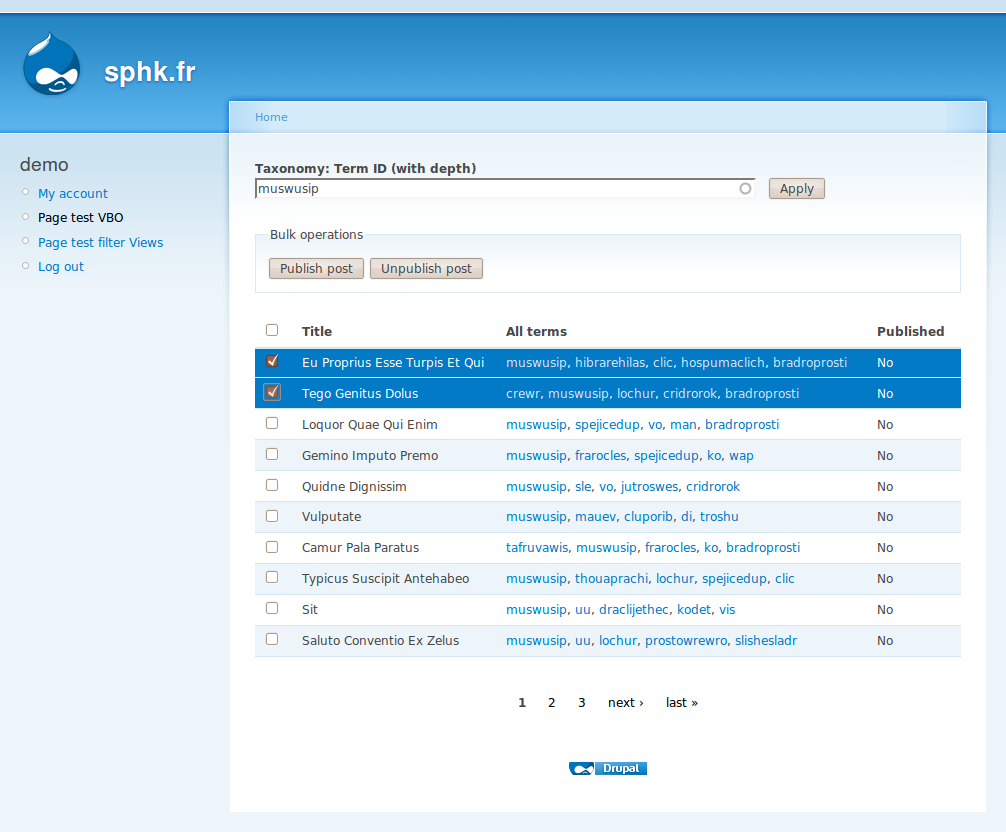
-> Type "muswusip" value in the "Taxoxomy: Term ID (with depth): field" and apply the filter. You'll have 3 pages of results.
-> Check the checkbox on two (or more) nodes and apply "Unpublish post" action.
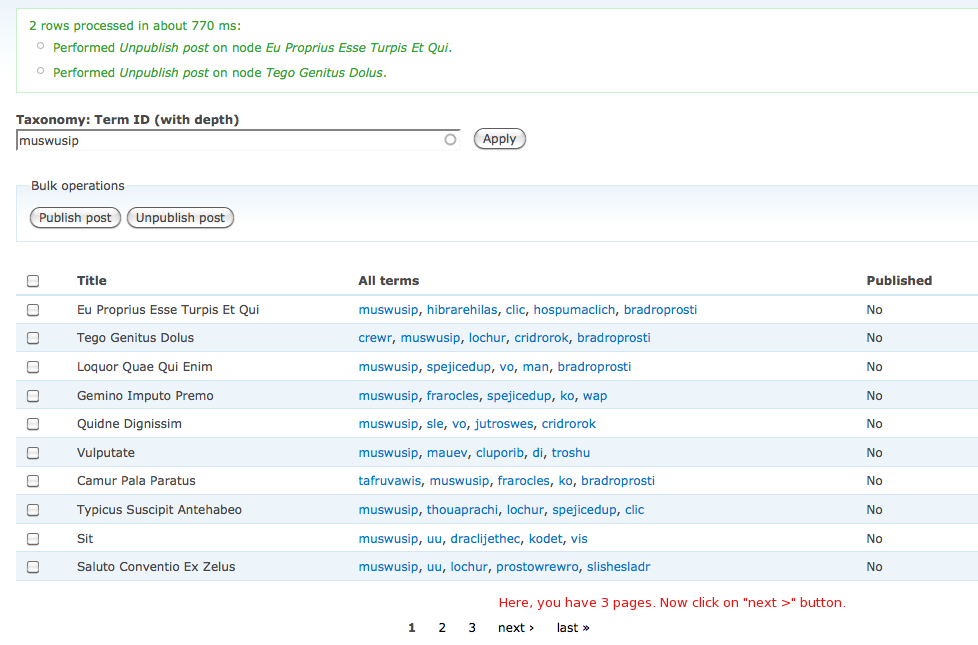
-> As you can see, you'll come back to your view page with the "Taxoxomy: Term ID (with depth): field" who remember my value (here: "muswusip"). You'll have always 3 pages of results. Here ok no problem.
Here is the bug.
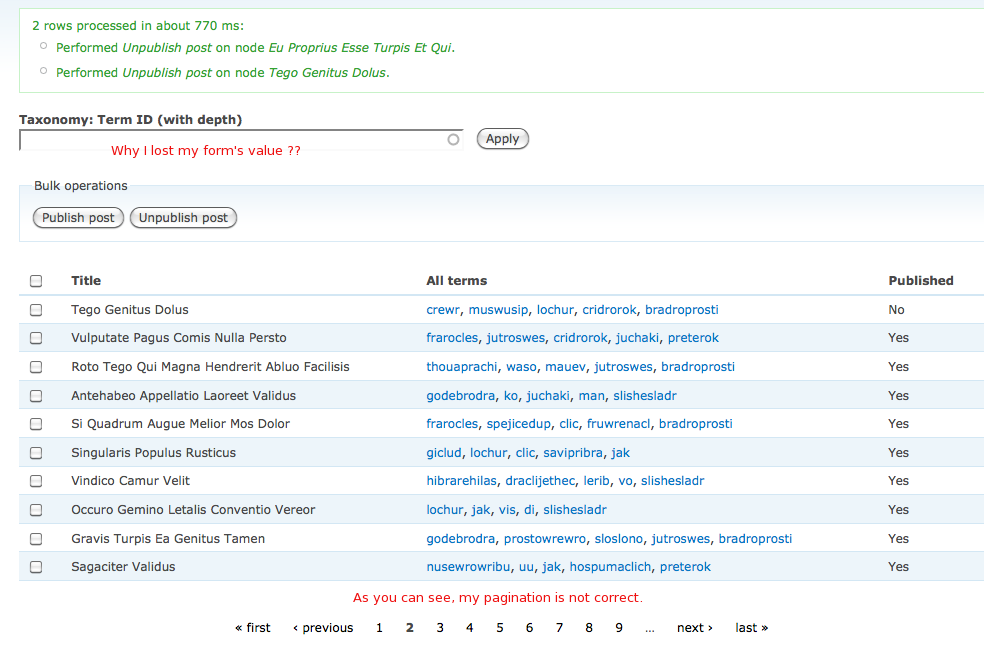
-> Now click on page "2" or page "Next". As you can see, I lose my filter value and the number of pages is not 3 but more.
I copy/paste my view code below.
Regards and thanks for your help !
Comment #7
infojunkieSorry for getting back to you so late. I've checked your site and things to be working correctly, but without the confirmation page. Is it also working with the confirmation page enabled?
Comment #8
jdidelet commentedSorry to getting back to you so late too :). You mean you always have 3 pages when you click on page 2 or "Next" (after you realize the operation)? Strange, in my computer, when I click on "Next" after I realize "Publish" Operation, I have more than 3 pages... Not good. Can you send me a screenshot of your result when you click on "Next" after you realize a bulk operation (publish or unpublish) ? Perhaps it's me...
Thanks in advance,
Comment #9
infojunkieCan you try a normal (non-VBO) view with the "Remember" setting on the same exposed filter? I just want to make sure this is not a Views issue.
Comment #10
jdidelet commentedI paramater a non-vbo view (table view) and as you can see, the result is ok. No bug from Views. Please test and tell me if you have the same result than me.
Comment #11
infojunkieCan you please put back the VBO in http://sphk.fr/test-vbo ? I forgot what I'm trying to check :-)
Comment #12
jdidelet commentedNo problem :). It's done.
Comment #13
infojunkieSorry, but it seems VBO is working correctly. Attached are the screenshots for the 2 stages (couldn't catch the progress bar).
Comment #14
jdidelet commentedI'm sorry but perhaps my english is not clear. The problem is not VBO action. The result is ok. It's after you've done the update. As you can see in Step2, you have 3 pages. Now, after the step2, try to click on "Next >" value (in the pagination). As you can see, the number of pages will not be 3 but more.
Comment #15
jdidelet commentedI publish 3 screenshots here. Perhaps it will be more clear.
Thanks for your help.
Comment #16
infojunkieI understand now. This doesn't occur on my test machine, but I'm using different exposed filters.
Can you please try with a taxonomy drop-down and see if there's a difference?
Comment #17
smuthu commentedI am also facing the same issue the user (jdidelet) faced pagination is not working and sorting also not working properly with exposed filter.
Comment #18
infojunkieComment #19
jdidelet commentedIt's done but the result is the same. You can try. I changed by a dropdown. I attached step 1, step 2 and step 3.
Comment #20
infojunkieThis only occurs with Ajax on. Can you confirm?
Comment #21
jdidelet commentedyes I tested. If you disable ajax form (Use Ajax = No in Views), it's ok. Do I need to create a ticket in Views issue?
Comment #22
infojunkieNo please keep it here. I need to investigate this more.
Comment #23
robby.smith commentedsubscribing
Comment #24
fatstar415 commentedsubscribing
Comment #25
verta commentedSubscribing.
The exposed filter works, but I cannot figure out how to disable it. I am filtering on a role, fine, but now I want to no longer filter. Since it's cached, I can't unselect it. Any advice?
Edit: Found it.
Ctrl-Click. First I found two other lost souls whom nobody would help (and I posted an answer for both of them), then I found Better_Exposed_Filters http://drupal.org/project/better_exposed_filters because it was discussing the exposed filter UI.
Comment #26
bojanz commentedA lot of changes got committed to VBO in order to handle this better, since this issue was last active.
Reopen the issue if there is still a problem (with 6.x-1.x-dev or 6.x-1.11-beta1).