

 The 2026 Drupal Business Survey is open. Your response will help shape the future of the Drupal business ecosystem.
I think it would be useful to have an option to remove or unlink a referenced entity within the IEF module without deleting that entity. A new button could be added to the edit and delete options called "remove" or "unlink". The delete confirmation should be changed to explain that the entity will be deleted from the database and all other displays. While the "remove" option would simply unlink the entity from the current display.
Example:
Node 1 and 2 both reference the same product/entity. If the product/entity has never been ordered or added to a cart, then deleting the reference on node 1 also deletes it permanently from the database and it can no longer be referenced by node 2.
| Comment | File | Size | Author |
|---|---|---|---|
| #35 | 1617886-followup.patch | 1.37 KB | bojanz |
| #34 | ief-1617886-remove_entity_checkbox_confusing-34.patch | 606 bytes | guypaddock |
| #16 | Edit Product display Alice 290 | Sono.jpg | 36.38 KB | leanderl |
| #11 | 1617886-working_example_of_remove_button-10.patch | 5.59 KB | marcin.wosinek |
| #4 | IEF variation list view changes | 15.88 KB | mnislamshihan |



Comments
Comment #1
andyg5000Discussed with @rszrama and he suggested leaving 2 buttons (edit, delete) and checking for other nodes that might reference the same entity before calling the delete entity method. I'm guessing this will need to be a database query to the reference table unless anyone knows a better way to check for these relations.
Comment #2
bojanz commentedUnsure about how this should work.
I'd avoid any automatic checks and leave the decision to the user.
Now the question is: should delete VS unlink be a widget setting, or should both actions be available at the same time?
I'm leaning towards a widget setting.
There's also a separate issue that I'm working on that will disable products if they are already referenced from a line item, while unlinking and telling the user it was deleted. This is commerce_product specific and falls under the "delete" tree.
Comment #3
andyg5000I was originally investigating having a check during the validation that would count existing node references and alert the user of them. Then give the option to delete all or unlink it from the current node. I think this would require a 'delete callback' since it would be entity type specific. I've yet to review the new patch http://drupal.org/node/1626706#comment-6100890, so maybe this is covered there.
Comment #4
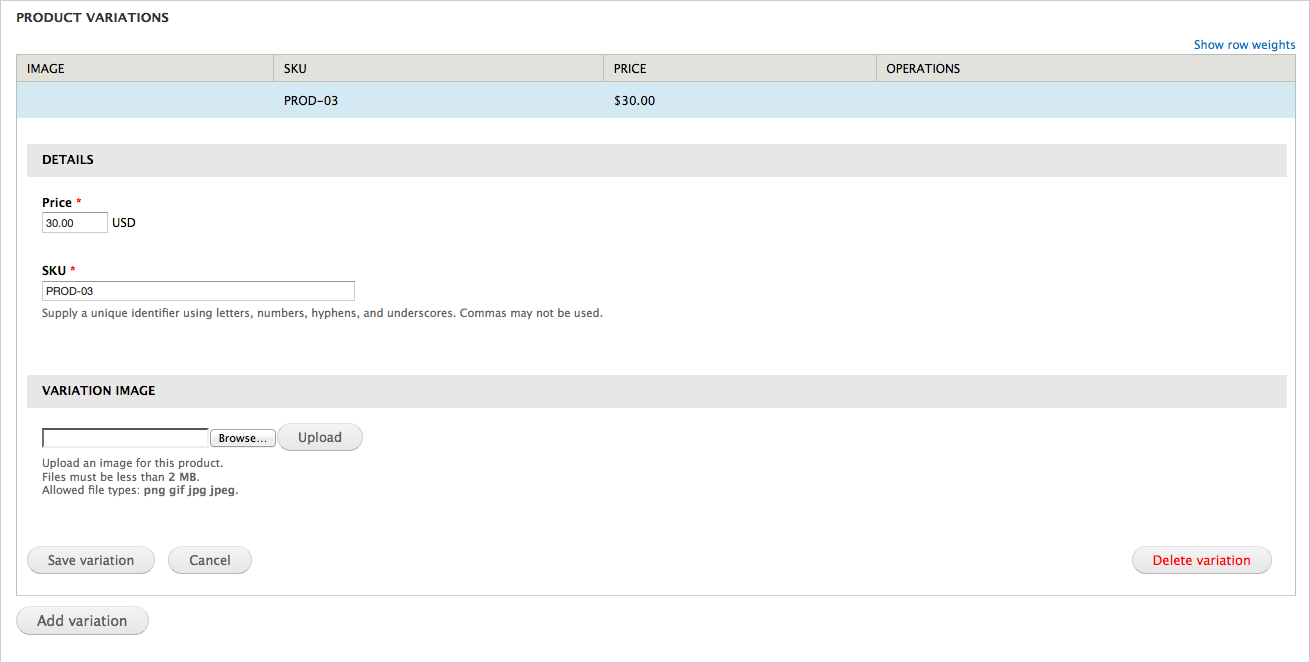
mnislamshihan commentedIMHO, the unlink button suggestion is really good, but instead of keeping three (edit, remove & unlink) buttons in variation list items, I would like to recommend the delete functionality (button) to be moved to edit view instead. This will make the UI concise as well as provide maximum functionality to the user.
Moreover, it would be really WOW, if a "Select variation" button can be added into the variation list of product display. This will allow the user to bulk import products from external sources (like csv file) and then associate imported products in existing product displays.
I've created two mockup images with the changes and attached FYC.
Comment #5
bojanz commented@mnislamshihan
Importing is not, and won't ever be the job of Inline Entity Form. Let's keep the issue focused on unlink.
I'm now pretty convinced unlink VS delete should be a setting provided by the base controller, that's how I'd like to proceed.
Comment #6
andyg5000I don't think that @mnislamshihan was suggesting that we add an import feature, but suggesting the ability to add an existing (previously imported) variations. This idea is already in another issue http://drupal.org/node/1526084. @mnislamshihan, I'd suggest posting any ideas you have on assigning existing entities in this issue.
As for the delete/unlink feature and how this will work, I think @mnislamshihan has a good idea, but I'm not sold on it. Each person that I've spoken with has had a different idea of how this would work. Regardless of which route is chosen, the upgrade that @bojanz made this weekend is going to make implementing it a lot easier.
When a delete method is called, I think the following needs to happen, automated or not (using commerce product as example):
1) Check for existence of other references to the same entity on all product display type nodes
2) Decide whether to unlink current or all references
3) Check for existence of line items (cart/order)
4) Decide whether to disable or permanently delete entity
Let's keep the ideas flowing...
Comment #7
mnislamshihan commented@andyg5000, thanks a lot for clarifying my saying about "Select variation" button. Also I was not aware of the other open issue on this feature. I'll follow that thread now on. I am also in sync with your other analysis.
BTW, another idea could be - the delete functionality can simply be removed from the product display interface, that is, the "Remove button" will always remove the association with the display node, never the actual Product entity. If needed the Product entities can always be deleted from the system using the product management interface provided by Commerce module [admin/commerce/products]. So, in this way the unlink functionality will be achieved without minimal complexities and will be safe for all use cases. The add functionality should be kept as is IMHO.
Comment #8
leanderl commentedIf it helps anyone: In my version of the module I did this (se below) to change "delete" into "unlink", which is what I thought was what was going to happen when I installed IEF, considering the concept of Commerce product display vs product entity.
Line 1107 of my diverging version of the module:
I have an custom version of module, since I added "clone button", "add exsiting" and fixed ordering of weight (delta) here http://drupal.org/node/1590146. As soon as I find the time I will try to make patches that hook into the workflow of the IEF maintainers... I'm just not sure exactly what version (branch) one should base ones patches on. I did it wrong the last time around it seems.
Comment #9
bojanz commentedYou did not do it wrong, the branch just changed dramatically since the patches were first written.
The ordering of weight has been fixed for beta2, and there's now an almost-final patch for "add existing".
Comment #10
marcin.wosinek commentedI see basically two use cases for ief:
Case 1 looks like default in commerce and is already done. #1526084: Abilty to add existing entities is going to make possible case 2. In case 1 we sooner delete referenced entity then unlink relation; in case 2 exact opposite.
Starting from this I see for us two options:
I'm not sure what option is better. I like more 2 because it looks as easier to implement. In both case we can keep old UI by default, so no sites will be changed by accident during update. Option 2 can make confusion among end user - especially if someone will change button from 'remove' to 'delete'; but it's more site builder problem then ours.
Comment #11
marcin.wosinek commentedHere is working example of feature described in #10. It's missing configuration part.
Comment #12
bojanz commentedNow that #1526084: Abilty to add existing entities has been committed, we really need to solve this.
What about always calling the button "Remove", when clicked checking the number of references, if the number is 1, show the delete confirmation form as it is today, if it's bigger than 1, give an option between Unlink and Delete?
I dislike the idea of having both "Remove" and "Delete" buttons because it's not obvious what the difference is.
Comment #13
jherencia commentedI like that aproach and agree "Remove" + "Delete" could be confusing.
Comment #14
leanderl commentedGreat work on this! Here are my thoughts for what they're worth.
I agree that remove and delete should not both be visible in the IEF. I think it might be better If the editor is given the option to unlink even if the number of references is equal to 1. The reason is that in some instances an editor might want to rearrange the variations in the product displays, and to that end keep the removed/unlinked variation stored, so that it can referenced in a different display later.
Perhaps the confirmation dialog could be: "cancel" | "unlink" | "delete"
The delete option however should only be visible when number of references is 1.
Comment #15
rcross commented@leanderl - i think your approach sounds good.
Just to be clear you think that there should be a link to "remove" the entity, and then the confirmation page should determine whether it is unlinking or delete?
I would suggest that the delete button still shows, but is disabled when the references are >1. This way people can see that they can't delete, rather than not finding the option.
Comment #16
leanderl commentedHi @rcross. Yes, that's is exactly how I meant.
In my humble opinion having more than one button for the task "get rid of this from here" is clutter. Also because I want to have a "clone" button in there. So that would be four buttons with your suggestion. I have a customized working version based on the old ief code, that has "Edit, Clone, Remove", which is exactly what I want, but I would love for this to be part of the regular version of the module, instead of a "home cooked" one. (See attached screenshot). I think "deleting" product entities would better be done with som kind of "find orphaned product variations" action outside of the node display context.
However, this is just my opinion and if most other users of the module prefer having "edit, delete, remove" I am willing to live with that. The important thing is that you can remove without deleting.
Comment #17
tmsimont commentedI also really need a feature here for "remove" vs. "delete"
This is especially important when adding existing entities, and even more so if the IEF field only allows 1 reference.
Consider this use path:
At this point, the only options are "Edit" and "Delete"
The user doesn't want to "Delete" because they know the referenced entity is used elsewhere, and contains a lot of entered field data that should not be lost. The thought of "Deleting" the reference is not acceptable to the user. "Editing" only shows an edit form for the chosen entity. They want to change the selection they've made, not "Edit" or "Delete" the reference, but they cannot. The user is screwed.
I see that code has been entered to prevent the actual referenced entity from being "deleted":
I think that is an extremely confusing work-around for this issue. The "Delete" button should not have variable results. The lack of consistency makes this unpredictable for the end user. The "Delete" action should always "Delete" -- otherwise the word needs to be changed.
This is true, but it is infinitely more confusing to have 1 button labeled "Delete" that acts in 2 different ways depending on the situation.
There is still a requirement here for 2 different actions: "remove" and "delete"
It would indeed be confusing if the two buttons are placed in the same "Operations" column, insinuating that each relates directly to the referenced entity. What would make more sense is if we could put the "Remove" action somewhere that it's more clear that you are removing the Reference from the Referrer, not the referenced entity from the system, which is what "Delete" should do.
I think the heart of this problem comes from the lack of visual difference between the 2 target objects of interaction: the Referrer and the Reference.
The table-drag weight, and the currently absent "Remove" button should clearly be related to the Referrer, while the "Edit" and "Delete" buttons should be more clearly related to the Referred. Right now, everything is in 1 table row, which makes adding the "Remove" button confusing.
Proposed solution
So what if the table-drag, and the "Remove" button could exist in 1 place and the "Edit" and "Delete" in another?
We could split the Referrer modifications to a different UI, that could be introduced with a "Modify selections" button at the bottom of the table:
Reference overview table (most similar to current table):
Then clicking "Rearrange/Remove selected Variations" would display this:
Referer modifications table
This clearly distinguishes Referrer vs. Referred actions in a manner similar to how views handles field settings.
Thoughts?
Comment #18
tmsimont commentedAnd then for fields that allow only 1 selection to be made: (limit 1)
Reference overview table (most similar to current table):
And "Change selection" would simply "Remove" the 1 selection made, and send user back to the default screen, which allows "Add new" and "Select from existing"
Comment #19
gmclelland commentedDisclaimer: I have never used this module and don't know much about how it works, but why not just get rid of the Delete functionality all together? This way you can have a "Remove" button that simply removes the inline item and it doesn't delete the item. The field_collection module doesn't allow you to delete the field collection entity from the node/edit form, it simply allows you to remove the item.
If someone wants to delete an entity then they need to do it through the proper entity delete form/page in the admin area.
I apologize if I am way off, I just wanted to throw out that simple suggestion.
Comment #20
leanderl commentedI agree with @gmclelland.
The functionality to remove without deleting is one of the tweaks I always try to do when I upgrade between IEF versions.
But if there are two strong arguments for delete vs remove I think offering a setting for this would be the best solution, where "remove" is default behavior and delete can be activated in preferences. Cluttering the interface with too many options (both delete and remove button) would be unfortunate.
Comment #21
tmsimont commentedI disagree -- I think there is a need for both.
What if you want to avoid sending the admin through additional steps to delete something they created on the Referrer page. If the Referrer and the Referred are created in 1 place, they should both be deleteable in one place.
What do you guys think about my long-winded self discussion and proposed views-like solution?
Comment #22
malberts commentedI'm also not too keen on overloading the meaning of a button (Delete vs Smart Delete), unless this is explained either on the form or to the people who will be loading content.
I was thinking about having a checkbox column "Linked" that will be checked by default or an Unlink column that will be unchecked by default. On save these checkboxes will then be used to unlink the relevant entities. However, from a UX perspective there is no solid visual cue that something has been unlinked except for a little checkbox. Ideally you'd want the unlinked item to disappear immediately.
In my mind there's a clear distinction between Delete/Remove and Unlink. This might not be the case for someone whose first language is not English, or if they are not experienced with Drupal.
Looking at this from a semantic point of view, I agree with #14 - #16. The action the user wants to perform is getting rid of the entity. Removing, as an act of taking something away, can be instantiated as either a destructive Deletion or a non-destructive Unlinking. Since the Delete button already triggers an "extra" step as a confirmation dialog, we might as well rather have the more general "Remove" as the button next to Edit, and then in the confirmation dialog the user can choose whether to (destructively) Delete or just to (non-destructively) Unlink.
I must give more thought to #17. The referrer vs referred distinction makes sense, but I'm not sure if making this distinction explicit by displaying the IEF in 2 ways is necessary.
I think #4 is a good idea too, except I'd change Remove to Unlink on the table so that, following the idea in #17, the table relates to the Referrer and the edit button relates to the Referred.
I think the best way for now would be to provide toggle options on the widget settings that allows you to turn on/off Edit, Delete, Smart Delete, Unlink, Clone, "put Delete button on entity form" or "put button on table", etc. This will expose a few options to the person doing the setup, but it lets that person decide what is considered "clutter" and understandable by their specific target audience.
Comment #23
leanderl commentedThis sounds like a good solution to me, which would cater to the needs of both "deleters" and "removers/unlinkers".
Comment #24
bojanz commentedInline Entity Form was originally built for managing entities that shouldn't have their own management pages (line items, product variations in Kickstart, discount offers).
This is why there was no ability to reference existing items, and why the delete is destructive.
When we added the feature to reference existing items, we opened the second big topic area: managing existing entities.
I've thought about this, and came up with the following plan:
We currently have an "allow_existing" setting called "Allow users to add existing @label" (where @label is replaced with "products", "nodes", or whatever).
Based on this setting, the button for referencing existing items is shown.
So, if that setting is off, the "Delete" is a hard delete.
If the setting is on, the "Delete" is an unlink by default, explained in the confirmation text, with a checkbox for saying "Also delete this @label from my system".
What do you think?
Comment #25
tmsimont commented#24 makes sense, but the word "Delete" no longer makes sense in the context of the action desired by the user that would later opt to not "also delete @label from my system"
Also -- again, the variable result of clicking the "Delete" button would undoubtedly lead to confusion. Imagine if there are 2 inline entity fields on one Referrer -- if 1 were allowing multiple and the other not, then the user would not expect to see different options presented when clicking the same button.
I actually researched this issue before I even clicked "Delete" because I was worried that "Delete" would drop a lot of Data I'd entered. The word "Delete" on a button does not invite the user to believe it's possible to save the Referenced data.
Comment #26
bojanz commentedWe'll call it "Remove" then. The confirmation text will explain the rest.
Comment #27
tmsimont commentedseems legit
Comment #28
philipz commented#24 This is great idea but there is one more thing we could add to make it complete.
There should be new option in field settings to allow_new in addition to allow_existing.
It could be set on by default as now it is (you can say it's always on now). This would allow for three scenerios:
1. allow_new -> only button for adding new entities + delete button
2. allow_new + allow_existing -> as described in #24
3. allow_existing (only) -> only button for adding existing entites + remove button (unlink)
The third option is great for scenerio where you import product entites (with feeds for example).
Comment #29
bojanz commentedThat sounds like something that should be done with permissions.
If products are imported, then nobody has the "create new product" permission, and IEF shouldn't show the add button.
Comment #30
philipz commentedYou're right that would be logical to work based on permissions. This applies to edit and delete buttons as well.
Comment #31
jpstrikesback commented@Philipz I started a thread last night to discuss permissions #1859834: Add entity & bundle access checks [FOLLOWUP]
Comment #32
bojanz commentedSplit into two commits, and pushed both:
http://drupalcode.org/project/inline_entity_form.git/commitdiff/896c463
http://drupalcode.org/project/inline_entity_form.git/commitdiff/61e0d86
If "Allow existing" is off, then nothing changes (other than the label of the button being Remove instead of Delete).
If "Allow existing is on", then "unlink" is the default unless the checkbox is clicked (see screenshot).
Now that the code is here, we can tweak the UI text if needed.
Comment #33
guypaddock commentedThis still needs some work...
I just tried the latest dev with this code, and it seems like the checkbox for "Delete this variation from the system" works the opposite of what one would expect. When I check it, the product is left in the system (i.e. still browsable through Commerce's normal product listing UI). When I leave it unchecked, the product is completely deleted.
I would expect three things:
Comment #34
guypaddock commentedAttached is a patch to correct the checkbox behavior. I won't address the label text, since I see why we couldn't make it specific to products here.
Comment #35
bojanz commentedWhoops, yeah, I inverted the logic.
Here's a followup:
1) Hides the "delete" checkbox if the entity hasn't been saved for the first time yet.
2) FIxes the inverted "delete behavior".
Please confirm that it works for you.
Comment #36
bojanz commentedCommitted.
Comment #37.0
(not verified) commentedAdded example for clairity