Closed (fixed)
Project:
Quickstart: Prebuilt Drupal Development Environment
Component:
Packaging
Priority:
Normal
Category:
Bug report
Assigned:
Unassigned
Reporter:
Created:
8 Jun 2012 at 00:15 UTC
Updated:
26 Jun 2012 at 19:38 UTC


Screen 1:
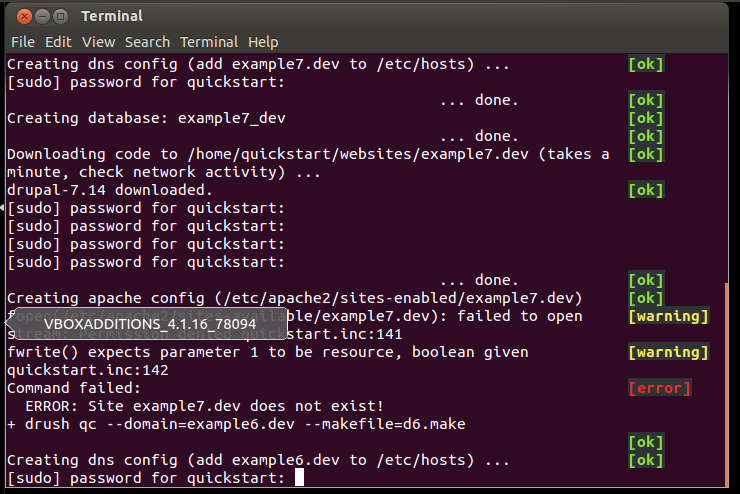
This is the last of the install scripts screens... after having to enter in the quickstart password about 50 times ( user and pass is quickstart )
Screen 2:
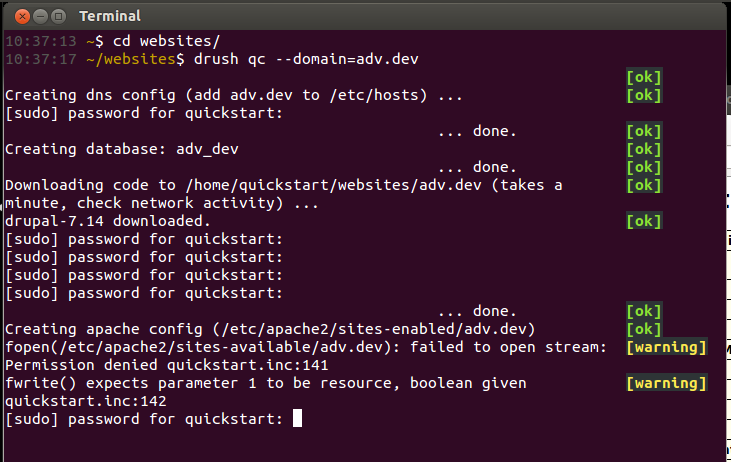
Getting folder permissions errors when doing a `drush quickstart-create` ...
it does everything but setup the settings file and build the db
Screen 3:
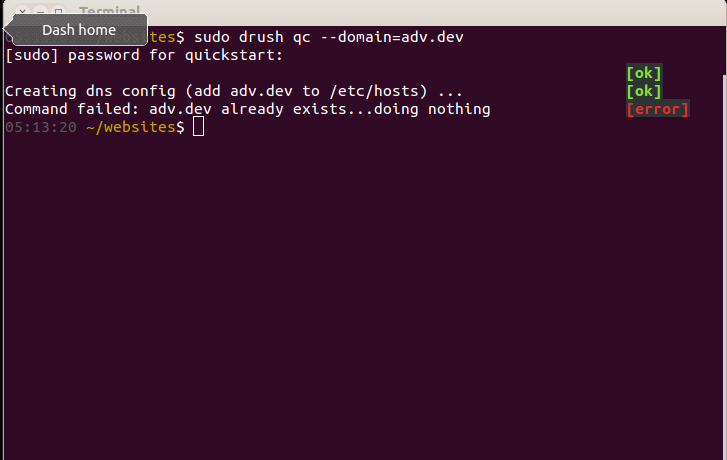
Trying to `sudo drush qc` (i know stupid, but just to prove a point)
This is a fresh 12.04 install with user and pass set as quickstart.
| Comment | File | Size | Author |
|---|---|---|---|
| Capture3.PNG | 34.07 KB | philosurfer | |
| Capture2.PNG | 81.16 KB | philosurfer | |
| Capture.PNG | 100.45 KB | philosurfer |

Comments
Comment #1
mike stewart commentedLooking at the first capture suggests your quickstart needs a password to run sudo ... which is better/more secure -- but drush quickstart scripts require loosened security. (I'd really like that to fix that or make it at least optional for those of us that prefer a hardened environment).
I think someone else mentioned to me in IRC (frob?) having to type in password over and over. (meh!) I haven't seen that except when my quickstart user isn't setup to automatically login. Ifyou go to System Settings > User Accounts > Unlock > Automatic Login it should resolve requiring a password over and over when first installing quickstart. Or do you mean after quickstart environment is already built, you need to enter sudo password over and over when running a drush script? in which case... I answered question in first paragraph and now I'm curious if /etc/sudoers.d/quickstart file is being created. What its contents look like. and the permissions on the file.
if you try to change anything here, be vewy, vewy caweful... changing things around sudoers is like hunting wabbits -- vewy scawy. (make a snapshot first)
Comment #2
mike stewart commentedComment #3
philosurfer commentedgoing in reverse:
/etc/sudoers.d/quickstart is set to readonly, and content is the following:
quickstart ALL=(ALL) NOPASSWD: ALLUser Account is set to auto login.
:-/
Comment #4
the_g_bomb commentedThis could be related to the error I found #1652710: Error on setting sudoers file permissons
you could try running:
Obviously snapshot first to pwotect the wascawy wabbits
Comment #5
the_g_bomb commentedSorry should have set the Status when I replied.
Comment #6
mike stewart commentedI think #4 is correct. and I've included in the current dev branch of DrupalPro an Ubuntu 12.04 Drupal stack based on Unity. checkout: http://drupal.org/project/drupalpro - beta2 is available for download now.
Also, I'm not sure why I haven't noticed this error. and it could be a problem still in the beta2 image -- but the code above should fix, and the fix has been committed so the next image build should be clean.
Comment #7
mike stewart commentedI've added an update which should fix this. I haven't tried this, but in beta1 image, something like the following should do the trick to update: