I have read the documentation and support notes here, but so far, I have not been able to learn how to do what I need.
I am migrating a web site from static html (actually a Lotus Domino platform) to Drupal 5.1. I know a lot about HTML and CSS, but virtually nothing about Flash. I was sent a Flash file to put on the static site along with some .js code to make it work. I put the code on the page, and it worked fine. You can see it at http://www.christophershaven.org/chaven1.nsf/ctest?OpenPage
Now I am trying to migrate the site to Drupal so I can take advantage of what Drupal offers, which is a lot, but I am struggling to get some things migrated, such as the Flash file. I tried to embed the javascript as I did before, but the page loads with a big white space where the file should display.
In an effort to reduce the work to get it up, and also to take advantage of Drupal, I looked for a way to play the Flash file that would easily be installed. I looked at SWF Tools, hoping it would help me. But alas, no luck yet.
So I am looking for straightforward step by step instructions that can take me from: "I have a file, Nix.swf" to "my .swf file is playing on my Drupal site."
I have installed the SWF Tools module, and enabled it. I looked at the Administer > SWF Tools > File Handling, and I see that there is a selected option, Default player for swf files: Embed directly. I also enabled the SWF Tools Filter. I uploaded my file, Nix.swf to sites/default/files/flash. On a test page, I created a SWF filter:
When I view the page, I see no flash file displayed. I know that SWF Tools is active, as I first had (note the lower case nix) and got a warning message that the file could not be found.
I assume from the file handling option for swf files that no player is needed. Is this correct?
If so, what must I do to get my .swf file to display?


Comments
Comment #1
bdornbush commentedI said before that I knew little about SWF. I found that I also have an .flv file, which I assume is the actual video. What would I need to do to display this file?
Comment #2
tanoshimi commentedI wouldn't worry about the filter to start with (which is like a shorthand way of putting stuff in the body of a node) - just try and embed the movie directly in the page. Go to:
Create Content --> Page
Under Input Format choose 'PHP'
Then in the node body type:
print swf('http://fullpathto/Nix.flv');replacing fullpathto with the full url to your file, and hit submit. This should also work with your swf file too.
Comment #3
JohnnyMoney commentedThanks but using the print swf... php code gives me:
Fatal error: Call to undefined function swf() in C:\wamp\www\drupal5\includes\common.inc(1355) : eval()'d code on line 2
I'm using drupal 5.9
Comment #4
Stuart Greenfield commentedswf()is the core function of SWF Tools! If you are getting an error to say that this function is undefined it suggests the module code isn't being loaded.Double check that the module is active. If it is active try de-activating and re-activating it, just in case there was a glitch.
If it still doesn't work, post again!
Comment #5
dman commentedAlso, it sounds like you are trying to embed an flv movie. In that case you DEFINATELY need both the swf and flv file uploaded to the same place.
ALSO, you need to ensure that the paths being used - hopefully passed as parameters (flashvars) in the embed code - are absolute enough, not just relative.
Flash need a little extra work when the resource files are not at the same URL as the HTML page
So, um, 'simply' embedding Flash is actually tricky when the flash has dependancies of its own. It can be solved, but you need to fully understand URL resolution and parameter passing first.
{edit} I only just noticed how old this thread is :-)
Comment #6
jwaxman commentedThanks for all your work on this project.
I also have been trying to display a simple SWF using the 6.x version of SWFTools.
I've looked at the HTML generated using the filter. The HTML invokes the mediaplayer.swf and doesn't include the uploaded file. I believe the original module was supposed to not invoke mediaplayer.swf for an uploaded SWF file.
Comment #7
Stuart Greenfield commentedThat's odd - when displaying a simple swf file no "player" should be invoked - it's working ok here.
Can you confirm that you are using the
<swf file="something.swf">syntax. Are you sending any other parameters to the filter?Comment #8
jwaxman commentedYes. I'm using that syntax exactly.
I'm not sending any other parameters.
How can I send more info to help out?
Comment #9
Stuart Greenfield commentedI have been thinking about this.
Firstly, can you check the source code for your page, and post the entire SWF Tools block - that will answer the question of how to send more info!
mediaplayer.swfis the filename for Wijering player, so that should be invoked if you have configured it to play mp3, flv or image formats. It should not be invoked for an swf.In no particular order, try:
Sometimes filters can play up - try changing the filter code by adding an extra space between
<swfandfile="something.swf">- that will make Drupal think the filter is changed and regenerate it.Try clearing your browser cache. I have found the browser cache can be very persistent when it comes to Flash and have spent ages investigating apparent bugs to discover I was being served a cached page. This can especially be true if you are experimenting with SWF Tools and you get an old filter by mistake.
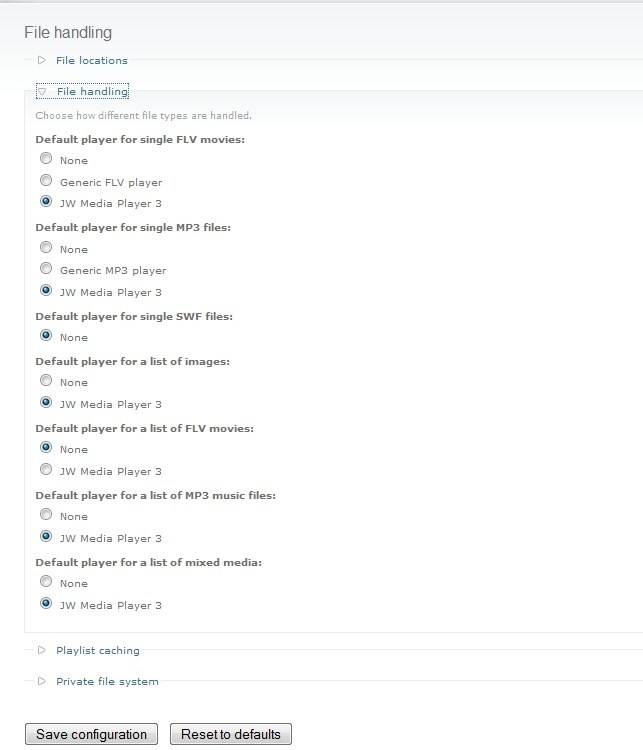
Check what SWF Tools thinks should be used to handle single SWF files. Go to Administer > Site configuration > SWF Tools > File handling. Open the file handling section and check that there is solid radio button next to "None" for "Default player for single SWF files:". If there isn't then click "Reset to defaults" just in case a glitch occured.
Post again if one of the above works (or if none do!)
I checked again here and everything is working fine for me so I'm a bit stumped as to why SWF Tools thinks an swf needs a player :-(
Comment #10
JohnnyMoney commentedok checking that and will report. thanks
Comment #11
jwaxman commentedOkay.
Added the extra space. No joy.
Cleared the browser cache. No change.
Here's the generated HTML
I've attached screen shots of
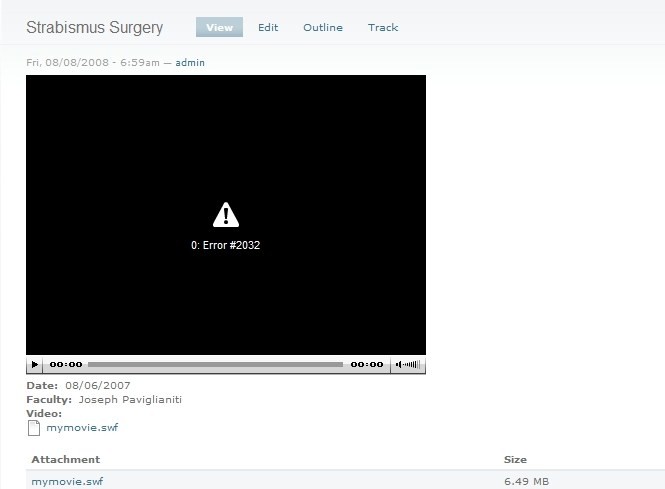
1) the node as it appears for viewing.
2) the node as it appears for editing
3) the SWF tools filehandling admin section
Thanks again for looking at this.
Comment #12
Stuart Greenfield commentedThis is really weird.
If you add
action="swftools_swf_display_direct"to the filter does it start working?I'm about to go off on a business trip so might be a while before I can pick this up again, but please post back if the above does/doesn't work!
Comment #13
jwaxman commentedThanks again.
Where do I put this text? inside the
<swf file="myfile.swf">? in the module code somewhere?Have fun on the trip.
I have a temporary work around using a CCK file field and Content Template.
I'd prefer to use SWFTools though
In fact, I'd really prefer to use FlashNode but I keep running into the large file size = WSOD problem.
Comment #14
kprmca commentedComment #15
Stuart Greenfield commented@kprmca
You have changed the title on this thread to "how to connect drupal from flex", but not posted any message or description.
Are you raising a new issue as this title is not related to the original discussion? If so, please can you raise a NEW issue, and provide some description of the issue you are having.
Comment #16
ron williams commented5.x-1.x is no longer supported, so I have marked as closed.