

 Come together with the global Drupal community in Rotterdam, 28 Sept – 1 Oct 2026. Sessions, contribution, connection, and Early Bird savings until 8 June.
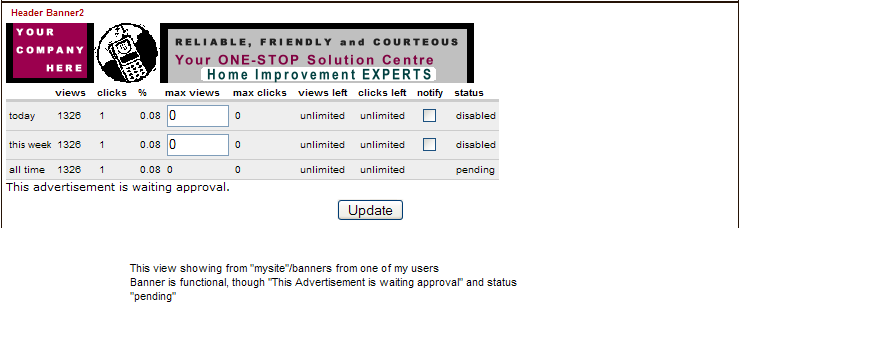
Banner always showing "This advertisement is waiting approval" and always "pending" status for anyone (including administrator).
This chows continually even after banner has been enabled and is active and working.
| Comment | File | Size | Author |
|---|---|---|---|
| #10 | mybanners section.bmp | 207.05 KB | tulula |
| #3 | bannerexample.bmp | 924.82 KB | tulula |


Comments
Comment #1
tulula commentedDoes anyone else notice this in the Banner module under their users/administrators under your website/banners?
Comment #2
jeremy commentedI'm not clear on where you're seeing this. There are two places the status can be displayed:
administer >> banners
banners
In both places, the status is displaying correctly for me.
What version of the banner.module are you using? (What does the ID tag say at the top of the file?)
What version of PHP is installed? On what OS?
Comment #3
tulula commentedHey Jeremy!
I'm using Banner 4.5 along with Drupal 4.5.2 (has been showing as it does since upgrading both to 4.5 right from the get-go),
my server OS is unix - shared hosting, my server http://www.challengehost.com/website/web-site-hosting.html - php 4.3.2 so definitely not an issue with php 5
viewing this on Windows xp - mozilla and IE thus far
I'll attach what it looks like under:
mywebsite/banners
AND
mywebsite/admin/banner/view or edit (always defaults back to pending instead of enabled on specific banner views) BUT under admin/banner/list, shows status as enabled
I can handled the admin portion defaulting back to "pending" in the admin specific views under each banner, however, when it consistently is showing to specific users that their banner is still waiting for approval and pending YET enabled and working... well, you know :)
Lisa
Comment #4
tulula commentedAny new break throughs? Shall I perhaps grab newest banner.module version and go from there?
Lisa
Comment #5
jeremy commentedSorry, I've not had a chance to look into this any more. I have never seen this bug, nor has it ever been reported before, seems rather odd.
It is always best to test the latest version of the code, to be sure it's not something that was already fixed. If you're running an older version, absolutely I recommend you start by upgrading.
Comment #6
tulula commentedI've upgraded, started anew scrapping my database content and testing with the latest and greatest... no change - still experiencing the above. Is there some trigger in the settings that will ensure a change in the message?
I've called up the code hoping to see SOMETHING within it that will offer a successful message to users under the mybanners section.
$output .= theme('table', $headers, $rows);
if ($banner->status == 0) {
// new banner, awaiting administrative approval
$output .= t('This advertisement is waiting approval.');
}
else if ($banner->unpublish_date) {
// if this banner expires, provide more information
if (($banner->status == 1) || ($banner->status == 2) ||
($banner->status == 3) || ($banner->status == 4)) {
$output .= t('This advertisement will be displayed until %date.', array('%date' => format_date($banner->unpublish_date, 'custom', 'M d, Y
')));
}
// status(5) == "blocked"
else if ($banner->status == 5) {
if (date > $banner->unpublish_date) {
$output .= t('This advertisement is expired.');
}
}
}
Because I'm allowing unlimited settings in that I have not set an unpublished date, is that perhaps why the message will not forcefully change? Now, I just tested to add an unpublish date to my test banner and there still is no change.
One thing I consistently notice is that when I go into mywebsite/admin/banner/"#"/edit, though active and enabled, the current view of the "status" of the banner defaults always to pending in the view.
Now with the CLEAN install, I'm at a loss... ????
Lisa
Comment #7
jeremy commentedI've reinstalled to latest banner.module (CVS version has additional error checking, currently works with 4.5 only, not the upcoming 4.6). I added a second user to my site, gave that user permission to manage banners, uploaded a banner with him, approved the banner, then viewed the banner with the user's control panel. It properly displayed that the banner was enabled.
Restore your banner.module back to the un-edited version. (If you grab the updated cvs version, you need the updated banner_file.php too). Then add a "print_r($banner)" as the first line of banner_user_edit(). Go to the user's page that's having trouble viewing the banner, and send me the output from the above print_r.
BTW: Also check your banner table. Do you have multiple copies of banners in there? Also post the following "SELECT * FROM banner WHERE id = #", where # is the banner that your user is unable to view.
Comment #8
tulula commentedHi Jeremy!
Followed all you said, thing is, by everyone, the banners ARE viewable. No Issues with that, the "My banners" or "Admin/banners" sections are continually telling the user the MESSAGE that "This advertisement is waiting approval" and "pending" is the status though they and all can see that the banner IS working.
- I dumped all banners in mysql,
- dropped my banner table,
- re-created my banner table with banner.mysql from cvs
- only am using CVS version banner.module,
- updated both Banner_file.php and Banner_db.php within drupal directory
- only have ONE banner currently going so nothing is mistaken and it is visible to all
- nothing to report from adding print_r($banner)" as banner is showing on page placement on right side column
Basically, the management system MESSAGE for "my banners" for the user is still showing prominently after they can know that their banner is "enabled" and "approved" that it's awaiting approval and still pending.
Guess I'm hoping for SOMETHING to change for their banner statistics so that message line of "This advertisement is waiting approval." will update to "'This advertisement will be displayed until %date.', array('%date' => format_date($banner->unpublish_date, 'custom', 'M d, Y '" or "This advertisement is expired." (However, I don't think it will update or change to anything else because I'm not inputting any start or end publish dates NOR have I slotted that the existing banner is expired yet. Is it possible for a code to state "Your advertisement is approved!"?)
Lisa
Comment #9
jeremy commentedDoes this also affect your user with user id of 1?
"nothing to report from adding print_r($banner)" as banner is showing on page placement on right side column"
This didn't display a bunch of variables about your banner when you went to your "my banners" page?
"Guess I'm hoping for SOMETHING to change for their banner statistics so that..."
Indeed, the pending message should go away (and does in my test installation), and the user should see "enabled" in the Status column on the "my banners" page. The bottom right corner should have a drop down menu offering the choices "enabled" and "disabled", allowing the user to temporarily disable their own banner.
Has anyone else had the problem being reported here?
Comment #10
tulula commentedYes, this does also affect user 1 or myself.
No, no dump of any variables occurred - What I did get was:
Parse error: parse error in /usr/local/share/doc/vhost/.../httpdocs/modules/banner.module on line 321
warning: call_user_func_array(): First argumented is expected to be a valid callback, 'banner_admin' was given in /usr/local/share/doc/vhost/.../httpdocs/includes/menu.inc on line 351.
THIS is where I put the code:
function banner_user_edit($banner) {
print_r($banner)"
$output = theme('banner_show', array2object($banner));
When I had upgraded to 4.5 from 4.4, I had a terrible time with getting the menu module to work and I had to reinstall the core from scratch and then add in table content and modules at leisure piece by piece to rebuild. I didn't have the banner module working in 4.4 so I know that wasn't part of the upgrade issue.
Interesting when you say: "The bottom right corner should have a drop down menu offering the choices "enabled" and "disabled", allowing the user to temporarily disable their own banner." I don't see this at all, sounds like a great functionality though. SEE ATTACHED :)
I'm feeling more and more "dumb" with trying to get this working. Haven't had this much difficulty since Mass mailer (though i still can't get that one working at all) AND I'm an habitual module tester!
Lisa
Comment #11
tulula commentedI guess if I'm having odd issues here that aren't working as most current CVS downloads of the banner module. IE, that pulldown for enable/disable, have never seen that before. Is there something else going on in my tables? Cache? Variables? that need to get thrown out SOME how SOME way?
Lisa
Comment #12
tulula commentedJust wanted to add that I tried to add this module and drupal - brand new - on another domain for testing and I'm still having same trouble.
It's so ODD cause I can see that all is working perfectly except the above messages are STILL the same. AND like I stated in the above reply, there are no pulldowns for user to "enable" or "disable" on their own in the status column.
WHY ME?!
Lisa
Comment #13
Emiliano commentedHi Lisa!
Hi Jeremy! ;-)
Lisa, I got the same here. Exactly the same. No "enable/disable" options, no "edit", the only thing I see is the same of your screenshot.
I'm using Drupal 4.5.2 on Windows XP/IIS with PHP 4.3.
Banner module 4.5
No watchdog messages.
Thanks,
Emiliano.
Comment #14
LuckyOne commentedHi,
I cannot 'approve' banners (using admin login). Drupal 4.5.2, banner module 4.5.0
'admin/banner' shows only simple list of banners and their states. How admin can change banner state to 'enabled'?
Best Regards
Comment #15
jeremy commentedFound Lisa (tulula)'s problem. The "status" field in the database was in all capital letters. When renamed from STATUS to status, the problem went away.
Thinking back, I believe that someone reported this long ago. For some reason when creating tables with phpmyadmin, this happens. I have no idea why.
Perhaps instead of using phpmyadmin, you could use the dba module... ;)
Comment #16
tulula commentedI can't thank you enough, Jeremy!
You went above and beyond with helping me out with this issue and then some!
If Drupal had a way to send kudos or be able to thank individuals who manage different projects/modules.
SUCH a small flaw causing a big difference! I myself use DBA on my main site for viewing, emptying, dropping... guess should utilize it for scripts from hereon in as well!
Lisa
Comment #17
(not verified) commentedComment #18
shiggi7 commentedI just installed 4.5.2 and banner module 4.5.2 and spent considerable time finding this thread and fixing this problem. I appreciate that what you have done, but could you take a minute and fix the instructions that are currently being delivered so that the users that have shared hosting and no choice but to use phpMySql don't have to repeat this process. I suggest the following verbage under step 1 of the installation instructions:
NOTE: if you update your database using phpMySql, please be advised that phpMySql changes the name of the status field in the banner table to STATUS (all caps), which causes a problem with this script. If you use phpMySql to update your database, rename the STATUS field to status before running this script.
Comment #19
Marcus_Mar commentedHello Jeremy,
I have installed the latest Banner version in my Drupal 4.6 system and have read this thread about renaming the SYSTEM field to system.
I do have the same problem as described in this thread, even though the field is named system and not SYSTEM.
I cannot find any links to approve the banners or change their states.
I do use phpMyAdmin, but did not have to change the field name. It was called system by default after installation.
Do you have any additional knowledge about what could be wrong?
Thank you for your great work and for any ideas regarding this.
Regards,
Marcus Charleville
Comment #20
jeremy commentedMy best suggestion is to drop the book review table, then recreate it with the dba module. I know that works...
Comment #21
wulff commentedClosing this (deals with 4.5/4.6).