Hi,
I've just installed the 7.1 dev version of FAQ. I've used pathauto and assigned an alias for the FAQ nodes.
I've also set up an FAQ Taxonomy, and then created a term reference field in the FAQ node.
Added a node without a problem.
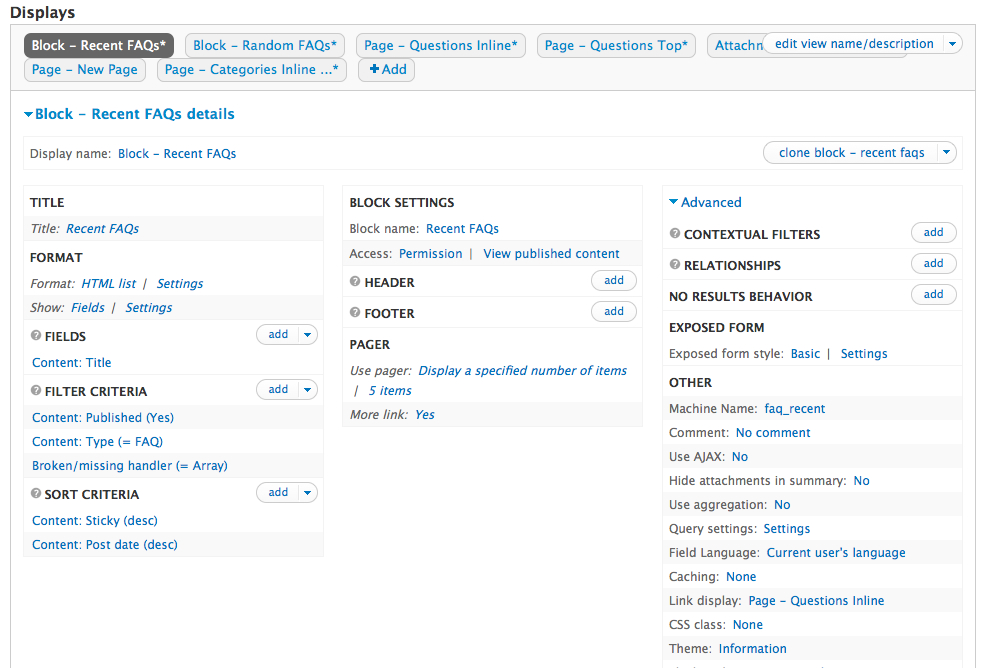
When I go to the views provided with the module, there's a broken/missing handler for all the views.
Is there a dependency I might be missing, or something I may have missed in terms of setup that would be causing the views issue?
I've attached a screenshot in case it may be helpful.
I appreciate any guidance you might be able to provide.
Thanks!


Comments
Comment #1
brad.bulger commentedTwo years later, this is still true. If you edit the built-in view, this error is displayed:
The "Page - Categories Inline ... details" page display, for instance, has no apparent connection to categories at all. Looking at the view code, there is an explicit reference to a "field_category". But users have to add their own custom term reference field to add category support, so the odds that this will be the field name seem slim at best.
If these views are not meant to work, they should be moved to an optional module or something.
Comment #2
jjozsi commentedI've got the same using the 7.x 2.0 alpha2 version. Broken handles in every view display. The content type filter was also broken but it was an easy fix, I added the faqs content type created by the module. How to fix the broken handler?
Comment #3
cjwest commentedSubscribe
Comment #4
Imaaxa-Cory commentedDelete / Remove the Filter Criteria: Broken/missing handler (= Array) For All displays, then save
or
Turn on the Locale module