I've been noticing two recurring errors in the error logs of a number of my sites which use Workbench Access:
Notice: Undefined property: stdClass::$menu in workbench_access_node_presave() (line 663 of workbench_access.module).
and
Notice: Undefined property: stdClass::$workbench_access_column in workbench_access_node_presave() (line 674 of workbench_access.module).
The notice shows up when saving a node. The node's content type has an available menu but no menu item has been created for the node ("Provide a menu link" is unchecked). Workbench access is configured to use Menu as the Active access scheme, the node's menu is enabled under "Menu scheme settings" and "Automated section assignment" is enabled.



Comments
Comment #1
agentrickardAre you using the WA-provided form element or the native menu form element (which is known to be buggy.)
Comment #2
gmclelland commentedI just experienced this as well.
I running the latest dev of Workbench Access 2012-Dec-25 and Workbench 7.x-1.1.
I'm using two term reference fields that use autocomplete as Workbench Access control fields.
Everything seems to be working correctly with the autocomplete, but when I hit save when creating a node. It gives the following error.
Note: The node is still created and the terms are still assigned.
Let me know if you need any more information
Comment #3
agentrickardThat's a great report. Thanks.
Comment #4
agentrickardI can't replicate that error.
What else can you tell me about the field? Can you look at the $node object when it goes into that loop (line 652)?
What is set in the $node->workbench_access_fields array?
Comment #5
gmclelland commentedFrom what I can tell, this only happens on node creation. These two fields are core taxonomy term references using autocomplete.
Don't know how to do this. If you tell me what to do, I will do it.
This could be because I entered this into the term reference field: "section user is assigned to, test" just to see what would happen. The term "section user is assigned to" is a term that I allowed the user to create content in using workbench accesss. The term "test" is a new term that hasn't yet been created.
Note: the user doesn't have permissions to create terms in this vocabulary, but the term was created anyways. I'm not sure if that is the intended behavior?
If I enter only terms the user is assigned to through Workbench Access then everything works correctly without errors.
Hope that helps, let me know if you need more information.
Comment #6
gmclelland commentedI believe I only see these errors when a user is using the core term autocomplete field and enters a new term that they have not been assigned to in Workbench Access.
Could this Drupal core bug be related #1078878: Autocomplete term widget: disable creation of new terms? The user shouldn't be able to create new terms unless they have that permission.
Comment #7
agentrickardI think the two are related and in Drupal 7, we have to account for it here. That core change is unlikely to push through.
Comment #8
gmclelland commentedHaven't tested but here is a module that might fix the terms from being created:
http://drupal.org/project/taxonomy_access_fix
Also, here is a core issue for this functionality.
#1848686: Add a dedicated permission to access the term overview page (without 'administer taxonomy' permission)
Comment #9
gmclelland commentedLooks like I'm still seeing this with 1.2. This seems to be happening every time I create a new node that uses workbench_access with a core autocomplete taxonomy term reference field. This happens even without any terms entered into the field.
Let me know if I can provide any more information.
Comment #10
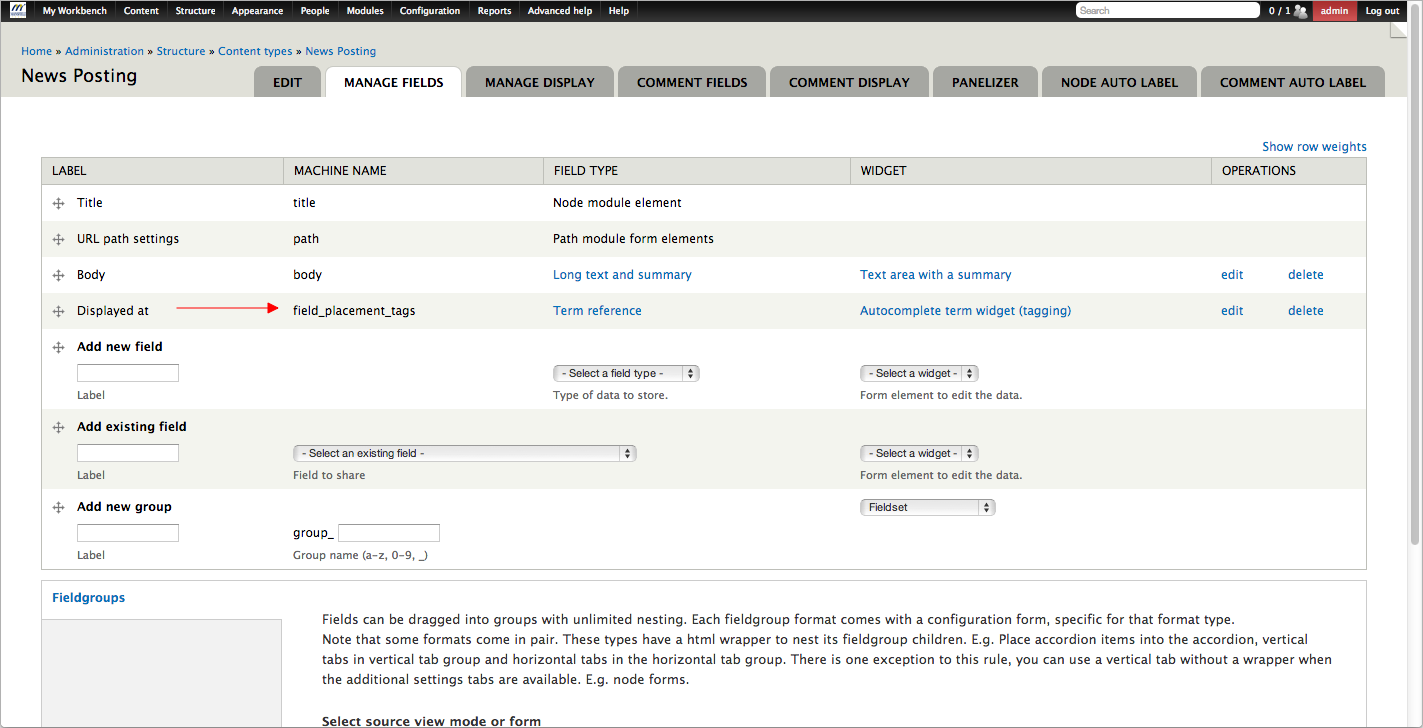
agentrickardCan you attach a screen shot of the configuration settings for that field?
Comment #11
agentrickardAnd, really, the settings for Workbench Access scheme.
Comment #12
gmclelland commentedHere are the screenshots you requested. I'm not sure but I think I found the problem. I think the problem is that there wasn't any editors or roles assigned to any sections. I'm logged in as user/1, so I assumed I could post to any section. As soon as I assigned a role to the sections it worked. I was able to create content without seeing the errors.
Comment #13
agentrickardIt's still something we should avoid, since it does scare people. That does explain why I couldn't replicate it.
Comment #14
martichka5 commentedHi,
I have the same issue. It seems that on first save form_set_value($element, $value, $form_state) does not set the empty value array to the node object in the taxonomy_autocomplete_validate function in the taxonomy module.
I searched the implementation of the select_list widget and there is a separate if clause for the case where they:
// Make sure we populate at least an empty value.
if (empty($values)) {
$values = array(NULL);
}
So, if a initialize(in the taxonomy_autocomplete_validate function) the $value as array(NULL) or make an else clause where to set the $value this way, it's working. I am not sure what is the reason workbench access presave to get node object without the empty taxonomy term reference fields.
This i s where i am now ... and will appreciate any advice or help!
Comment #15
agentrickardThe reason is likely execution order of the pre-save hooks.
Comment #15.0
agentrickardAdded second error message.
Comment #16
chromix commentedI have a possible fix for this. The problem actually stems from the fact that the presave function was running on ALL nodes, even ones where this was turned off in the workbench_access_node_type_ variable.
BTW the easiest way to replicate this bug is to just do a node_load/node_save on a node that doesn't have menu turned on and is not controlled by workbench_access (when using the menu access scheme, obviously).
Comment #17
gmclelland commentedThanks @chromix, but I tried your patch and I'm still getting the problem:
This happens when I leave the taxonomy field (placement tags) blank and then save the node. The "Placement Tags" taxonomy field is the field I use for workbench access.
If I fill in a taxonomy term, then I don't get an error.
Comment #18
chromix commentedI was also getting this while programmatically saving nodes using menu. This patch should fix both instances, as it ensures that the fields are present if they're required. I haven't been able to test this for taxonomy but it should work. Feedback, as always, is appreciated!
Comment #19
gmclelland commentedMany thanks @chromix
Your suggestions fixed the problem for me.
I think you left some extra unneeded code in the last patch in #18.
Here is a new patch without that code that works for me.
Comment #20
chromix commentedGood to hear! I think I just rolled against the wrong version of the module. Anyone else having similar results?
Comment #21
Adrian Richardson commentedThere's a bit of a gotcha with menu_node_prepare() - it expects the link to be marked enabled in the form submission.
If it's not marked enabled, menu_node_save() will delete the menu link when we do a node_save().
Here's an updated patch to include this check and set the enabled flag accordingly.
Comment #22
gmclelland commentedJust tested the patch in #21 and it seems to work correctly. Going to set this to RBTC and see what @agentrickard's thoughts are about this.
Comment #23
agentrickardI'd feel better about it if this were testable.
Are there clear steps to replicate?
I'm not crazy about the menu-specific code here.
Comment #24
chromix commentedThe clearest way to reproduce this bug is to programmatically create and save a node that would normally be controlled by workbench_access (a migrate module migration will do this). When this happens, particularly when using workbench_access menu, the menu component of the module will be missing, which will throw the error.
I haven't been able to specifically recreate this for terms, though. Anyone care to take a stab at this?
Comment #25
agentrickard@chromix -- did the patch fix that issue, at least?
Comment #26
chromix commented@agentrickard
The patch totally works for my use case (menus as opposed to terms). I've been using this for months without issue.
Comment #27
gmclelland commented@chromix - Which patch are you using?
Comment #28
steve.stotter commentedI was getting the same error on 7.x-1.2. It was actually really messing up my permissions - a user who should be able to create 'landing' pages but only in certain sections as specified by Workbench Access was actually bypassing this section access as $menu was not being saved. Therefore there was an empty array given under $node->workbench_access instead of the correct section access.
I can confirm that by changing to 7.x-1.x-dev (didn't solve the problem on it's own) and applying patch #21, this solved my issues. I also had to re-save all the nodes that had the incorrect workbench_access properties on them as this property is attached to the node object on save.
Thanks all who helped with this! :)
Comment #29
kumkum29 commentedHello,
i have developped a multilingual site and uses worbench access to control the contents.
As steve.stotter, I was getting the same errors (i use the dev version).
With the patch #21 the problem is solved.
Have you planned to include this patch in the next version (dev or stable) ?
Thanks.
Comment #30
chromix commented@gmclelland Sorry just saw this now. I was using the latest patch, #21. Still using it, still working great :)
Comment #31
agentrickard