

Closed (fixed)
Project:
Node expire
Version:
6.x-2.01
Component:
Code
Priority:
Normal
Category:
Bug report
Assigned:
Unassigned
Reporter:
Created:
10 Aug 2007 at 01:41 UTC
Updated:
23 Mar 2010 at 21:36 UTC
Jump to comment: Most recent file

Comments
Comment #1
astoltz commentedThis already exists. The content types are only defaults. So long as the person creating/editing a node has sufficient priviledges, they can already be set per node. The screenshots available for this module also show the editor for this.
Maybe I am misinterpreting what you are requesting?
Comment #2
raddevon commentedNo. I think you got it. I just wasn't looking hard enough for it. Thank you for pointing it out, and I'm sorry to have jumped the gun.
Comment #3
astoltz commentedComment #4
stankovski commentedI can't seem to find this functionality in the latest build for 6.X. Is that I defect?
Comment #5
brmassa commentedDenis,
D6 2.0+ already has it. You can define the DEFAULT expiration date for node types, but its on each node that you define the exact date. Of course, the user must have the proper permissions.
regards,
massa
Comment #6
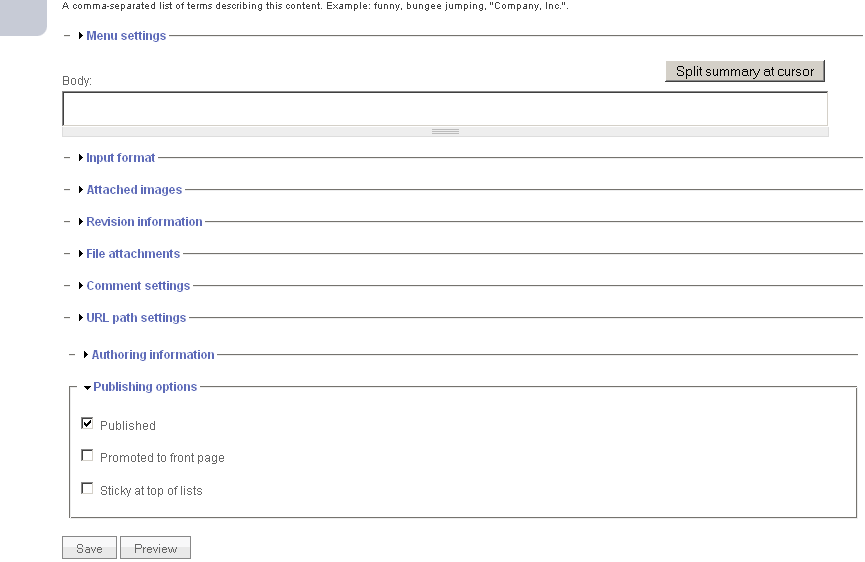
stankovski commentedThanks for such a quick response. I have version 6.x-2.01 and under permissions I have checked boxes next to "administer node expire" for admin user and "edit node expire" for admin and authenticated users. When I go to create a new node I do not see expiration anywhere (I attached a screenshot). Where should I look for it? Should I do anything else? Thanks a lot!
PHP: 4.4.9
Drupal: 6.9
Node Expire Module: 6.x-2.01
Rules Module: 6.x-1.0-beta3
Comment #7
bennos commentedstatus change and subscribing.
Comment #8
brmassa commentedGuys,
i cannot replicate the bug.
1* i went to Content types page (admin/content/types) and them selected Page.
2* Inside Workflow settings, i enabled Node expire feature on this type of content by settings the default value as +3 days.
3* I tried to create a page with another user, that has only "edit node expire " permission and the field was there.
please, tell me the steps you did so i can try to replicate it here.
regards,
massa
Comment #9
stankovski commentedThank you. I was able to get expiration to work. My incorrect understanding was that step 1 (creating expiration on the node type level) was optional. Is there any way to have "expiration field" available on nodes, but to have it blank so that it was optional? A workaround for now would be to set expiration to +1 year. Thanks a lot!
Comment #10
brmassa commentedComment #11
bennos commentedAh. Checked the permissions and workflow Settings. Ok. I have found it.
Comment #13
rpindu commentedWhat is the difference between scheduled unpublishing date and date option , what does it refers in scheduled unpublishing a node?
Comment #14
rpindu commentedhow to expire a node? i need each and every steps, i have node_epire module with me, what i have to do next?
Comment #15
catrincm commentedto expire a node, you can change default expiries in administer>Content>Content types> {edit whichever content type you want}> workflow settings. For the individual nodes, check under publishing options.