

 Come together with the global Drupal community in Rotterdam, 28 Sept – 1 Oct 2026. Sessions, contribution, connection, and Early Bird savings until 8 June.
The version of the menu module is 7.14 if I need to use another to make this happen better please advise. This is the problem.
I upgraded to 7.14 and the menu shows on Danland and all primary and secondary items show. I select any item and I go where I need to go without fail. However, I can set the default menu item to be the Home page but the active-trail is not set.
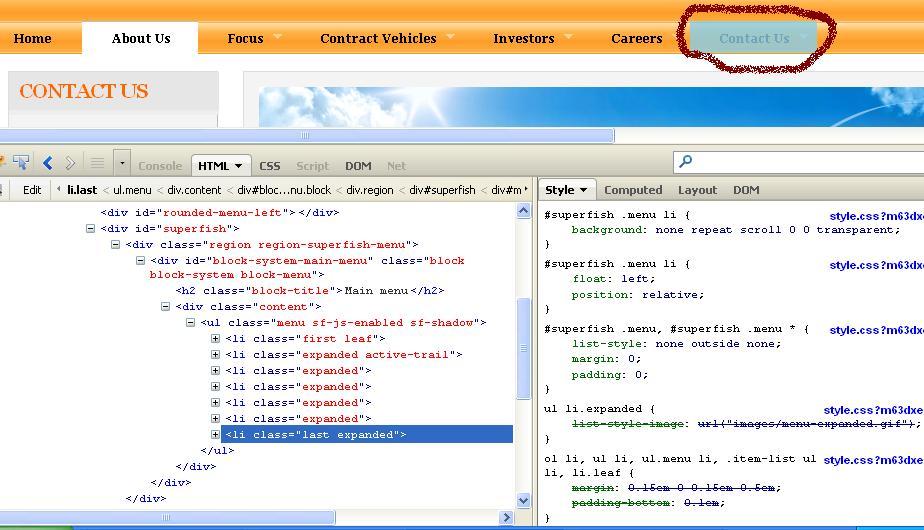
When I select Home on the menu I go to the location and see the home page. But the tab in the menu does not change color. Using Firebug I see the item and it is not classed as the active-trail element only the first leaf.
I included images to illustrate. In the images the red circled item is the one pressed, the whit is where it shows the active-trail. The firefly information is also on the image.
I do not have any custom menu modules active only the menu module in core.
| Comment | File | Size | Author |
|---|---|---|---|
| Superfish36_2012.JPG | 65.3 KB | CowTownFarmBoy | |
| Superfish26_2012.JPG | 92.64 KB | CowTownFarmBoy | |
| Superfish6_2012.JPG | 93.37 KB | CowTownFarmBoy |


Comments
Comment #1
CowTownFarmBoy commentedWanted to note that I did upgrade from 6.26 rather than 6.25.
Comment #2
CowTownFarmBoy commentedComment #3
CowTownFarmBoy commentedUpdate on problem.
I added another item to the Main Menu level to the right of the one that was failing and giving the active-trail to the second element in the menu and the last item the new one worked. This showed that the problem is not positional. However the one did continue to fail and put the active trail on the second menu element.
So I reconfigured the main menu moving the one that failed one to the right. It started to work. I moved it back and it kept working. The sub-element underneath continued to fail and go to the wrong place. So I recreated the page and reconfigured the menu again and the sub-element started to work correctly and the active-trail goes to the right place.
I still have the one Home menu item that when pushed does not change from the basic menu color, does change during hover, and still when pressed gets you to the home page. So I am now to the point where the problem I have is common to many others.
Drupal 7.14 appears to have all the patches identified in other like issues applied. The issue is that they are not working in all cases.
Comment #4
CowTownFarmBoy commentedUpdate of the evaluation over the past couple of days:
1. I changed the theme from Danland to Garland and looked at the menu problem both online as it appears and in Firefly. The problem is the same no matter what the theme.
2. I had only one module that should effect the menu and I disabled that so I am running Drupal Core only and the problem still exists.
3. I have take a quick look at the database and specifically the menu-link table and the entry in the menu for the Home/front-page appears to be right.
4. I have run updatephp after I disabled the module that had something to do with menus and have cleared all the cache. Cron is up to date and there is no identified problems in the reports or in the error log. For all practical purposes the code is running well but still wrong.
What I will do today is to reboot the server to see if there is some latent garbage rolling around. And will look further at the database. I will after that refresh the menu.inc from the back up I have and retest, and if I still have no success I will stand a second site up on the same server and compare the databases of the two once I have created a home page and associated menu system.
I'll report back when I get this done or solve the problem.
Comment #5
CowTownFarmBoy commentedRebooted and did not fix.
Looked closer at database and nothing.
Changed themes to Batik and Stark and nothing but I looked at how Bartik was using the classes to set color etc...
Then I reexamined the classes and strategy of Danland. Not all menu's get the active-trail the one that does not in Danland is the Top Main front page menu entry. It probably should but it does not.
What it does give you is the active class at the anchor level. So I added an entry in my local CSS and made it work. The menus are now showing the way they should. What I added is below:
#superfish .menu li a.active {
background-color: #f4f4f4;
height: 33px;
}
Thank you for letting me ramble on till I found a solution.
Comment #6.0
(not verified) commentedUpdate to the text to eliminate some unneeded wording.