

Closed (fixed)
Project:
Office Hours
Version:
7.x-1.4
Component:
User interface
Priority:
Normal
Category:
Feature request
Assigned:
Unassigned
Reporter:
Created:
26 Jun 2012 at 21:12 UTC
Updated:
14 Mar 2017 at 22:08 UTC
Jump to comment: Most recent, Most recent file


Comments
Comment #1
Lazarus-Long commentedHi tangamampilia,
The display formatter has a setting that let's you choose between 12 hour and 24 hour formats. Is that what you mean?
Laz
Comment #2
tangamampilia commentedNo, I mean.... look the following scenario: I'm developing a site for restaurants... some of them open until too late and continue opened during the next day. This kind of restaurants opens from 19:00hrs to 04:00 hrs (using the 24 format). So I create a new content using this settings:
Friday - from 19:00 to 23:00
Saturday - from 00:00 to 04:00
In this way there is a 1 hour missing from 23:00 to 00:00. I'm unable to fill this missing hour. Did I explained myself? Thanks!
Comment #3
Lazarus-Long commentedAh, I understand. I'm fairly sure this is just an issue with the widget and not the storage, so it should be fixed in the widget redesign.
Comment #4
johnvCan't you use "Friday - from 19:00 to 04:00" ?
Comment #5
tangamampilia commented@Lazarus-Long
Thanks!
@johnv
Actually I guess the widget validation don't allow it. Anyways, strictly they close the next day :P
Comment #6
laszbalo commented+1
Comment #7
johnvComment #8
johnvlet's explore this. IMO we have the following options:
- adding a checkbox 'all day' like Date module does - I don't like that.
- entering the times like 00:00 - 00:00. That might work. It might be the opposite of an empty/closed day.
- entering the times like 00:00 - 24:00. I tried to implement that, but ran into problems with date-api and DateTime. See attached patch for a start.
IMO, the previously mentioned format '19:00 to 04:00' can be done by disabling the widget's field validation.
If someone wants to try a patch for this, here are some hints:
- http://en.wikipedia.org/wiki/ISO_8601#Times
- #1697322: Call to a member function getName() on a non-object in date api
Comment #9
antonín slejška commentedIs it possible just to make possible to show 24:00 instead of 0:00, if 0:00 is chosen in the field "until". It would look better, see:
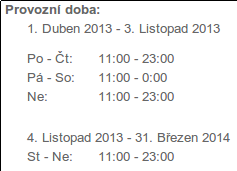

http://www.ceskesvycarsko.cz/cs/restaurace/restaurace-na-stodolci
It could be enabled or disabled e.g. in the settings "Manage Display".
Comment #10
johnv@Antonín Slejška , IMO your proposal is the best way: just repair this in the presentation/theming layer, not in the storage.
I'll commit attached patch shortly.
I guess this only affects the 24-hour reprsentation? People using the 12-hours representation do not suffer from this issue?
Comment #11
johnvcommitted
Comment #12
antonín slejška commentedThank you John! It works fine.
Comment #14
aze2010 commentedHi Folks...
i dont know how to create a patch, but i would like to explain my modification for the "24-hours open" problem.
In the File "office_hours.module" at Line 555 i modified the following code
if ($start <= $now) {to
if ( ($start <= $now) || ($start == $end) ){So, if you setup the openhours for one day from 0 to 0 it will now show you "Currently open" not currently closed as it does now.
I hope, it will help many other people.
Many Greetings
Aze
Comment #15
cdmo commentedI can see that #10 has been rolled into the current version of this module (7.x-1.4), but when I just did a fresh install and setup a field with no validation, I am unable to set a given day's hours to 00:00 to 00:00. When I do that it doesn't give an error, it just saves the node and switches to view mode and the day's hours show as Closed. If I go back to edit the node the day I set to 00:00 to 00:00 is now unset.
I'm digging through the code to see if I can figure out what's going on. For what it's worth if I set the value directly in the database Drupal will correctly display 12:00 am-12:00 am.
Comment #16
johnv@cdmo #15, your problem with the 'open now'-feature is fixed in the dev-version: #2402183: Cannot set midnight end time . You will find it in the next 1.5 version, too.
@aze2010 #14, ITMT, your problem is solved in another issue, and should be available in 1.4 version.
Comment #17
johnvComment #18
johnv