

 Come together with the global Drupal community in Rotterdam, 28 Sept – 1 Oct 2026. Sessions, contribution, connection, and Early Bird savings until 8 June.
workflow is made for content type Abstract with states
Submit - Anonymous user can submit abstract
Review - Authenticated user can accept or reject
Allow Final Submission - admin can allow
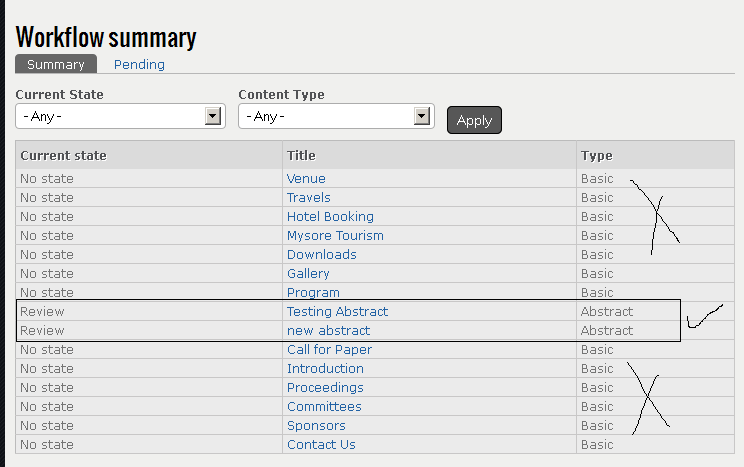
Admin workflow summary tab
admin can select both current state and content type and can change the state to review.
prob here: if state and content is selected all content type(basic page, book) details is shown although the workflow is made for
content type Abstract.
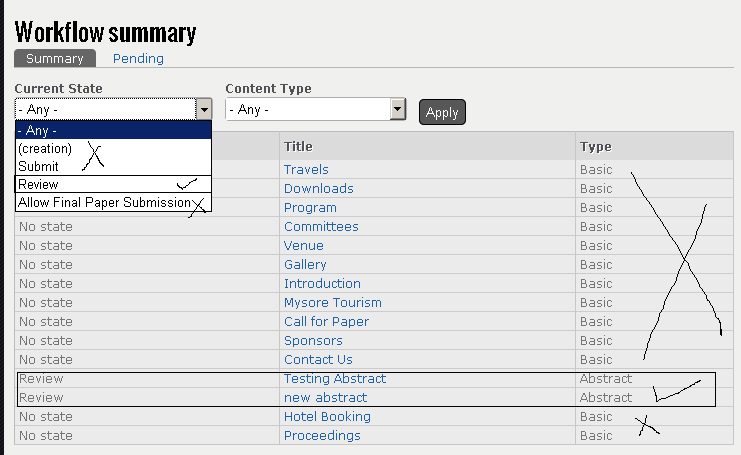
Authenticated user workflow summary tab
here user can cahnge the state from review to next state.
prob here:
1. Same as above
2. Current state is showing all state instead of state review to which user have access.
I tried to make changes to workflow_summary view by adding filter, but because same view is presented to admin and authenticated user I am unable to get desired output. Can I clone the view so that both user have access to different user or it can be done in that single view only.
| Comment | File | Size | Author |
|---|---|---|---|
| #1 | admin.PNG | 21.58 KB | nithinkolekar |
| #1 | authenticated.PNG | 21.27 KB | nithinkolekar |



Comments
Comment #1
nithinkolekar commentedfile attachment was not successful in opera browser returning error http error 0 in upload.js.
So I am attaching file through firefox.
Comment #2
nancydruTo answer your last question, you may clone the view, there's no law against it.
Otherwise, I don't understand the issue at all.
Comment #3
nancydruChanged component
Comment #4
SlayJay commentedI'm running into the same issue with this. I believe what he's saying is, we need a views filter that limits the view to only items that the user viewing the view has access to moderate.
So in other words, we need a view filter that hides items if the user viewing the view doesn't have permission to move them to another state.
Comment #5
nancydruWith the hook provided in #1997242: ask other modules for permission in node forms, I would think this is available now.
Comment #6
nancydruNo further update.