Closed (fixed)
Project:
Menu Trail By Path
Version:
7.x-2.x-dev
Component:
Code
Priority:
Normal
Category:
Support request
Assigned:
Unassigned
Reporter:
Created:
9 Jul 2012 at 13:53 UTC
Updated:
20 Sep 2012 at 13:13 UTC


I'm experiencing the same problem as mentioned in #1355514: Where are the configuration options located? but in the 7.x version of the module.
I don't see any configuration options.
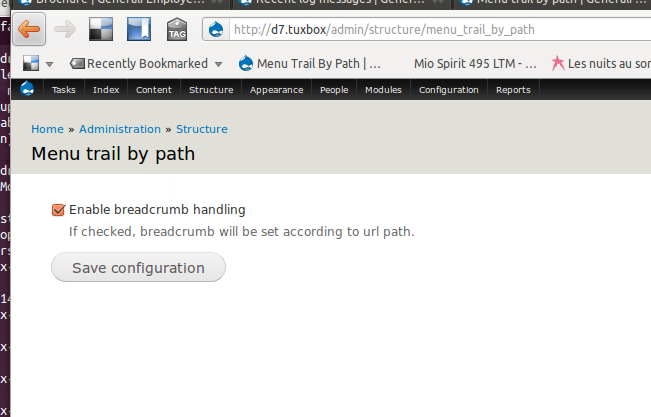
At /admin/structure/menu_trail_by_path I only have the option to set "Enable breadcrumb handling"
Are there any config options elsewhere?

Comments
Comment #1
SeriousMatters commentedThis module requires no configuration to work.
If it doesn't work for your site, please provide more information.
Comment #2
akki123 commentedI am using latest dev version - 7.x-2.x-dev .
I have a news listing page.
Let's say I have menu "news" under "media".
Media->News
On this page , I have three news,
News item 1
News item 2
News item 3
These nodes are not associated with any menu item. But when user click on "News item 1", I want to show
Media->News menu as active.
Is this possible with this module?
If yes, how to configure module to achieve this result?
Thanks
***Edit***
Use pathauto module to configure this module.
http://drupal.org/node/1772242#comment-6432372
Comment #3
caspercash commentedThis module doesn't work in my multilingual site too. I have a main menu named Galleries with 'galleries' as its link and i set also the pattern of one of my node types to 'galleries/[node:title]'. When I visit 'galleries', the menu is set to active but when i visit the gallery node which has a link of 'galleries/some-title', the Galleries menu is not set to active. Can anyone please help if this module functions this way? I read in its project description
that its doing same as what I've described above but its not working in my site. Can anyone please help?
Comment #4
akki123 commentedCheck CSS of menu items. This module uses class 'active-trail' , you may be using 'active' as css class.
Comment #5
SeriousMatters commentedClosing this issue since the original question has been answered.
Comment #6
akki123 commentedThis module doesn't has any configuration option.
Use pathauto module to configure it.
http://drupal.org/node/1772242#comment-6432372