I have a font (Cholla) that I downloaded from Emigre which appears to have installed far enough to have created folders for normal and oblique styles with the font files and proper looking css files. However, when I install the normal style first the oblique never gets included in the source code of the rendered page...and...vice versa -- when I install the oblique first the normal never loads. For instance:
@import url("http://emotionalgame.test.brownrice.com/sites/default/files/fontyourface/font.css?m70oe3");
@import url("http://emotionalgame.test.brownrice.com/sites/default/files/fontyourface/local_fonts/chollslaultbol-normal-900/stylesheet.css?m70oe3");
@import url("http://emotionalgame.test.brownrice.com/sites/all/themes/eg_omega_1/css/global.css?m70oe3");</style>
...here you can see that the oblique (chollslaultbolobl-oblique-900) never made it to the css 'stack' of my Omega theme.
I did try to modify the font.css so that it assigned oblique by force:
#inspiration-of-sport-header-blog, #inspiration-of-sport-eg { font-family: 'chollslaultbol'; font-style: normal; font-weight: 900; }
#inspiration-of-sport-header-title { font-family: 'chollslaultbolobl'; font-style: oblique; font-weight: 900; }
(note: the second line/selector did not exist even though it was set for the font on the admin form)
This did not work, because the other style sheet is not being pulled. I even modified the normal stylesheet.css so it included the font-face code chunk from oblique and it STILL did not render...a factoid which leaves me quite blank. I thought if the one sheet was pulled and included the code from the other that the module would not be able to 'tell' the difference. I want to fix this, but I would also like to understand how this hack could possibly fail!?
The combined 'chollslaultbol-normal-900/stylesheet.css' stylesheet:
@font-face {
  font-family: 'chollslaultbol';
  src: url("chollslaultbol-071211005EmigreWebOnly.eot");
  src: url("chollslaultbol-071211005EmigreWebOnly.eot?#iefix") format("embedded-opentype"), url("chollslaultbol-071211005EmigreWebOnly.woff") format("woff");
  font-style: normal;
  font-weight: 900;
}
@font-face {
  font-family: 'chollslaultbolobl';
  src: url("chollslaultbolobl-071211005EmigreWebOnly.eot");
  src: url("chollslaultbolobl-071211005EmigreWebOnly.eot?#iefix") format("embedded-opentype"), url("chollslaultbolobl-071211005EmigreWebOnly.woff") format("woff");
  font-style: oblique;
  font-weight: 900;
}
Finally...here is the html that requests the fonts:
<div id="inspiration-of-sport-header">
     <span id="inspiration-of-sport-eg">EG</span>
     <span id="inspiration-of-sport-header-title">The Inspiration of Sport</span>
     <span id="inspiration-of-sport-header-blog">// Blog</span>
</div>


Comments
Comment #1
sreynen commentedAre both fonts enabled and one just isn't showing up? Or does enabling one disable the other?
Comment #2
MhueD commentedBoth are enabled and whichever one is second on the install doesn't show on the page.
Comment #2.0
MhueD commentedAdded reference to new combined stylesheet for both font-style types
Comment #3
tstarback commentedFor your test of the combined CSS (hack) did you also move the fonts to the chollslaultbol-normal-900 directory?
It might not have worked because the fonts were in a different directory.
BTW I tested Cholla and the Oblique with a Drupal 6.19 and it worked fine.
Best,
Tim
Comment #4
MhueD commentedYes! There IS a copy of both fonts in the 'Normal' directory so that local url calls in the @font-face code chunks resolve properly. Yet they still don't both show on the page...I am totally in over my head on this one.
Interesting about 6.19...so this is quite probably a v7 bug in the module...
Comment #5
sreynen commentedI haven't had a chance to test this on D7 yet, but there was a somewhat similar issue on D6 a while ago: #1115182: More than 1 local font??. I think that was fixed before the D7 version, so the fix should have applied to D7 as well, but I haven't checked it out yet.
Comment #6
MhueD commentedI am not sure this is the same issue...I looked at the fix from v6 -- with the md5 string and the tags array changes -- and those survived into v7 as they were. Unless they aren't working because of the context?
Comment #7
Drave Robber commentedI just tried to reproduce this issue (with 7.x-2.x-dev, using FF World Wide Web from fontshop.com) and found something interesting (as in 'interesting times' :).
I imported the normal variant, enabled it and assigned to some CSS selectors; it worked smoothly. Then I imported oblique, and it instantly showed up under 'enabled fonts' in
admin/appearance/fontyourface, but was not in fact enabled. Assigning CSS selectors, somewhat unsurprisingly, had no effect whatsoever. Once I navigated toadmin/appearance/fontyourface/browse/local_fontsand enabled oblique, it worked smoothly, too.I will continue to investigate this issue, but would appreciate the OP checking whether this might be the same issue (i.e., whether both variants are actually enabled in
admin/appearance/fontyourface/browse/local_fonts.Comment #8
MhueD commentedIn my case, the fonts DO appear enabled in both the general and specific lists...but they continue to not show up on the page together. I don't know if we are talking about the same problem or not.
Comment #9
Drave Robber commentedProbably not - it seems I found another issue (which was in fact simply some confusing UI).
I took a look at your site and was able to force the missing font from the browser (via Chrome inspector):
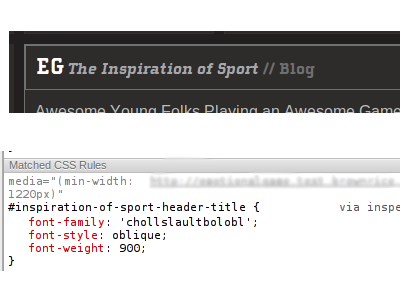
So it seems both fonts were somewhere out there, but the CSS wasn't before I forced it.
What does your
Appearance > @font-your-face > Enabled fonts > By CSS selectorscreen look like?Comment #10
sreynen commentedMhueD, I think we're going to need to look at your specific site to figure this out. Can you post it on a public server somewhere and point us to it?
Comment #10.0
sreynen commentedAdded HTML request section
Comment #11
neslee canil pinto