Closed (fixed)
Project:
Address field for CCK
Version:
5.x-1.x-dev
Component:
Code
Priority:
Normal
Category:
Bug report
Assigned:
Unassigned
Reporter:
Created:
18 Aug 2007 at 00:36 UTC
Updated:
18 Aug 2007 at 23:01 UTC


I previously had 5.x-1.0 installed. I deleted the cck_address folder in the module folder, then uploaded 5.x-1.x-dev. Finally, I ran update.php.
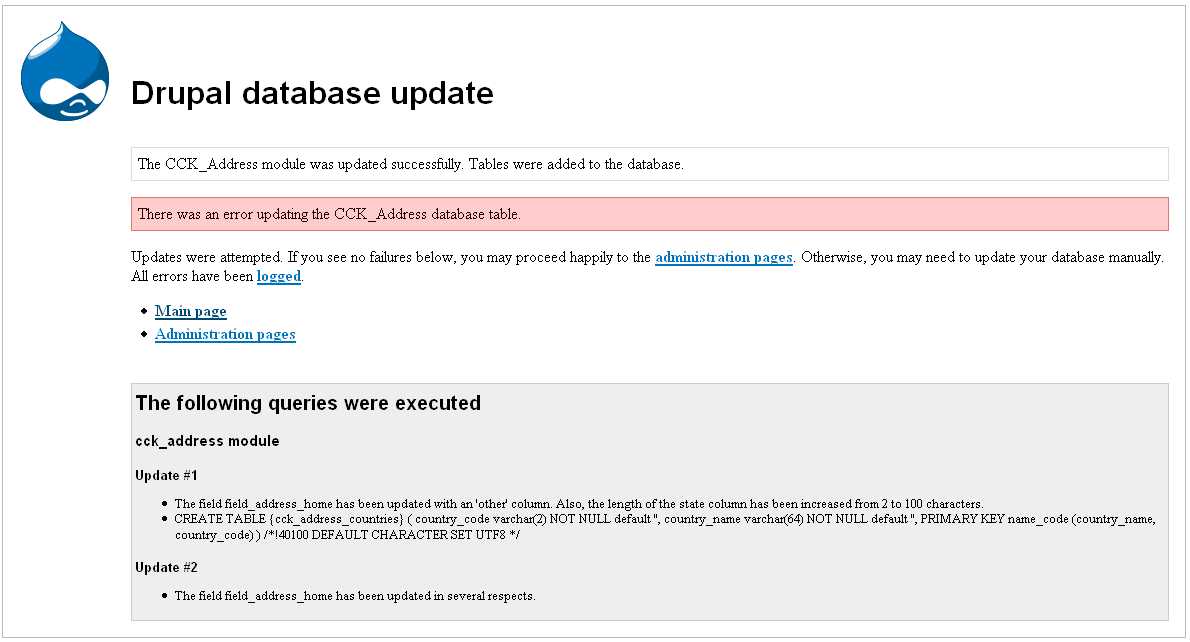
I received error message There was an error updating the CCK_Address database table.
Please see the attached jpg.
Is this a problem? Should I be concerned?
| Comment | File | Size | Author |
|---|---|---|---|
| update_error.jpg | 65.63 KB | misterlawrence |

Comments
Comment #1
misterlawrence commentedI tried to fix this myself, but I wasn't successful.
Here's what I did:
I went into the database and deleted cck_address_states and cck_address_countries. I then ran update.php, assuming that it would recreate the tables properly.
It did not recreate the tables.
Sorry Ryan...I really thought I would be bothering a different module developer by now!
Comment #2
rconstantine commentedJust open up the .install file and make sure you have the tables mentioned in your database: cck_address_states and cck_address_countries
Also make sure that the state table has all 50 U.S. states plus D.C. and that the country table has the U.S.
I have to assume, based on the order of the messages in your screen shot that update 1 worked, but update 2 had a problem.
I'm hoping that since you got a message (near the update 2 report) that the field has been updated that your field is actually okay. If you had more than one cck_address field defined, then perhaps that is the problem. If you only had one, then that's okay.
So if you only had one field defined, then that would point to the last part of update 2. This would mean that you are missing the Washington D.C. entry of your states table. Add it by hand if that is the case.
Let me know. The alternative would be to remove the address fields from the affected content types, then disable and uninstall cck_address, then reinstall. Sorry if that's what you have to do. The CCK module doesn't make it easy to update CCK-managed fields (that's what most of the code in update 2 is supposed to do) and so they must be updated in a round-about way. Although it seems to have worked okay for most people, they could easily have been upgrading from a previous dev version and not run into the same problem.
Comment #3
rconstantine commentedIf I didn't make such interesting modules, I'm sure you would!
Since you deleted the tables, you will have to uninstall and reinstall. (seems we were both responding at the same time)
Comment #4
rconstantine commentedOr rather, I started responding before dinner and then didn't refresh the page after.
Comment #5
misterlawrence commentedSorry Ryan. I'm still confused.
Here's where I'm at.
Can you tell me exactly what to do to get this working again? I don't understand your instruction about the .install file. Could you give me step by step instructions to fix this? Thanks!
Comment #6
rconstantine commentedIgnore #2 since I posted after you deleted your tables.
Um, in your system table, find the entries for both the cck_address and cck_address_canada. Set status of each to 0.
That should do it. Maybe. There are possible complications depending on whether the initial upgrade successfully modified your existing field instances. Your screen shot indicated a field called field_address_home. If that is the only one, then there's a good chance it is okay and will be usable when you reinstall.
Speaking of which, after you set the status as I just mentioned, reinstall per the normal Drupal way. If it doesn't work, I'm not sure what to tell you. There are a number of places in your database that info that should be removed could be hiding. Having deleted the cck_address tables without running the install first may have left remnants (aside from the known bug ones that have been posted at the CCK issue queue).
In other words, if the status/reinstall thing doesn't work, you're looking at deleting your database (or most of it) and starting over. But before you do, take all of the screen shots you can so you don't lose your settings for the work you've done.
Comment #7
misterlawrence commentedUm, in your system table, find the entries for both the cck_address and cck_address_canada. Set status of each to 0.They already were 0. I guess this means I'm hosed?
Is there no way to simply force the module to reinstall over itself, to add the missing tables?
Comment #8
misterlawrence commentedI decided to go ahead and start with a clean database, so don't worry about answering my last question.
You may want to look at the update process from 5.x-1.0 to 5.x-1.x-dev, since it doesn't seem to work properly (at least it didn't for me).
Comment #9
rconstantine commentedI'll look at that update process. Clearly I thought it worked.
If you restore sanity to your project, make a database backup right away and then close this issue. Sorry about the mess.
Comment #10
misterlawrence commentedAll set. Issue closed.