Just installed browsercap/ block to hide a slider block on mobile devices, after installation im shown this error constantly.
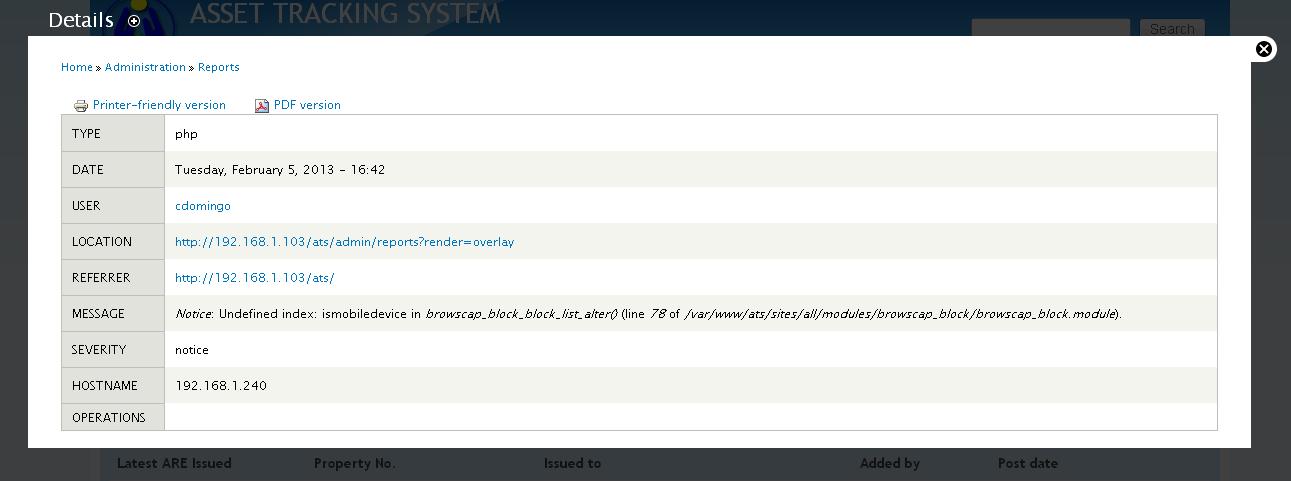
Notice: Undefined index: ismobiledevice in browscap_block_block_list_alter() (line 78 of /sites/all/modules/browscap_block/browscap_block.module).
and the block set to be hidden is still shown.
I tried using the lates dev version but then the error moves
Notice: Undefined index: ismobiledevice in browscap_block_block_list_alter() (line 83 of /sites/all/modules/browscap_block/browscap_block.module).


Comments
Comment #1
Jeff Burnz commentedIf
$browser['ismobiledevice']is not set then it can never return TRUE.What browser/device are you getting this on?
The bug here would be that you get a notice, so we need to check if $browser['ismobiledevice'] isset.
Comment #2
jkirkby commentedWell we was getting this error when viewed on desktops haven't tried mobile yet.
checking to see if the variable has been set or not doesn't seem to fix any issues here
Comment #3
jkirkby commentedSorry wasn't checking the syntax right this fixes the error at line 83
Comment #4
jkirkby commentedBack to work .....
Even though the error has now gone, browsecap block is still not hiding block for any mobile device. I've configured the blocks to hide for mobile, i've tested on browserstack.com with the ios simulators with safari developer to change the user agent to apple and my own iphone blocks are still displayed.
In the browsecap configuration page it is registering the different user agents so this must be a bug with browsecap block.
I could just display:none the slideshows but the images/code will still be downloaded which defies the point of using this module
Comment #5
Jeff Burnz commentedWell, I can't reproduce this and no one else is saying they have the same problem - being able to reproduce the issue is very important.
Is this live, if so please link to it. I can't do anything more because I cannot reproduce it, so without access to the site, admin, code base etc its not possible for me the guess the issue.
Comment #6
jkirkby91 commentedWell i was using the dev Browscap Block with rc Browscap that was the duff setup,
Now i switched it round and used the rc browscap block and dev browscap and it works fine?
I have a dev and live environment i can show you the dev with the defunc setup if it would help
Comment #7
Jeff Burnz commentedOK, yes I would like to see. Regarding the broken setup - can you attach the .module file from that version, or paste the code from that file.
Comment #8
Jeff Burnz commentedI've added an isset check, so this is now fixed.
Comment #10
cllamas commentedcould you post now the code with the isset included?
thanks
Comment #11
oscardax commentedI get the same error in 7.x-1.0.
It would be great if you could post the code or even a patch. Otherwise, may you recommend just downloading the 7.x-1.x-dev version?
Thanks!!
Comment #12
oscardax commentedI've tried a minor variation of the code in #3, and seems to be all right.
Thanks!
Comment #13
vonfracas commentedSame problem after Browscap 2.0 upgrade. Code in #3 seems to fix it.
Comment #14
chrisdomingo commentedI'm also experiencing this error. I'm using Chrome version 24.0.1312.57 m in my desktop, as well as the mobile firefox version in my android phone.
Comment #15
chrisdomingo commentedI found out why I keep on getting these notices. It's quite simple, really. My webserver doesn't have access to the internet, so browscap cannot connect to http://tempdownloads.browserscap.com/versions/version-number.php and http://tempdownloads.browserscap.com/stream.php?BrowsCapINI.
What I did is to download these files and placed them inside the "files' folder of my drupal installation, then edited the corresponding links in "import.inc".
Once these files were recognized by browscap, the notices were gone and the blocks set to be viewed/hidden in mobile were displayed accordingly.
Comment #16
deejmer commentedI've done exactly as instructed on #15, but the error persists. I've downloaded those files, staged them on my server. Relative paths didn't seem to work, so I've tried absolute file system path and an absolute URL based path (http://......).
I then tried disabling and re-enabling all browscap modules i have installed (browscap, browscap block and browscap ctools).
Using all the latest stable versions of 7x core and browscap (and Ctools) modules.
Any ideas? Thanks!
Comment #17
Jeff Burnz commentedLooking at this as the real fix: http://drupal.org/node/1898936
Problem is here: http://drupal.org/node/1868808
Comment #18
Jeff Burnz commentedChange status.
Comment #19
Magic03 commentedhttp://browscap.org/
Important Information
Download URLs
Version:
http://browscap.org/version
http://browscap.org/version-number
Download:
http://browscap.org/stream?q=BrowsCapINI (replace BrowsCapINI with the appropriate version)
import file needs to be updated
Comment #20
TenzAirbrush commented#3 worked for me. Thanks.
Comment #21
ugintl commented#3 worked for me. Thanks.
Comment #22
subir_ghosh#3 worked for me as well. Thanks.
Comment #23
namjoo commented