

Closed (fixed)
Project:
Location Map
Version:
7.x-2.1
Component:
Miscellaneous
Priority:
Normal
Category:
Feature request
Assigned:
Unassigned
Reporter:
Created:
19 Jul 2012 at 07:16 UTC
Updated:
24 May 2014 at 13:51 UTC
Jump to comment: Most recent, Most recent file



Comments
Comment #1
rupertj commentedThere's info here on how this could be added to locationmap: http://drupal.org/node/1087468
From the looks of it, it's as easy as changing the type of those form fields.
Comment #2
jvdurme commentedThanks for the good tip, rupertj.
I can successfully change the field to text_format and specify the format. The wysiwyg editor appears!
I used this code:
Then I type some text in the editor and save it. Unfortunately this raises an error without displaying the text I typed:
Suggestions are welcome. :)
Comment #3
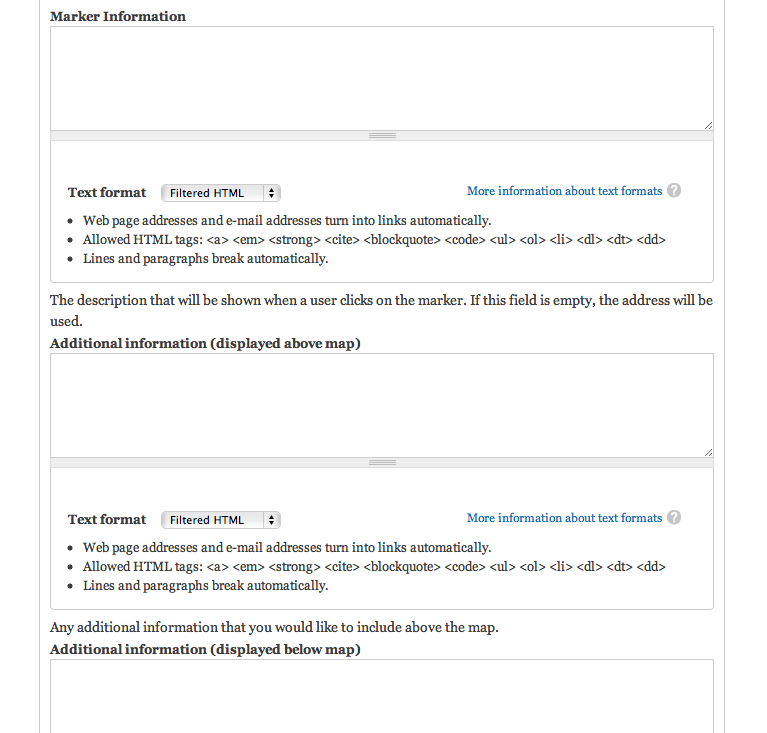
babbage commentedInitially I thought, sure, I'll add that. Why not. Then I did, and I saw what it looked like and remembered why I didn't do this in the first place:
The configuration form just becomes an unreadable mess, thanks to Drupal's verbose "help" about html tags. Now not sure whether I want to do this or not. Hmm.
Comment #4
jvdurme commentedWell, you don't have to if you don't want, but a working workaround for people who want it, would be nice.
Right now we are stuck with this error when trying to alter the field type and try to save some text in the editor.
Any help is appreciated.
Comment #5
babbage commentedYep, I know the cause of the error you're seeing and will fix soon. Will at the least post a patch for people who want this now, then look at how to implement while minimising the ugly. :)
Edit: By "soon", I mean at the earliest tomorrow.
Comment #6
jvdurme commentedThanks babbage, much appreciated!
In the mean time, I have found a solution to get rid of the error. But your patch will be better, because my fix won't work with plain textareas. But I'm quite proud that I found it , so here goes.
The code to alter the form field to text_format:
Then I changed the line in locationmap.module:
$output = '<div id="locationmap_body">' . $locationmap_body . '</div>';To:
$output = '<div id="locationmap_body">' . $locationmap_body['value'] . '</div>';The text_format element outputs an array with 2 elements, one is the value of the field, the other is the text format. So the module has to print the value element of the array, not the entire array.
The difference with plain textarea is that textarea only outputs a string containing the value. I hope I'm right.
But I'm eager to see your patch, babbage. :)
Thanks again!
Comment #7
babbage commentedOK, I've committed the change to the 7.x-2.x branch, and a 7.x-2.x-dev release will be available next time the drupal.org packaging script runs (used to be once every six hours). This hasn't fixed the ugly yet (i.e. the form editing page now has multiple "help" text sections that tell you how to manage text formats) but it at least provides the requested functionality.
If you'd like to see the changes to manually apply them yourself, a diff and patch are here. jvdurme, you were indeed on the right track, as you'll see from the diff. :)
Comment #8
jvdurme commentedThat's really great, babbage!
Forget the ugliness a little, that's not what the user sees (normally).
Really thanks for the quick update. :)
Comment #9
babbage commentedUgliness fixed in commit e51c3af on 7.x-2.x. Should be fixed now... Before closing this issue, I'd appreciate review from those wanting to use particular WYSIWYG editors that this has enabled their preferred editor to be used in these fields succesfully.
Comment #10
jvdurme commentedI promise to review it tonight. Haven't had the time to apply the patch, but will review everything tonight.
Thanks!
Comment #11
jvdurme commentedHey babbage,
I disabled 7.x-2.1, deleted the whole module folder, installed 7.x-2.x-dev and enabled it.
When going to admin/config/locationmap, I get following drupal error message:
For the rest, everything works. Map is showing and I can use my favorite CKEditor in the config page. :)
One little thing: when going to admin/config/locationmap, I was only interested in the info above the map. So I selected Full html there. The other info boxes were not important to me, so I left them alone. However, when trying to save the settings, I got the error that I have to select a text format for every item/text field.
Not that it's fatal, but it's a bit annoying. ;)
Thanks!
Joost
Comment #12
babbage commentedGood feedback Joost. There is supposed to be a default set for those fields, based on your global default. Will look into it, and the error messages.
Comment #13
jvdurme commentedMmm, today I'm not getting the error (the one I put in a code box in the previous post) anymore... that's strange.
But I think it had something to do with the fact that the footer field was the only empty one.
Marker and 'above info' had some text.
Great job on the ugliness fix, babbage. Looks really smooth now!
Comment #14
babbage commentedActually, I suspected when I saw it you'd only get the error on the first visit. So unless you'd done a clean install again, you wouldn't see it the second time. Just about to test that. :)
Comment #15
babbage commentedHey jvdurme. I'm afraid I've not been able to reproduce any of the errors that you described, using a stock-standard fresh Drupal 7.14 installation and a brand new installation of the module. I'm wondering if the error you saw was because although you had deleted the module code base, you hadn't actually uninstalled the module so the old configuration information was still in the database. So I'll try installing v2.1, the upgrading to the development branch, and see if I can reproduce what you saw...
Edit: Yep. Shockingly obvious when I think about it. The data for those fields is stored now as an array, it wasn't before, and I didn't provide an upgrade. Oops. Fixing now... :)
Comment #16
babbage commentedCommit to the 7.x-2.x-dev branch provides the necessary upgrade code to modify the variables. This fixes both of the reported error types, which were related to the same underlying problem.
Be sure to run update.php (or drush updb) when updating to the development branch...
Comment #17
jvdurme commentedAllrighty.
I disabled the previous version, enabled the new dev version, ran update.php and went to my locationmap.
All is well. And for the record: no error messages. ;-)
I think this issue can be closed. Job well done, babbage! Much appreciated.
I'll send you a link when my website is live. :)
Comment #18
babbage commented