I installed addressfiled, geocoder, geofield modules. I am not trying to do graphical maps at this point. Just addresses with proximity searches (location module does this but doesn't play well with Rules).
After I added a geo field to my users I then told it to get data from address field. When I save a user's new address I get this error:
Warning: Invalid argument supplied for foreach() in geocoder_widget_array_recursive_diff() (line 423 of /home4/growtogi/public_html/sites/all/modules/geocoder/geocoder.widget.inc).
If I resave I do not get the error but I don't know if it's saving anything in the geofield or not. Also I can't see the geo field to see any type of data. Is it supposed to be visible?
I left all the settings at default settings.


Comments
Comment #1
IWasBornToWin commentedI just changed the geocoder handler from google to longitude/latitude thinking this is what I need for my proximity needs and I got this error after saving the user's address:
Notice: Undefined index: value in geocoder_latlon_field() (line 90 of /home4/growtogi/public_html/sites/all/modules/geocoder/plugins/geocoder_handler/latlon.inc).
Comment #2
phayes commentedYou should be using the google handler. I'm surprised it even *let* you select the lat/lon handler for an adressfied. Or is the field a text-field?
Comment #3
IWasBornToWin commentedI switched it back but it gives me several choices - see screenshot.
Comment #4
phayes commentedYou should be using "Google Geocoder".
Comment #5
phayes commentedComment #6
IWasBornToWin commentedOK. I changed it back, registered a new user, collected their address information at registration and received these red error messages:
•Notice: Undefined property: stdClass::$language in geocoder_widget_get_field_value() (line 211 of /home4/growtogi/public_html/sites/all/modules/geocoder/geocoder.widget.inc).
•Warning: Invalid argument supplied for foreach() in geocoder_widget_array_recursive_diff() (line 423 of /home4/growtogi/public_html/sites/all/modules/geocoder/geocoder.widget.inc).
•Warning: Invalid argument supplied for foreach() in geocoder_widget_array_recursive_diff() (line 423 of /home4/growtogi/public_html/sites/all/modules/geocoder/geocoder.widget.inc).
Comment #7
phayes commentedHi IWasBornToWin,
Would you be able to produce a feature that has this bug and post it here?
Comment #8
IWasBornToWin commentedNew feature request here http://drupal.org/node/1694526
Thanks for your quick replies, Phayes
Comment #9
phayes commentedHi IWasBornToWin,
I think you misunderstood me. I was asking you to bundle up your content-type and fields using the "features" module and post it here as a .tar.gz file. Would you be able to do this?
Comment #10
IWasBornToWin commentedSorry about that. I've never used features to do that before but I expect I could figure it out. Here are two things to consider though:
1. It's not a content type, It's for users.
2. I have TONS of custom fields in my user entity.
Comment #11
IWasBornToWin commentedI've noticed the errors from adding new content is because I have a rule that changes some user fields when this event occurs. It then throws a geocoder error after updating the user account. Also just noticed my captcha at registration is gone, not sure if this is related to geofield or geocoder yet.
Comment #12
IWasBornToWin commentedCaptcha was irrelevant issue, sorry. The notice below is from registering a new account. The warnings originally posted come after rules updates a user account.
Notice: Undefined property: stdClass::$language in geocoder_widget_get_field_value() (line 211 of /home4/growtogi/public_html/sites/all/modules/geocoder/geocoder.widget.inc).
Comment #13
IWasBornToWin commentedStill having problems with this -
Got this warning after adding new content that shows a view of the content related to the user. My only geofield field is in user entity.
Warning: Invalid argument supplied for foreach() in geocoder_widget_array_recursive_diff() (line 423 of /home4/growtogi/public_html/sites/all/modules/geocoder/geocoder.widget.inc).
Comment #14
IWasBornToWin commentedThis error seems to be coming from a conflict when I upload or edit a user photo in the user settings:
Hope that helps isolate the problem. I'm using module , http://drupal.org/project/user_picture_field also.
Comment #15
IWasBornToWin commentedSolved with by doing this http://drupal.org/node/1720842#comment-6331514http://drupal.org/node/1720842#comment-6331514
Comment #16
IWasBornToWin commentedNow I get this error when saving new user account - Notice: Undefined property: stdClass::$language in geocoder_widget_get_field_value() (line 211 of /home4/growtogi/public_html/sites/all/modules/geocoder/geocoder.widget.inc).
Comment #17
Rob_Feature commentedSaying "Delete the module and all the data and reinstall" is not considered "Fixed". There's something wrong causing this and that needs to be figured out. Marking as active and as a bug, since no one seems to know what's causing it.
For me, this doesn't happen when saving a node (it geocodes sucessfully), but only when running cron (when it tries to geocode the nodes).
Comment #18
netbek commented@IWasBornToWin What field type are you using to store the address information? Text, long text, addressfield (module), location (module), etc.? If it's attached to the user entity, config should be at /admin/config/people/accounts/fields. It might help to narrow down the culprits if we knew what's failing to geocode.
Edit: You say you installed addressfield. Above is to confirm that's what you're geocoding from.
Comment #19
IWasBornToWin commentedYes, addressfield module is what I'm using. It seems that anytime I change a user field, or a node with a user relationship I get the error.
Address field:
Format handlers
X Address form (country-specific)
Hide the country when only one is available
X Organisation (single line)
Name (First name, Last name)
Name (single line)
Comment #20
netbek commentedOK, tested it. Got an "Invalid argument supplied for foreach() in geocoder_widget_array_recursive_diff()" warning when editing an existing user entity after adding the addressfield & geofield combo. The problem occurs when geocoder_widget_get_field_value() checks the original entity to see if another geocode is necessary. To reproduce the problem, remove and add the addressfield and geofield fields from the user entity, then edit a user. The same might occur with other entity & field combos when the original field value is empty.
Patch attached to make it more robust.
Comment #21
netbek commentedMarking for review because I've reproduced the bug and have a patch [#20]
Comment #22
phayes commentedCommitted, thanks netbek. I'm marking this as fixed, but anyone should feel free to re-open if they are still seeing this issue.
Comment #23
IWasBornToWin commentedI just got this error :Notice: Undefined property: stdClass::$language in geocoder_widget_get_field_value() (line 211 of /home4/growtogi/public_html/sites/all/modules/geocoder/geocoder.widget.inc).
I think it's the same as #16. I'm currently using latest dev geocoder and geophp. I haven't installed latest geofield dev yet.
After I installed latest geocoder two messages which used to appear (from orginal post, 423 error) are no longer appearing so thats great!
Comment #24
netbek commentedProgress is good. I'm not sure if it's a factor, but what does your language config look like /admin/config/regional/language? Multiple languages, i18n module?
A quick Google suggests:
#1608836: entity->language doesn't always exist
#1461878: errors
#1495648: Introduce entity language support
Possibly we could just pass NULL if the entity language is not present, i.e.:
Comment #25
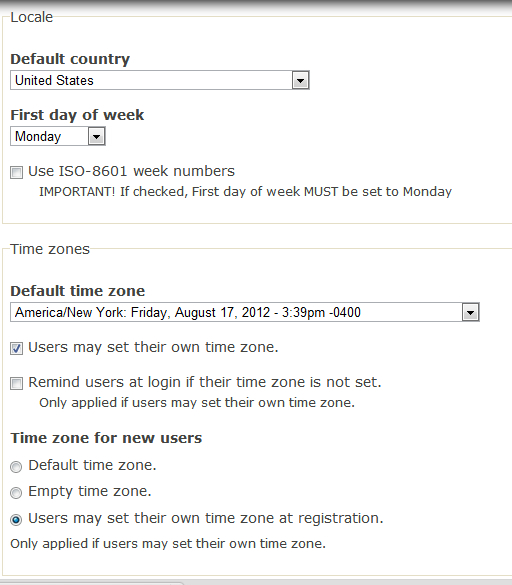
IWasBornToWin commentedYou may have lost me. Here is a screenshot of regional settings:
Comment #26
netbek commentedI'm testing on a site that has the locale and internationalization modules enabled (to support multiple languages). I suspect entity language might be missing if locale isn't enabled. But I don't have time to test that at the moment unfortunately. I've attached a patch. It shouldn't do harm as $langcode is optional per documentation.
Comment #27
phayes commentedThanks netbek. #26 has been committed. I'm optimistically marking this as fixed (again). Please feel free to re-open if any problems persist.
Comment #28
netbek commentedComment #29
IWasBornToWin commentedJust tried latest dev, unfortunately I still get the error when adding a new account.
Notice: Undefined property: stdClass::$language in geocoder_widget_get_field_value() (line 211 of /home4/growtogi/public_html/sites/all/modules/geocoder/geocoder.widget.inc).
Comment #30
IWasBornToWin commentedI just changed display from wkt to latitude/longitiude to see if it would help, and it doens't. Which setting do you recommend?
Comment #31
netbek commentedAre you sure you're using the latest version? The dev on the module home page doesn't contain the changes yet. You can get those now from git or wait until the module page updates.
I doubt wkt or lat/lon is the problem.
Edit: see http://drupal.org/project/geocoder/git-instructions if you're in a hurry.
Comment #32
IWasBornToWin commentedI must not be using the latest version. I thought "comitted" means it's in the latest version? I'm not in a huge hurry, I can wait a few hours! :) JK
Comment #33
IWasBornToWin commentedI'll just apply the patch.
Comment #34
IWasBornToWin commentedApplied patch, got no error! Thanks
Comment #35
phayes commentedThere's a lag of a few hours (up to 12 I think) for commits to be picked up in the dev download.
Comment #37
jcnventuraI've also did this step of creating the location field after already having some content. When using the latest dev version, I get this message (line 448). The value of $aArray1 is 'S'. Original field value was 'Sölden, Austria'.
Comment #38
jcnventuraSorry this happens because I'm geocoding from the 'Title' property, and this seems to only work with fields...