
On this page
Getting Started - Installation Options for the Starter Kits
Please Note: These starter kits are no longer supported, and most of the relevant Community Media modules have been forked as part of the Community Media Advanced initiative.
We created this fork to provide a central place to host all community media modules that are in ongoing development, and to facilitate new releases.
We are doing this under the terms of GPL version 2, and using Drupal branch/ tag/ release conventions on Github so that new releases can be shown on the Available updates Drupal page the same way they are for modules hosted on drupal.org.
The following organizations have undertaken this Community Media Advanced initiative together (listed alphabetically as of July 2017):
Amherst Media, Brattleboro Community Television (BCTV), Easton Community Access Television (ECAT), High Five Access Media (HFAM), Manhattan Neighborhood Network (MNN), Open Signal PDX, ORCA Media, PhillyCAM, Regional Educational Television Network (RETN), St. Paul Neighborhood Network (SPNN), Vermont Community Access Media (VCAM)
For more information please visit cmadvanced.org
Installing
There are 4 ways to install a starter kit:
- One Click Install on Pantheon (easiest) - Pantheon provides a one click install option for this distribution. It is FREE to try and is by far the easiest way to get started with Drupal and CiviCRM, but you will need to pay for a Pantheon plan at some level to launch your site.
- FULL DOWNLOAD (easy) - Download the full package bellow and install using the CiviCRM Starter Kit option in the install process. All of the modules, themes, and libraries included in the kit will then be located in profiles/cm_starterkit_easy, profiles/cm_starterkit_moderate, or profiles/cm_starterkit_difficult. These modules are still listed normally in the modules list and additional modules can still be added to sites/all/modules
- DOWNLOAD ONLY MODULES- Download the no-core option listed under View all releases. Then add the CONTENTS of sites/all/modules, sites/all/themes, and sites/all/libraries to an existing install. This is currently the best option for adding these modules to an existing site.
- DRUSH MAKE (advanced) - An alternative is to use git to clone the kit and drush to install it. That will add the modules to the normal sites/all/modules. This is by far the fastest way to configure a kit, but requires some basic command line experience.
EASY
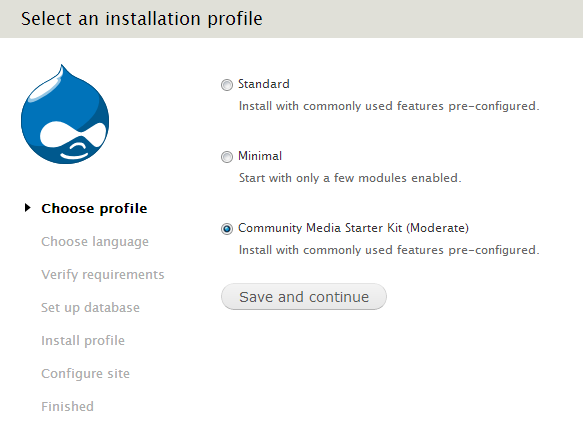
When installing the Moderate or Difficult Starter Kit using the Install Profile, first select the Starter Kit option instead of the normal standard or minimal options.
You will be told that you can not finish the install until the CiviCRM install is complete. Click the install link in the CiviCRM settings file does not extist. It should be created by CiviCRM install message and configure CiviCRM the same way you would if you were installing it after configuring Drupa.
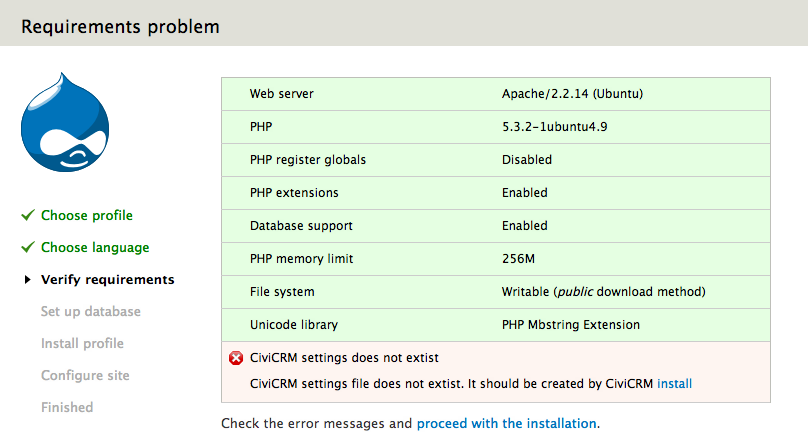
Once the CiviCRM install is complete, you will be able to continue the Drupal installation process.
MODERATE
At the bottom of each Community Media Startkit project page, you will see a link to View all releases. Download the no-core tar.gz or zip option for the latest supported release. It will be named something like cm_starterkit_easy-7.x-1.0-beta1-no-core.tar.gz. That download will include the modules, libraries, and theme, but not the Drupal core. Those directories that can be added to the sites/all directory of an existing Drupal install.
The easiest way to do this on a new install would be to navigate to the sites direct and use wget to create the all directory.
wget http://ftp.drupal.org/files/projects/cm_starterkit_easy-7.x-1.0-beta1-no-core.tar.gz
tar -xvf cm_starterkit_easy-7.x-1.0-beta1-no-core.tar.gz
mv cm_starterkit_easy all
Once downloaded, you can install Drupal and CiviCRM using the normal installation process.
DIFFICULT
git clone --branch 7.x-1.x http://git.drupal.org/project/cm_starterkit_easy.git
cd cm_starterkit_easy
drush make cm_starterkit_easy.make
git clone --branch 7.x-1.x http://git.drupal.org/project/cm_starterkit_moderate.git
cd cm_starterkit_moderate
drush make cm_starterkit_moderate.makegit clone --branch 7.x-1.x http://git.drupal.org/project/cm_starterkit_difficult.git
cd cm_starterkit_difficult
drush make cm_starterkit_difficult.makeDrush will download the specific versions of Drupal core, CiviCRM core, all of the modules, and additional libraries defined in the .make file into the normal sites/all/ directory. Once downloaded, you can install Drupal and CiviCRM using the normal installation process.
Help improve this page
You can:
- Log in, click Edit, and edit this page
- Log in, click Discuss, update the Page status value, and suggest an improvement
- Log in and create a Documentation issue with your suggestion
