Short version of the problem: Pre-created Tags in a purchased theme display properly. Newly added Tags, do not.
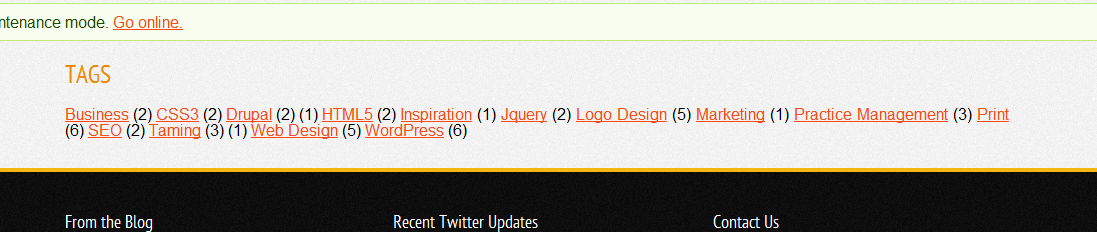
I purchased the Solaris theme here (http://themeforest.net/item/solaris-drupal-theme/2295781) which utilizes TagCloud. All the Taxonomy Terms that come "stock" with the theme display properly in the blocks that TagCloud builds. If I edit the pre-existing Terms, they continue to display properly. However, Terms that I have added since installing the theme do not display properly. I've confirmed that they are created properly in the database. I can even navigate directly to the Term page for new additions. Oddly, the count of content containing the tag displays properly, but the name of the tag does not. I've confirmed this is not a theme issue by navigating to domain.com/tagclouds where the problem exists as well. (Screen shot attached. Note the stray "(1)" in the 2nd row before Web Design, displaying the count, but not the name of a Term called "General")
I assumed this was a cache/database issue and have tried the following in various order:
- Cleared Cache
- Tried with Cache off and on
- Tried in maintenance mode and live
- Re-installed TagCloud and ran update.php
None of these steps have changed the behavior. I'm hoping that I'm missing something simple. Thank you for any help you can provide.


Comments
Comment #1
MGParisi commentedVery Weird, and can not reproduce... but will keep this open if more people are having problems. Your using 1.4 or the dev version?
Comment #2
MacaroniDuck commentedUsing 1.4. I'll be creating more content later this week and may repeat some of the steps above to see if the behavior continues.
Comment #3
MGParisi commentedAre the tags your adding to nodes?
Comment #4
MacaroniDuck commentedYes. (Core) Blog nodes.
Comment #5
MGParisi commentedI'll leave it open as no one else seems to be having this issue (including myself)
Comment #6
MacaroniDuck commentedOk, this is really odd behavior. I just did a couple of things that provided more information, but no answers. Perhaps they'll make sense to you.
I created a second blog entry identical to the first. I chose the same Category and Tags for it. Following this the Category and Tag Clouds displayed properly (showing a count of 2 for each Category and Tag and displaying the names correctly). Next, thinking this must have simply been some odd problem with the original blog node, I deleted it, expecting all the Tags and Categories to now display properly with a count of 1. They didn't. It reverted to the previous behavior of displaying the count, but not the name of the Tag/Category.
I confirmed this odd behavior by creating a third blog entry. I chose three Categories for it. One that matched the previous blog and two that did not. I added multiple tags to it, only one of which matched a tag from the previous blog entry. Sure enough, each of the items that has a count of 2, now displays both the count and the name. All of the items with a count of 1, only display the count. *boggle*
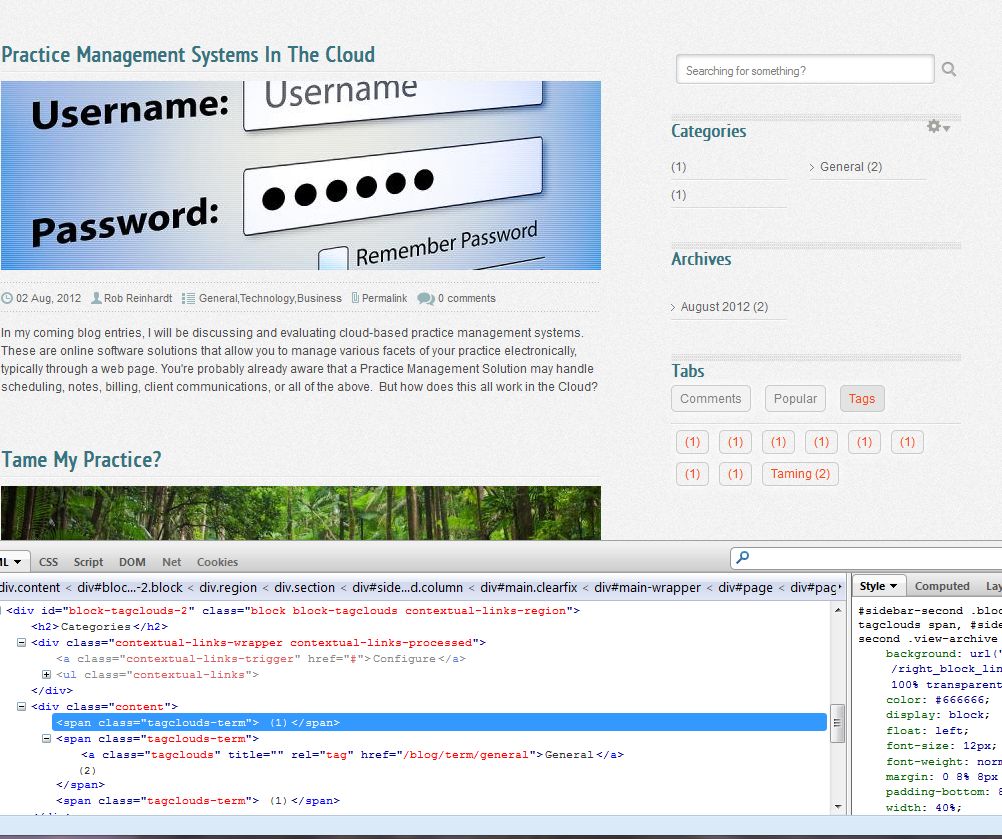
I'm including a screenshot again, this time showing the HTML/CSS in Firebug. I verified this is the same CSS/HTML spit out on the tagclouds page.
Comment #7
MGParisi commentedTry updating to dev or 1.5 (when its published).
Comment #8
MacaroniDuck commentedNo love :\ Just installed 1.5 (deleted old folder, extracted, update.php, cleared cache twice). Same behavior.
For now I've create a "Tag Placeholder" blog post. As long as I add every tag/category I use to that post, all the names display properly (since there are at least two of everything). Makes it easy to test also since I just unpublish that post. Obviously not a long-term solution though.
Comment #9
MGParisi commentedI don't know why its not working for you. Sorry:( I'll keep this open until someone else can reproduce the issue. You can do this in views and/or try taggadelics.
Edit ive reproduced the issue, but I don't know what is causing it other then it appears to be related to tags with only one term.
Comment #10
MGParisi commentedMark as Bug
Comment #11
MacaroniDuck commented*phew* I feel just a touch more sane now.
Comment #12
MGParisi commentedMarking Critical - As far as I see it, it only happens when the tag has a count of 1
Comment #13
MGParisi commentedYou can set the patch... Im not even working on the critical issue at the moment
Comment #14
MGParisi commentedWell I fixed one issue, wait for the dev release (should be marked with todays date) and try it out!
Comment #15
MGParisi commentedSetting to Needs Review
Comment #16
MGParisi commentedThe New Dev Is Up!
Comment #17
MGParisi commentedFixed -- hopefully
Comment #18
MGParisi commentedFixed -- hopefully