

Closed (fixed)
Project:
Content Templates (Contemplate)
Version:
5.x-1.3
Component:
User interface
Priority:
Normal
Category:
Bug report
Assigned:
Unassigned
Reporter:
Created:
28 Aug 2007 at 03:09 UTC
Updated:
17 Jul 2008 at 14:09 UTC
Jump to comment: Most recent file

Comments
Comment #1
jrglasgow commentedHave you tried this with the newest release. Is this still a problem for you?
Comment #2
aren cambre commentedIt appears to be fixed.
Comment #3
jrglasgow commentedgood to hear
Comment #4
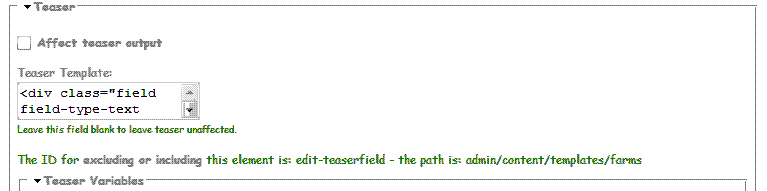
zcc_nz commentedWell I just downloaded and installed 5.x-2.02 and am getting the exact same results on Opera and FF3.
Do I need to fiddle with the css?
I have..
div.contemplate-input .form-textarea {
height: 200px;
border: 1px solid #666;
font-family: Profont, 'lucida console', Monaco, monospace;
I am using the wabi template which resizes wonderfully..
Any advice?
Thanks
(attachment is b&w sample of size I am getting)
Comment #5
jrglasgow commentedcan you take a "view source" for the page and paste in the code for the text area you are having problems with