Closed (fixed)
Project:
Video
Version:
7.x-2.7
Component:
General
Priority:
Major
Category:
Bug report
Assigned:
Unassigned
Reporter:
Created:
3 Aug 2012 at 19:59 UTC
Updated:
14 Aug 2012 at 15:00 UTC
Jump to comment: Most recent file


I installed FFMPEG using the following instructions.
https://ffmpeg.org/trac/ffmpeg/wiki/...mpilationGuide
I am using this software package with DRUPAL 7. I could not use the instruction for FFMPEG as described in the document page above. I had to load FFMPEG using the apt-get install ppmpeg command. This worked to install it and DRUPAL was able to find it.
I attempted to load a video on my website and FFMPEG was suppose to convert it from .mov to fv4.
I got an error when it attempted to convert the file.
FFmpeg failed to transcode test_video.mov.

[B]Reported errors[/B]


PHPVideoToolkit  Error: Execute error. Output for file  "/home/website/sites/default/files/videos/original/test_video.mov"  was not found. Please check server write permissions and/or available  codecs compiled with FFmpeg. You can check the encode decode  availability by inspecting the output array from  PHPVideoToolkit::getFFmpegInfo().   [B]Executed commands and output[/B]


 /usr/bin/ffmpeg -i '/home/website/sites/default/files/videos/original/test_video.mov' -s '640x360'  sites/default/temp/1342509155-50051063bbd2d.
ffmpeg version 0.7.6-4:0.7.6-0ubuntu0.11.10.1, Copyright (c) 2000-2011 the Libav developers
  built on Jun 12 2012 16:28:10 with gcc 4.6.1
  configuration: --extra-version='4:0.7.6-0ubuntu0.11.10.1' --arch=i386 --prefix=/usr --enable-vdpau --enable-bzlib --enable-libgsm --enable-libschroedinger --enable-libspeex --enable-libtheora --enable-libvorbis --enable-pthreads --enable-zlib --enable-libvpx --enable-runtime-cpudetect --enable-vaapi --enable-gpl --enable-postproc --enable-swscale --enable-x11grab --enable-libdc1394 --enable-shared --disable-static
  WARNING: library configuration mismatch
  avutil      configuration: --extra-version='4:0.7.6-0ubuntu0.11.10.1' --arch=i386 --prefix=/usr --enable-vdpau --enable-bzlib --enable-libgsm --enable-libschroedinger --enable-libspeex --enable-libtheora --enable-libvorbis --enable-pthreads --enable-zlib --enable-libvpx --enable-runtime-cpudetect --enable-vaapi --enable-gpl --enable-postproc --enable-swscale --enable-x11grab --enable-libdc1394 --shlibdir=/usr/lib/i686/cmov --cpu=i686 --enable-shared --disable-static --disable-ffmpeg --disable-ffplay
 avcodec     configuration: --extra-version='4:0.7.6-0ubuntu0.11.10.1' --arch=i386 --prefix=/usr --enable-vdpau --enable-bzlib --enable-libgsm --enable-libschroedinger --enable-libspeex --enable-libtheora --enable-libvorbis --enable-pthreads --enable-zlib --enable-libvpx --enable-runtime-cpudetect --enable-vaapi --enable-gpl --enable-postproc --enable-swscale --enable-x11grab --enable-libdc1394 --shlibdir=/usr/lib/i686/cmov --cpu=i686 --enable-shared --disable-static --disable-ffmpeg --disable-ffplay
  avformat    configuration: --extra-version='4:0.7.6-0ubuntu0.11.10.1' --arch=i386 --prefix=/usr --enable-vdpau --enable-bzlib --enable-libgsm --enable-libschroedinger --enable-libspeex --enable-libtheora --enable-libvorbis --enable-pthreads --enable-zlib --enable-libvpx --enable-runtime-cpudetect --enable-vaapi --enable-gpl --enable-postproc --enable-swscale --enable-x11grab --enable-libdc1394 --shlibdir=/usr/lib/i686/cmov --cpu=i686 --enable-shared --disable-static --disable-ffmpeg --disable-ffplay
 avdevice    configuration: --extra-version='4:0.7.6-0ubuntu0.11.10.1' --arch=i386 --prefix=/usr --enable-vdpau --enable-bzlib --enable-libgsm --enable-libschroedinger --enable-libspeex --enable-libtheora --enable-libvorbis --enable-pthreads --enable-zlib --enable-libvpx --enable-runtime-cpudetect --enable-vaapi --enable-gpl --enable-postproc --enable-swscale --enable-x11grab --enable-libdc1394 --shlibdir=/usr/lib/i686/cmov --cpu=i686 --enable-shared --disable-static --disable-ffmpeg --disable-ffplay
 avfilter    configuration: --extra-version='4:0.7.6-0ubuntu0.11.10.1' --arch=i386 --prefix=/usr --enable-vdpau --enable-bzlib --enable-libgsm --enable-libschroedinger --enable-libspeex --enable-libtheora --enable-libvorbis --enable-pthreads --enable-zlib --enable-libvpx --enable-runtime-cpudetect --enable-vaapi --enable-gpl --enable-postproc --enable-swscale --enable-x11grab --enable-libdc1394 --shlibdir=/usr/lib/i686/cmov --cpu=i686 --enable-shared --disable-static --disable-ffmpeg --disable-ffplay
 swscale     configuration: --extra-version='4:0.7.6-0ubuntu0.11.10.1' --arch=i386 --prefix=/usr --enable-vdpau --enable-bzlib --enable-libgsm --enable-libschroedinger --enable-libspeex --enable-libtheora --enable-libvorbis --enable-pthreads --enable-zlib --enable-libvpx --enable-runtime-cpudetect --enable-vaapi --enable-gpl --enable-postproc --enable-swscale --enable-x11grab --enable-libdc1394 --shlibdir=/usr/lib/i686/cmov --cpu=i686 --enable-shared --disable-static --disable-ffmpeg --disable-ffplay
 postproc    configuration: --extra-version='4:0.7.6-0ubuntu0.11.10.1' --arch=i386 --prefix=/usr --enable-vdpau --enable-bzlib --enable-libgsm --enable-libschroedinger --enable-libspeex --enable-libtheora --enable-libvorbis --enable-pthreads --enable-zlib --enable-libvpx --enable-runtime-cpudetect --enable-vaapi --enable-gpl --enable-postproc --enable-swscale --enable-x11grab --enable-libdc1394 --shlibdir=/usr/lib/i686/cmov --cpu=i686 --enable-shared --disable-static --disable-ffmpeg --disable-ffplay
  libavutil    51.  7. 0 / 51.  7. 0
  libavcodec   53.  6. 0 / 53.  6. 0
 libavformat  53.  3. 0 / 53.  3. 0
  libavdevice  53.  0. 0 / 53.  0. 0
  libavfilter   2.  4. 0 /  2.  4. 0
  libswscale    2.  0. 0 /  2.  0. 0
  libpostproc  52.  0. 0 / 52.  0. 0
Seems stream 0 codec frame rate differs from container frame rate: 5000.00 (5000/1) -> 25.00 (25/1)
Input #0, mov,mp4,m4a,3gp,3g2,mj2, from '/home/website/sites/default/files/videos/original/test_video.mov':
  Metadata:
    major_brand     : qt
    minor_version   : 537199360
    compatible_brands: qt
    creation_time   : 2012-07-16 21:32:29
  Duration: 00:00:15.20, start: 0.000000, bitrate: 4761 kb/s
    Stream #0.0(eng): Video: h264 (Main), yuv420p, 960x540, 3346 kb/s, 25 fps, 25 tbr, 2500 tbn, 5k tbc
    Metadata:
      creation_time   : 2012-07-16 21:32:29
    Stream #0.1(eng): Audio: pcm_s16le, 44100 Hz, 2 channels, s16, 1411 kb/s
    Metadata:
      creation_time   : 2012-07-16 21:32:29
Home directory /var/www not ours.
ALSA lib pcm.c:2212:(snd_pcm_open_noupdate) Unknown PCM sites/default/temp/1342509155-50051063bbd2d.
[alsa @ 0x9b345a0] cannot open audio device sites/default/temp/1342509155-50051063bbd2d. (No such file or directory)
Output #0, alsa, to 'sites/default/temp/1342509155-50051063bbd2d.':
  Metadata:
    major_brand     : qt
    minor_version   : 537199360
    compatible_brands: qt
    creation_time   : 2012-07-16 21:32:29
    encoder         : Lavf53.3.0
    Stream #0.0(eng): Audio: pcm_s16le, 44100 Hz, 2 channels, s16, 1411 kb/s
    Metadata:
      creation_time   : 2012-07-16 21:32:29
Stream mapping:
  Stream #0.1 -> #0.0
Could not write header for output file #0 (incorrect codec parameters ?)
TROUBLESHOOTING I DID.
I check the file permissions in the /home/www/website/sites/default/files/videos/original/ and all of these files have a 777 permission.
So I am sure I am having an issue with the install of FFMPEG.
1. Can someone tell me how to " inspecting the output array from PHPVideoToolkit::getFFmpegInfo()" ?
2. What library mismatch could there be? I see a reference to library mismatch but i do not know what to do with this information.
3. Any idea what librarys or codecs I need to install to fix this issue?
Any help ?
| Comment | File | Size | Author |
|---|---|---|---|
| #28 | Screen Shot 2012-08-14 at 7.59.17 AM.png | 84.49 KB | spineless |
| #14 | Screen Shot 2012-08-08 at 8.03.38 AM.png | 72.61 KB | spineless |
| #12 | Screen Shot 2012-08-07 at 10.05.44 PM.png | 192.68 KB | spineless |
| #10 | Screen Shot 2012-08-07 at 9.00.34 AM.png | 59.03 KB | spineless |
| #10 | Screen Shot 2012-08-07 at 9.18.37 AM.png | 168.98 KB | spineless |






Comments
Comment #1
Jorrit commentedWhat are the settings for your codecs? It seems you haven't selected any codecs.
Comment #2
spineless commentedHow do I do that?
1. Are you talking about the UBUNTU FFMPEG? I am not sure how to set up the codec in Ubuntu.
2. Are you talking about the DRUPAL "Video" Module?
The Video module Transcoder setting are the following:
Video transcoder : FFmpeg
PATH TO FFMPEG EXECUTABLE FFMPEG : /usr/bin/ffmpeg
Path to save thumbnails: videos/thumbnails
Number of thumbnails: 5
Comment #3
spineless commentedIn case you are looking for a Drupal error message. I attempted to upload a file and when I do I get this error in Drupal:
I think there is something wrong with the FFMPEG install but I do not have a clue as to where to start in order to understand the error. Any help would be great.
Comment #4
spineless commentedComment #5
Jorrit commentedI was talking about the video module. Could you send screenshots of the presets tab and the forms of all selected presets?
Comment #6
spineless commentedI am using the video presets module as a base. Here are the screen shots of the preset mp4.
I get the following error when I attempt to create a mp4 file.
• Something went wrong with your video transcoding. Please check your recent log entries for further debugging.
PDOException: SQLSTATE[23000]: Integrity constraint violation: 1062 Duplicate entry '160' for key 'PRIMARY': INSERT INTO {node_comment_statistics} (nid, cid, last_comment_timestamp, last_comment_name, last_comment_uid, comment_count) VALUES (:db_insert_placeholder_0, :db_insert_placeholder_1, :db_insert_placeholder_2, :db_insert_placeholder_3, :db_insert_placeholder_4, :db_insert_placeholder_5); Array ( [:db_insert_placeholder_0] => 160 [:db_insert_placeholder_1] => 0 [:db_insert_placeholder_2] => 1344275450 [:db_insert_placeholder_3] => [:db_insert_placeholder_4] => 1 [:db_insert_placeholder_5] => 0 ) in comment_node_insert() (line 1301 of /home/website/modules/comment/comment.module).
Comment #7
spineless commentedHere is the Players and Transcoder pages
Comment #8
spineless commentedComment #9
Jorrit commentedCould you try to update to version 7.x-2.7 of the Video module? Could you also post a screenshot of the presets overview screen?
Comment #10
spineless commentedOK
Updating to the new version has changed the errors somewhat. I am now able to create the node which was not happening before but of course the video converter is still not working. Since there have been some changes I am going to give you a little more information about what has changed. I did the following steps.
1. Updated the video module to version 7.x-2.7
2 Attempted to create a new video node and upload a .mov video again.
3. Captured the new set of error messages.
4. Took a screen shot of the preset config page.
NEW ERRORS I FOUND.
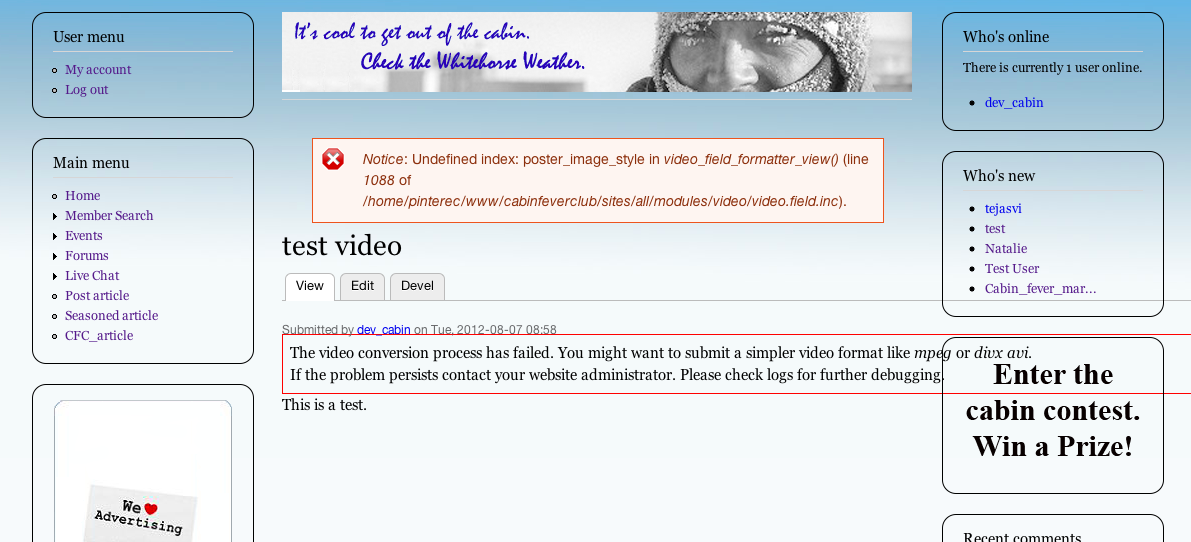
1. Error appears when I look at the new video node I just created.
Notice: Undefined index: poster_image_style in video_field_formatter_view() (line 1088 of /home/website/sites/all/modules/video/video.field.inc).
1a. The converter was not able to convert the format. I received the following error.
The video conversion process has failed. You might want to submit a simpler video format like mpeg or divx avi.
If the problem persists contact your website administrator. Please check logs for further debugging.
I also took a screen shot of the node so you can see what it looks like.
2. Write protect error noted in the Drupal log.
-FFmpeg failed to transcode test_video.mov.
-Reported errors
-PHPVideoToolkit error: Execute error. The tmp directory supplied is not writable.
-Executed commands and output
I looked at the directory ...sites/default/files/video/ and I noticed that the automatically created number directories in the directories "Thumbnail" and "Converted" have the permission 776 and are owned by www-data. Most of my directories in this website have a "username" owner.
Can you tell me which temp directory this error is referring too?
Thanks,
Spineless
Comment #11
Jorrit commentedDid you clear the cache at the Performance administration page after you installee the new version? You screenshots suggest that that did not happen. The temp directory is the one that is configured on the Filesystem administrative page.
Comment #12
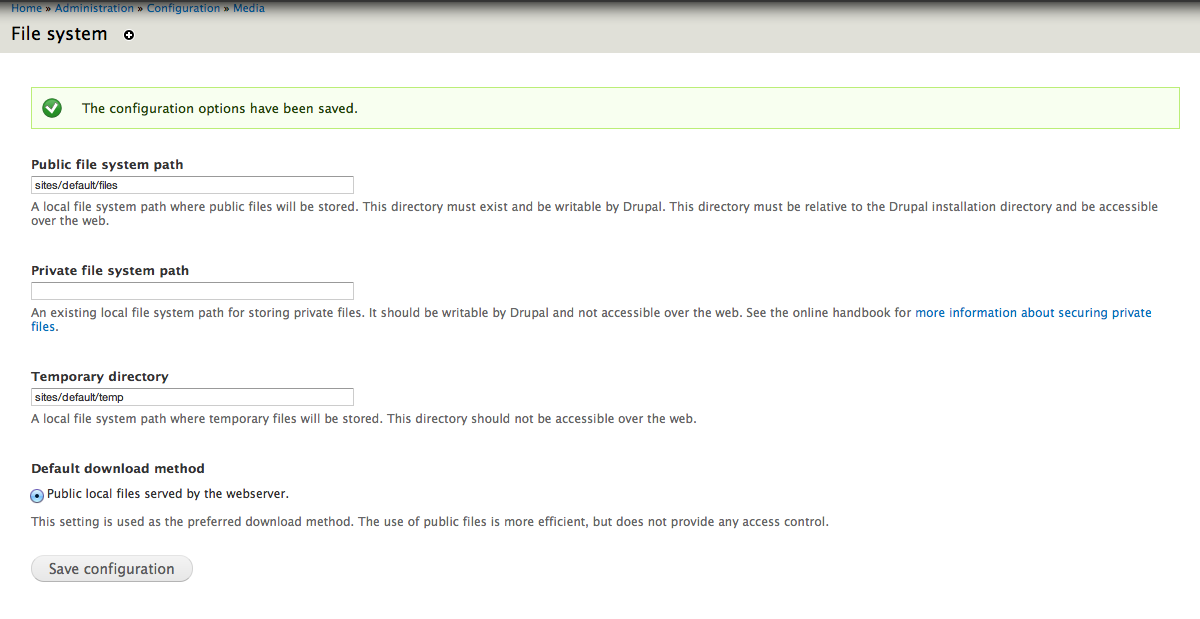
spineless commentedWhat do you mean by "Filesystem administrative page"? Are you referring to the sites/default/files directory? or the sites/default/temp directory. These two files are pointed to in the website configuration page located at admin/configuration/media/file system.
These directories have a permission of 777.
Or do you mean the Transcoder....
There are two folder the transcoder page points to which is visible in the screen shots I provide earlier. The directories are
"Path to FFMPEG Executable" is ... /usr/bin/ffmpeg
"Path to save thumbnails" is .... videos/thumbnails
Again....the error I see is " PHPVideoToolkit error: Execute error. The tmp directory supplied is not writable."
Could you provide me the path or the location where I can find the directory you are referring too?
When I took a look at the last directory I can see that the screenshots are being created and uploaded to this directory but the converted files that the trancoder is suppose to create and not being placed in the video/converted directory.
I noticed that when I create a new video node I see that an error appears on the node page. The error log indicates a permission issue but the node error states something else.
Could there be anything else that could be misconfigured?
Comment #13
Jorrit commentedWith the file system administrative page I mean the page located at
admin/config/media/file-system. Could you check if the temp directory on that page is in fact writable bywww-data? If you submit the form atadmin/config/media/file-systemthat will be checked, if I am not mistaken.Comment #14
spineless commentedThere are two directories listed on the page admin/config/media/file-system.
sites/default/files
sites/default/temp
Both are owned by the "user". They are not owned by www-data. However, the permission setting for these two directories is set to 777 and can be written by everyone.
To double checked, I resubmitted the page admin/config/media/file-system and the configuration was able to be saved.
Comment #15
Jorrit commentedUnfortunately, I have no idea what is going wrong and what else to ask you. Can I get access to your site so I can try to find out what is going on?
Comment #16
spineless commentedYes I can do that. Please log in and I will upgrade your access.
www.cabinfeverclub.ca
Comment #17
Jorrit commentedI've done that. Can you install the devel module, if you haven't already done that?
Comment #18
spineless commentedOK...Give me a day. I just noticed that there are modules that need updating includes video preset. So i will update these back up the system then provide you access.
Comment #19
Jorrit commentedAny news?
Comment #20
spineless commentedHello Jorrit, You should have access now.
Comment #21
Jorrit commentedI found the problem: your temporary directory path was a relative path and this wasn't supported. I have changed your path and I will fix the module.
After I solved that, I found that your FFmpeg installation doesn't support H.264, which you need to encode MP4. Look at http://ubuntuforums.org/showthread.php?t=1117283 for instructions on how to get H.264 support.
Comment #22
spineless commentedHello Jorrit
Can you please update your doumentation to reflect these findings so that others can get this.
By the way. I am unable to open the link you provided to Ubuntu forum. I do not have permission....which is weird because I am fairly active on the site. I did some pocking around and found this FFMPEG Configuration guide that mentioned H.264.
https://ffmpeg.org/trac/ffmpeg/wiki/UbuntuCompilationGuide
IS this the link you mean to point to?
Comment #23
Jorrit commentedI have just updated the module so relative tmp paths are no longer a problem. The guide I was referring to has the advantage of not needing compilation. For me it is inaccessible too, unfortunately. Basically, you've got to install the libav*-extra-* packages. For self-compilation of FFmpeg + libx264 there are a lot of guides, the one you found is probably going to help you get a good FFmpeg installation. I am marking this issue as fixed because I think you get a working installation once you have a proper FFmpeg version. If not, please reopen this issue or open a new one.
Comment #24
OldAccount commentedI had the same Ubuntu forum issue and I've been on there for about 6 years. I also used the guide you mentioned and it worked great.
Comment #25
spineless commentedThanks for your help.
This is the best documents I could find to install FFMPEG with X264 on UBUNTU 11.04.
https://ffmpeg.org/trac/ffmpeg/wiki/How%20to%20quickly%20compile%20FFmpeg%20with%20libx264%20(x264%2C%20H.264)
Comment #26
spineless commentedHello Jorrit,
I was able to reinstall ffmpeg with X264 using the instructions in #25. The code compiled without any error and I assume it works but i do not know how to test if this is so.
I experienced the same error as before. When I checked the log I found a comment " File for preset 'libx264-hq' not found" So I took a look at the presets again and found a comment to use NONE in the field "FFMPEG video Preset".
This is the error report. http://www.cabinfeverclub.ca/admin/reports/event/96
When I used this setting I got a different error.
Could not write header for output file #0 (incorrect codec parameters ?): Operation not permitted.
This is the error report. http://www.cabinfeverclub.ca/admin/reports/event/101
I read through the preset documents at the ffmpeg website and could not figure out which preset would apply to this install. I was able to find the preset directory inside the ffmpeg directory and here are the files I found.
libvpx-1080p50_60.ffpreset
libvpx-720p50_60.ffpreset
libx264-ipod640.ffpreset
libvpx-1080p.ffpreset
libvpx-720p.ffpreset
libvpx-360p.ffpreset
libx264-ipod320.ffpreset
I tried selecting a couple of these.....libvpx-360p and libx264-ipod640.
http://www.cabinfeverclub.ca/admin/reports/event/110
http://www.cabinfeverclub.ca/admin/reports/event/114
I hope this helps. I do not have a clue why this is not working.
Any help would be great.
Comment #27
Jorrit commentedThe video codec selected for the MP4 preset was not set to libx264 yet. I have changed this and now MP4's convert fine. However, converting your mov videos still results in an error. It may be something with the specific mov file that you are using.
Comment #28
spineless commentedThanks for your help. I was able to upload a video or two and everything works now.
Here is a screenshot of the final preset for anyone else reading this.
Spineless