

Active
Project:
OpenPublish
Version:
7.x-1.0-beta2
Component:
Miscellaneous
Priority:
Normal
Category:
Support request
Assigned:
Unassigned
Reporter:
Created:
5 Aug 2012 at 07:26 UTC
Updated:
11 Aug 2012 at 07:05 UTC
Jump to comment: Most recent file


Comments
Comment #1
Tran commentedJoe
What I did, and this seems like a lot of work,
Is I Cloned the Section Front Page (In Contexts) for every section front I have and added PATH as a condition.
So I created my Sports Section front, then went into the Section Front Page context, cloned it, called it Sports_Front and then added the path of sports as a condition.
Also make sure you click "all conditions" apply on context.
Comment #2
pkchoo commentedmidek, thanks for the input.
I'm going to wait for further input, only because if the documentation says it's supposed to work based on assigned sections and sections fronts, I would like it to either find out what I did incorrectly or see if there's a problem with this distribution.
-Joe
Comment #3
Tran commentedGood Luck!
Everything I've experienced indicates that the Section does nothing except give you a nice section head.
Comment #4
pkchoo commentedSomebody please prove midek wrong
Comment #5
Tran commentedpretty please
Comment #6
jec006 commentedHi Guys,
The section front page are nodes with custom contexts (they each have their own context). To take advantage of this you can use the context inline-editor (aka Context UI) which looks something like:

Select edit on the custom one and then add blocks and boxes where you like.
To show a list of items in that section, you can add a custom views box to the region where you would like it to show up (from the inline-editor, just click the 'Add a block here' link in the region you want). Then configure it as you like and set the section filter to be the section you would like to show entries from ... here is one configuration that would do what you want:
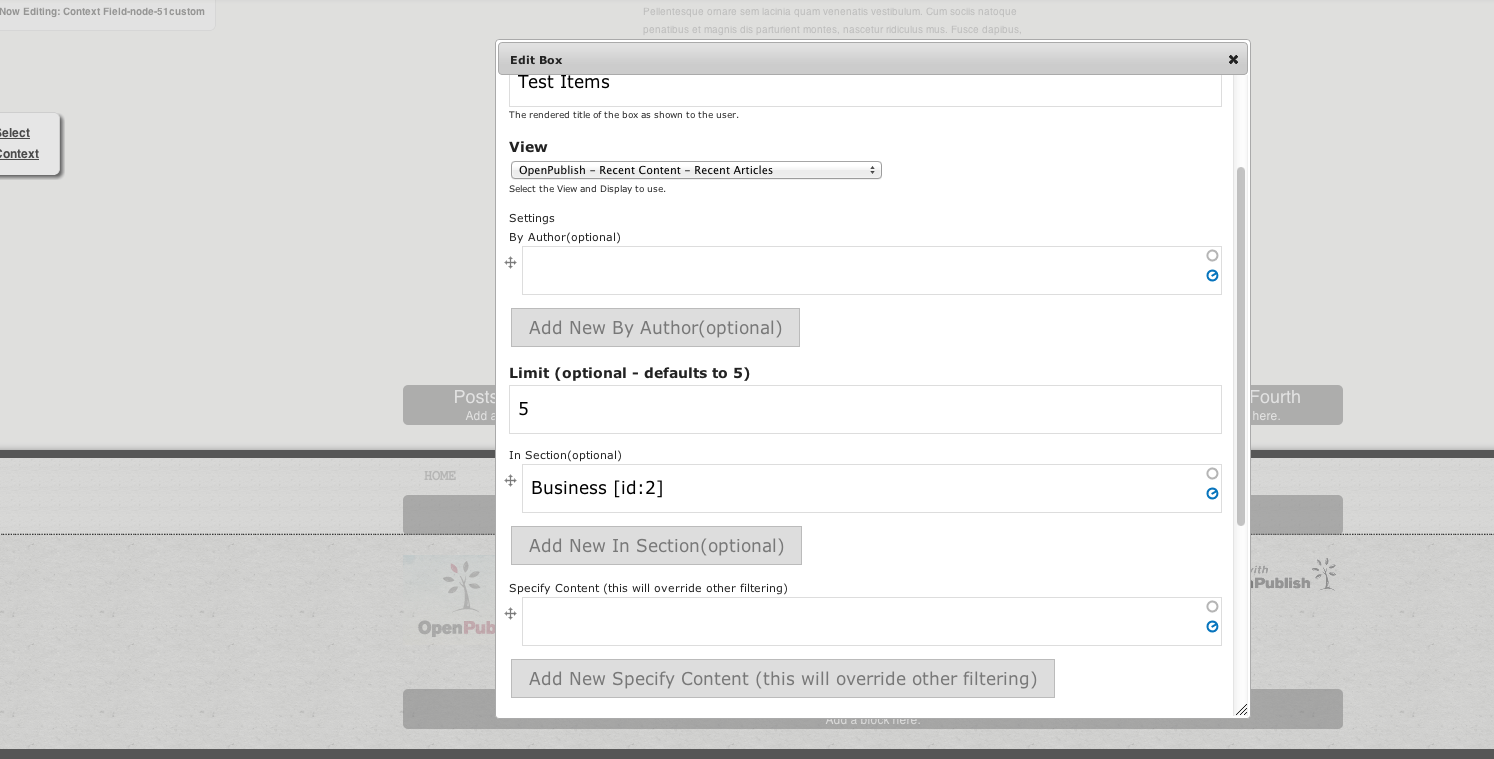
Most of the views have filters on the section taxonomy and so can be configured to just show items in that section.
I would like to get a screencast together to showcase using section fronts effectively, but don't have time right now. Hopefully this helps a bit till we can get that together.
Comment #7
pkchoo commentedjec006, thank you for taking the time to explain this!!! I will attempt this tonight :)
Comment #8
pkchoo commentedjec006, thank you! I was able to get it to work :)
Thank you for the explanation, it wasn't difficult, but I wouldn't have figured this out on my own. I would never have chosen to edit the "Context Field-node-1" and then add "Custom Views box". Also, when I was configuring the "custom views box", it presented me with an error ("An illegal choice has been detected. Please contact the site administrator.") when I attempted to chose the "recent articles (filtered)" view and both the error message and the "has taxonomy term" field is red. But when I continue past the error message and complete the configuration and save, it works :)
This provides a nice way to place content on pages within its context, and because the OP distribution has many views built-in it works, but what happens when I need to create a new view to work with boxes. I look at those views' contextual filters and have no idea how to recreate that... hopefully, some more documentation follows.