I have struggled some days with this, and i think that some setting forms just don't show up for me.
For example, the domain and language link blocks that should have links to the variable pages don't show up in the Site Information the way they show on top of the example shown on the project page:
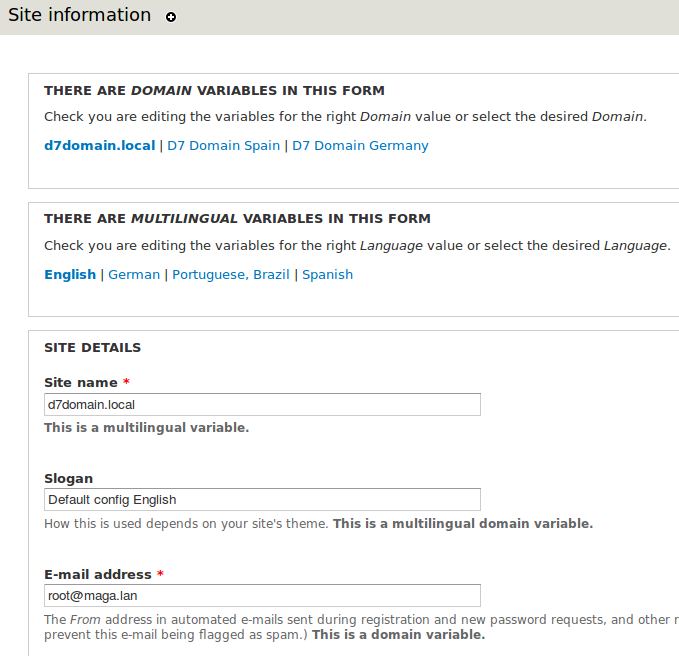
I am using the latest dev's of all modules of importance to this module...
I am able to see in the variables overview page admin/config/system/variable/realm that "domain+language" is in the list, but that does not have 'configure|edit' options like 'domain' and 'language' has in that list.
How can I ever configure or edit the combinations?
Maybe someone is successfully using this module and is willing to walk me through this?
My primary interest is to have the front page and site name to be different for each domain. Currently nothing thanges.
Also, on the variables overview page admin/config/system/variable/realm , domain, language and domain+language have weights, but i can't see how to edit these weights.
I can access the domain+language variables page on admin/config/system/variable/realm/domain_language but that page shows only text (keys and variable lists) without links, can't edit anything on it.


Comments
Comment #1
Yuri commentedCan someone please give a hand here..
Comment #2
bforchhammer commentedYou configure variables to be multilingual and domain-specific, separately. If you configure the same variables to be both "multilingual" and "domain-specific", then they will automatically show up as "multilingual domain variables". So, just go to settings for "multilingual variables" and select "sitename" and "frontpage", then go to settings for "domain variables" and do the same.
Once you have configured them, the realm selection widgets should automatically appear on the site-information form.
Weights can only be changed programmatically at the moment; that should not be necessary for your use case though.
There is currently no central form for editing "multilingual domain variables"; you will have to use the "Site Information" form...
Comment #3
bforchhammer commentedAssuming fixed, please reopen if you have further questions. :)
Comment #4
chikaramike commentedI've also been running around in circles during the set for this and not sure if I need to be. I set the Multilingual language detection to domain. I'm attempting to set the site default language under the domain regional setting for each domain and after saving configuration the radio button is deselected.
Also after configuring the domain for site default language I start to get erros like...
Notice: Trying to get property of non-object
Warning: Attempt to assign property of non-object in template_preprocess_page()
Thanks for any help.
Comment #5
bforchhammer commented@chikaramike: Support for the
language_defaultvariable is being discussed in #1593494: Support language_default variable. Have you tried the patch over there?Comment #6
chikaramike commented@bforchhammer, thanks for the heads up. I have not. I'll take a look but not sure I know how to install a patch yet as I'm still somewhat new to drupal. What i'm trying to do is have 5 domains, 3 in default language english, 2 in japanese which are affiliated and have translated content. Between domain/internationalization variables and content vs entitiy translation I've been running a bit in circles.
Comment #7
bforchhammer commentedThis was fixed a while ago in the variable module... see #1585946: language_default form element ignores existing value. Please make sure you're using the latest recommended version, and try the dev version if it still doesn't work :)
This sounds like a new or unrelated error? Are you sure it's the domain variable module causing the error...? If yes, please open a new issue and provide more details (e.g. exact error message).
That's okay. I just committed a respective patch, so you can simply re-download the new dev-version from the module page... (you may have to wait a little bit until the zip/tarball has been repackaged).
Comment #9
daniel wentsch commentedI guess it should be mentioned somewhere that by any means you need to disable Domain Settings submodule for the multilingual domain settings to appear on the site information form.
Made me some headache, but as soon as I disabled Domain Settings it seemed to work as expected.
Comment #10
lolandese commentedCross-posted in the module's documentation at http://drupal.org/node/1856908
Comment #11
vhiering commentedHi Benedikt, here i am trying to follow up on your instructions. i am new to drupal. i am hoping you will shed some more light in my direction : ) to get there and exactly as seen in the image. i have installed all the modules needed.
where do i find : "multilingual variables"
are you being general?
i see "configuration", then "multilanguage settings"
but then i don't see where to select "sitename" and "frontpage"
when i click "multilanguage settings" i see a window with 5 tabs. one of those tabs is "variables"
when i enter "variables" i find a page with the title: Select variables to be set for this realm. with the following links:
Other(active tab)
Menu settings
Site information
Feed settings
Regional settings
Theme settings
User settings
User emails
i am attaching an image to show you where i am. i found a checkbox for site name.
am i in the right place? it looks so different from what you are explaining.
i will greatly appreciate your patience in showing me how to get there.
thank you Benedikt
Virginia