Closed (fixed)
Project:
Panopoly
Version:
7.x-1.x-dev
Component:
Code
Priority:
Normal
Category:
Task
Assigned:
Reporter:
Created:
7 Aug 2012 at 00:16 UTC
Updated:
23 Aug 2012 at 04:51 UTC
Jump to comment: Most recent file


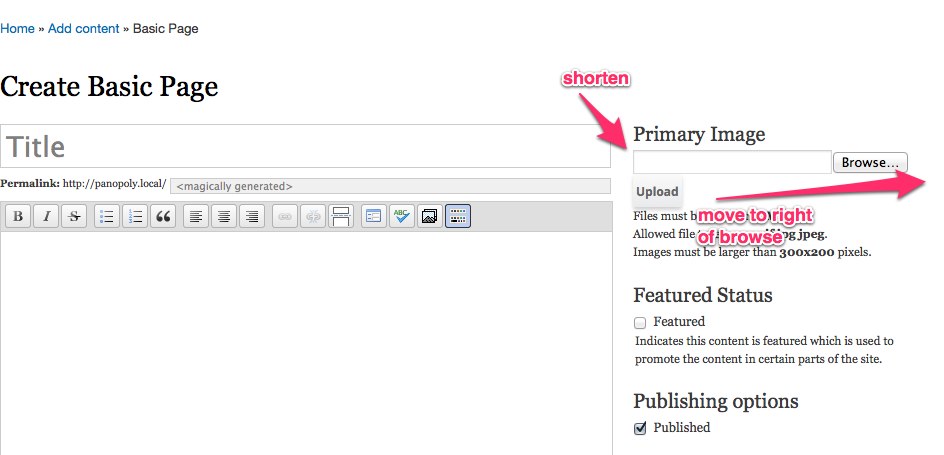
The primary image on the node edit form is super cool, but has some wierd alignment issues in certain themes (http://drupal.org/files/primary-image-alignment.jpg). Can the browse button be better aligned to work across different browsers?
| Comment | File | Size | Author |
|---|---|---|---|
| #2 | panopoly_admin-1716046-2.patch | 2.57 KB | kmonty |
| primary-image-alignment.jpg | 57.24 KB | populist |


Comments
Comment #1
kmontyThe most obvious solution would be to resize these element with percentages (say, maybe the input width: 65% w/ 5% right margin, and make the "Submit" button width: 30% max-width: 75px, or something like that)/
However, there no good way to resize input type=file forms without resorting to JS.
A few possible solutions:
1) We reduce the size attribute of the form to something less than 22 (13 worked sufficiently well in Bartik) and give the file input a margin-right of 10px, which would align it. Pluses: no JS hackery, easy. Minuses: doesn't look that awesome, not responsive, will still be broken on narrow themes/browser windows.
2) We could get rid of the upload button entirely, having the image auto-upload after the user selects it. IMO, this is ideal, as the two-step process is already confusing and ultimately needless. There's a decent starting point discussed here: http://drupal.stackexchange.com/questions/31121/how-can-i-automatically-...
3) We could use a JS library to allow us to style the forms, however this adds some glut to the module.
Comment #2
kmontyHere's a patch that removes the submit button and autouploads
Comment #3
populist commentedWonderful! Committed + Pushed.