I need to uninstall the l10n_update module because of many errors in the admin menus, I've catched the exception:
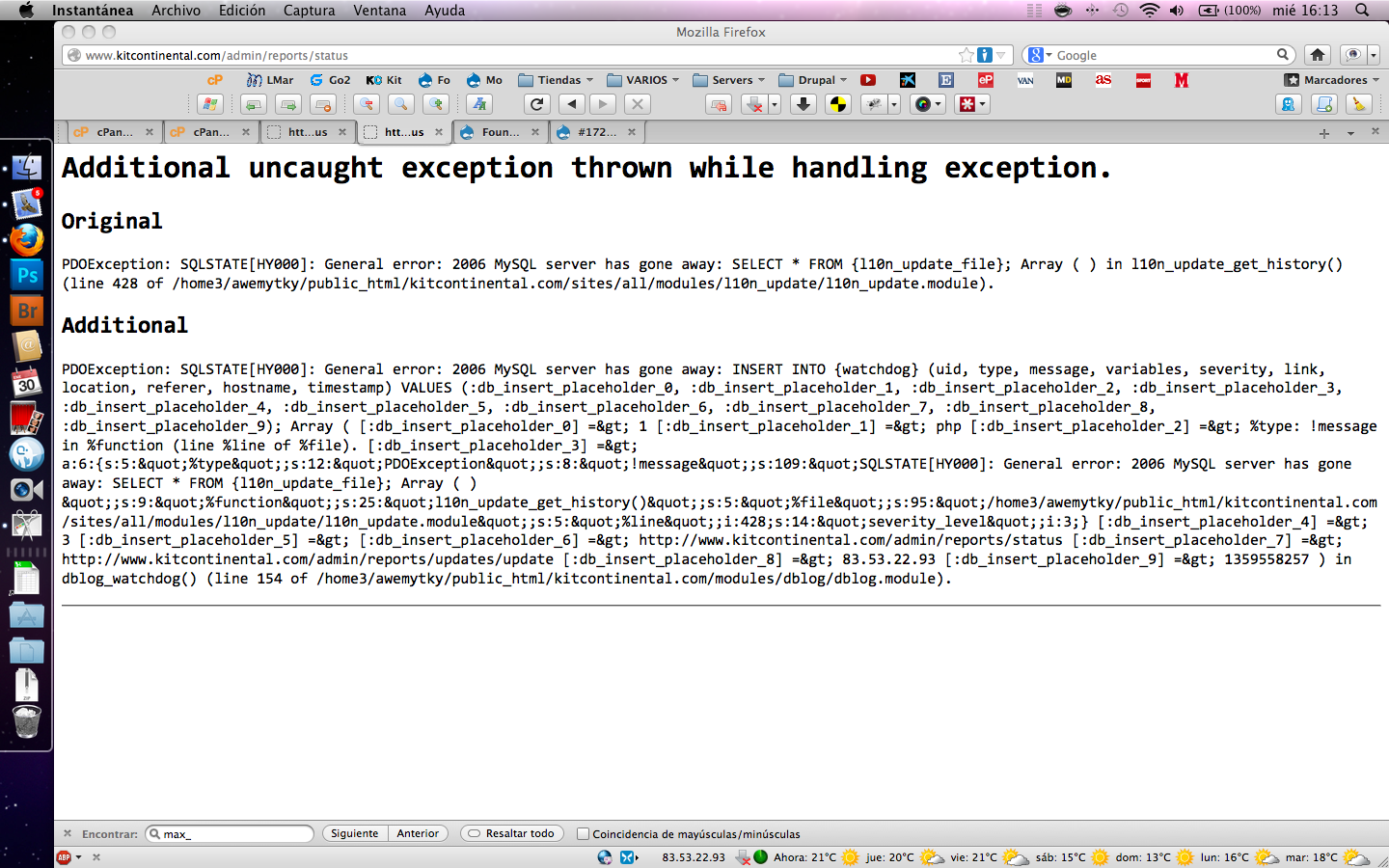
Additional uncaught exception thrown while handling exception.
Original
PDOException: SQLSTATE[HY000]: General error: 2006 MySQL server has gone away: SELECT * FROM {l10n_update_file}; Array ( ) in l10n_update_get_history() (line 428 of [path_domain]/sites/all/modules/l10n_update/l10n_update.module).
Additional
PDOException: SQLSTATE[HY000]: General error: 2006 MySQL server has gone away: INSERT INTO {watchdog} (uid, type, message, variables, severity, link, location, referer, hostname, timestamp) VALUES (:db_insert_placeholder_0, :db_insert_placeholder_1, :db_insert_placeholder_2, :db_insert_placeholder_3, :db_insert_placeholder_4, :db_insert_placeholder_5, :db_insert_placeholder_6, :db_insert_placeholder_7, :db_insert_placeholder_8, :db_insert_placeholder_9); Array ( [:db_insert_placeholder_0] => 1 [:db_insert_placeholder_1] => php [:db_insert_placeholder_2] => %type: !message in %function (line %line of %file). [:db_insert_placeholder_3] => a:6:{s:5:"%type";s:12:"PDOException";s:8:"!message";s:109:"SQLSTATE[HY000]: General error: 2006 MySQL server has gone away: SELECT * FROM {l10n_update_file}; Array ( ) ";s:9:"%function";s:25:"l10n_update_get_history()";s:5:"%file";s:97:"[Path_domain]/sites/all/modules/l10n_update/l10n_update.module";s:5:"%line";i:428;s:14:"severity_level";i:3;} [:db_insert_placeholder_4] => 3 [:db_insert_placeholder_5] => [:db_insert_placeholder_6] => [path_domain]/admin/config [:db_insert_placeholder_7] => [Path_domain]/admin/modules [:db_insert_placeholder_8] => [My IP] [:db_insert_placeholder_9] => 1344529403 ) in dblog_watchdog() (line 154 of [Path_domain]/modules/dblog/dblog.module).



Comments
Comment #1
Chimos commented+1 !!!
Any clue? I did not update 'localization update' now, but the last things I updated were Rules, Metatag and Pathauto I think. I'm using Drupal 7.14.
I can not explain better, because of my ignorance; but I will be attentive and answer any question you need about this.
Thanks in advance.
EDIT: I forgot to say I have only detected this error when trying to access: [PATH_DOMAIN]/es/admin/config or [PATH_DOMAIN]/admin/config
I can access the front end, and admin page; the problem is only in 'Configuration' page now
Comment #2
Chimos commentedI tested; I explain everything because I can't see any consistency on the behavior with this testing, and hope it helps someone that finally could help everybody better than me...
If I disable "Localization update" there is no error, that knew we already. But I tested with "localization update" ENABLED, and disabling all other modules one by one and running cron and cleaning cache every time to see if there is some kind of conflict between modules.
After disabling almost all modules, the "configuration" page began to load normally, but I couldn't identify the reason, since it seems not to be directly modules I disabled (the prompting of the error doesn't react inmediatly to my actions, although I cleaned Drupal cache every time). So I enabled ALL modules again one by one and the config. page was allways still loading normally (!?).
Then I updated Metatag from alpha7 to the last version alpha8, and the error apeared again. I uninstalled alpha8 and installed again alpha7, and the error was still there (running cron, and cache and looking if there was scripts to update).
Then I updated Drupal core from 7.14 to 7.15 and updated again Metatags from alpha7 to alpha8. The error persisted.
Finally I disabled one by one: Metatags, Page Title, Pathauto, Token and Seo Tools, in this point the error disappeared again.
Then I enabled them one by one to see if one of them caused this and now they are all enabled and the error is not there anymore (!?).
Sorry for my poor level of english and Drupal. I can not explain better and shorter because I don't understand ANYTHING of the problem and the solution. But hope it helps maybe if you use similar modules and know a bit more about the issue.
EDIT: I can say, the solution doesn't seem to be related with the Drupal core update from 7.14 to 7.15, since it solved "magically" in a 7.14 clone of the web.
Here is the same or similar problem apparently solved for local server http://drupal.org/node/1014172
I think its not for me, since I have the web in production on a shared server of a widely used service.
Comment #3
cesarmenes commentedServer hosting increase the parameter to max_allowed_packet=100M, but problem persist. I can't do anymore, except inspect the code looking for bugs and errors. First time I can't install a module in Drupal ;(
Comment #4
cesarmenes commentedMy hosting service migrate to another server with different parameters, the problem is gone. I can't understand where the problem is located.
Comment #5
astutonetI also have this issue. Exactly as described in 1 above.
Anything new?
Tks.
Comment #6
astutonetOk, so here we go.
Together with my host, did some tests to find out where the problem was.
All commands indicated in the display of error were executed via command line of phpMyAdmin.
When executed the original form, ie how they are written in the module, the response is exactly the same error pointed when of his execution by browser.
However, when the commands are executed without the Left and Right curly brackets ("{ and }"), the code runs normally and smoothly.
Therefore, it is presumed that there is a fault in the code, in the form that the module was written.
My hosting is shared and there is no way to raise the parameter value of the max_allowed_packet to 100M.
That is to say that while the code is not corrected, the error will persist on my site and to the other users, unless that we disable the module.
In the images below you can see the commands execution and their results.
Any idea?
Comment #7
sutharsan commentedThe problem is "server has gone away". This is usually caused by a combination of a long running process, the time php/mysql are waiting until they close the connection, the speed of the internet connection and/or the speed of the processor. It is a known problem with Localization Update module that is problems occur with importing large translation files (e.g. Core, Views). One attempt to fix this is in #569004: Add support for seek based batch import of .po files, the other attempt is the rewrite of the import code for Drupal 8. I'm not sure if we will get a definite fix of this problem in Drupal 7.
The curly braces are not an error in Drupal. It is a way of telling the Database API that this is a table name which enables the API to prefix the table names if required. See http://drupal.org/node/310072
Comment #8
sutharsan commentedYou can help improve this situation for Drupal 8. See #1881402: Test automatic interface translation for Drupal 8
Comment #9
astutonet@Sutharsan, thanks for your reply.
I've been noticing problems with the Localization Update module since the 6.x versions. Particularly, I migrated the sites where I use Drupal to version 7.x, only because of lack of support for the previous version.
I think that any initiative aimed at correcting problems is valid. Especially when we speak of a universal community, where users around the world face the same problems.
So I think it would be extremely unfair on the part of the Drupal developers create solutions for future versions of CMS, leaving current users without a valid and concrete repair.
Even because the requirements for Drupal 8.x are superior to previous versions and around the world are not all hosts who are prepared to receive the new version.
So if I have a way to optimize the code, to correct errors and failures and make it work for all versions, I will preserve the concept of the Drupal and let all users happy, without the need to migrate to new versions hastily, same because the resources for this action may be absent.
The last post (#69, December, 2012), in #569004: Add support for seek based batch import of .po files, is my own and as you can see, the suggestions made in there solved my problems only on localhost.
I'm not a programmer, but would like to help, but my host is not ready to receive the D8.
As for my problem, what can I do?
There is some suggestion?
Tks.
Comment #10
sutharsan commented@astutonet, it is up to a developer to hammer out this issue. I understand your situation, but my priority is to spend my community effort on improving Drupal 8. Once that is finished I have time to spare for this and other major issue on this module. Since you are not a developer, you can hire a developer to work in this issue, mobilize others to do so with you, or else wait until some else fixes your problem.
Comment #11
astutonet@Sutharsan, only remove the keys does not solve the issue. I confess that I tried that.
It really would be necessary to reformulate the entire project, or part thereof. For the moment, the issue is that all current users will be orphaned, until a solution is presented.
Anyway, I thank you for your commitment and hope that the community presents many questions like mine, that may force us to seek concrete solutions.
I think the issue should be left open, since there is no solution.
Tks.
Comment #12
sutharsan commentedIs it really? this is new to me. But please explain yourselves.
This module has almost 80K users, judging from the activity in the issue queue the modules does quite well without too many or too big problems. I don't deny the pain this issue gives a number of users, but it affects a relatively small group and definitely not all users.
Comment #13
astutonet@Sutharsan, I just have to help and be helped...
We only need a solution, only that.
Think: if you buy a new car and they gives engine trouble, you should have an immediate solution. Or do you want to wait until the automaker introduced a new model of your car to fix your problem? I think you will not want to be standing...
Your module is perfect. We all need it, including me. But we need to create a way to reconcile increasingly larger files with few resources. That's it.
Anyway, thank you for your help, it is very valuable to me.
Comment #14
sutharsan commentedAnd that is exactly the problem. You bought a car. But now you are riding in rough terrain and get disappointed when the car gets stuck in a ditch. Too bad you did not check the terrain before you bought the car.
Comment #15
ChrisValentine commentedJust tried this myself and got the same error, but I did have a lot of languages enabled (nearly 30) . I found that if you turn them all off, the activation works just fine then you can switch them on again one at a time and check for updates. If you switch them all back on it takes an age to check for updates and an ice age to download them!
Comment #16
makokis commentedsame issue as #1
when triying to access to "Status Report", and also, can't update modules !!
Comment #17
sutharsan commentedClosing this issue in favour of #569004: Add support for seek based batch import of .po files
Note that problems like the one in this issue are a (fatal) combination of slow server and/or slow internet connection and/or large amount of languages and/or large amount of modules.
Comment #18
dsellers commentedi added a file called my.cnf in my mysql configuration folder with:
[mysqld]
max_allowed_packet = 32M
[mysqldump]
quick
max_allowed_packet = 32M
This fixed for me. I think this could also be added to my.ini but not sure..
Comment #19
sutharsan commentedIf you need/consider changes like this (many people will not be able to access the database settings, I highly recommend to try the 7.x-2.x version of this module. That was written with better performance in mind for lager number of modules, multiple languages, etc..
Comment #20
opp67 commentedFor MAMP users, I was able to resolve it using this:
The MySQL server of MAMP (not PRO) will be started without any my.cnf file. But you can create your own my.cnf file.
Stop servers
Create a "my.cnf" file in "/Applications/MAMP/conf/".
Add your content in to "my.cnf"
Save "my.cnf"
Start servers
You do not have to put a complete configuration in the my.cnf file. You can just add parts of a configuration ... for example:
Comment #21
Problem Solver commentedTo Solve This problem I went to xampp/mysql/bin/my.ini
There i searched "max_allowed_packet = 1M" I changed 1M to 128M Then I saved it and restarted xampp
Then it worked for me
Good Luck! :).
Comment #22
York_Ballin commentedI was getting this error on Drupal 8.5.3 on CentOS 7 with MariaDB. I applied the max_allowed_packet line to /etc/my.cnf . I then did restarted Mariadb.
systemctl stop mariadb.service
systemctl start mariadb.service
and now Drupal works again.
Before the problem occurred, I had just created a file upload type that could take files up to 50 MB.
Thank you to user "Problem Solver" for the solution!
Comment #23
shifali baghel commentedThanks, #20 solved my problem in drupal 8.
Many many thanks
Shifali Baghel