I just used this module to import user icons, but after I imported the users, the images are not displayed on the profile pages. It can't come from the feed configuration, because I also made an image field associated with the user, which works.
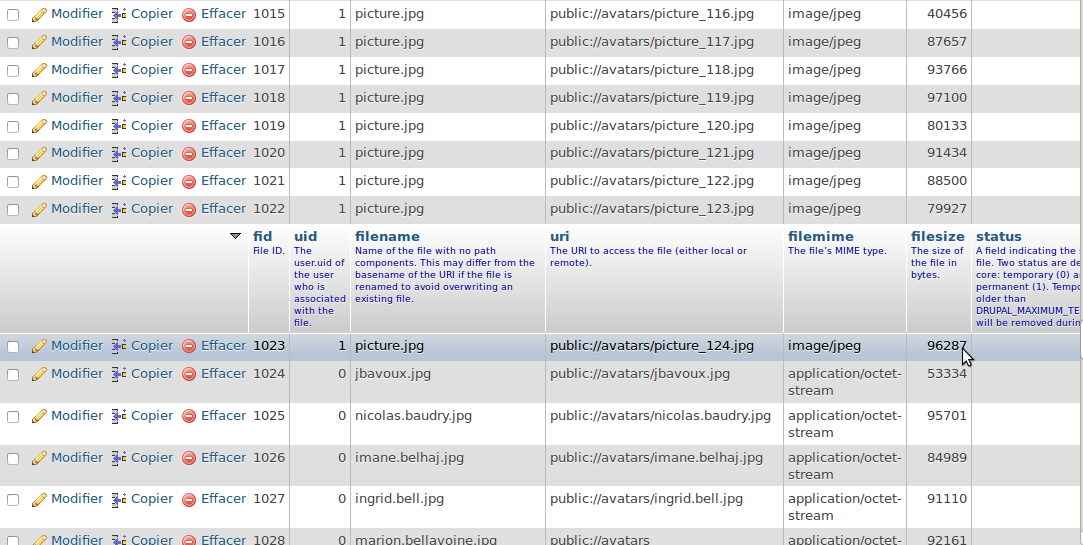
I've attached a view of the table file_managed from the database.
In the column 'uid', the 1 corresponds to the images imported with this module (so the user icon).
And the 0 corresponds to the images imported with the core module (the image field added to the user)
I found the recordings made by this module a bit strange, but the worth is that in 'users' table, the attribute 'picture' is always set to '0', and if I force it to another number, it correctly displays an image in the profile page.


Comments
Comment #1
firfin commentedIt seems that in the file_managed table the uid is incorrectly set to UID of the user executing the import.
So most people (running it as admin/superuser) will see uid 1 here.
Instead the UID should be set to the freshly imported/created user.
As for the 'picture' field in the 'users' table, that is where the file-id of the user picture is stored. This doesn't get filled properly.
Will delve deeper into this tomorrow. Need some sleep first.
Comment #2
firfin commentedImproved issue title.
Comment #3
chrisguindon commentedI had the same problem tonight.
I created a patch to fix it. Basically $entity->picture needs the full $file object.
I am also changing the way the filename is created. It now uses the same filename from the source.
This patch doesn't change the uid in {file_managed} because it's not necessary to fix this.
The uid in {file_managed} is from the global $user.
file_save_data/7
Comment #4
chrisguindon commentedMinor changes to the comments in my previous patch.
Comment #5
firfin commentedPatch looks good to me.
Comment #6
druderman commentedThe patch worked fine for me.
Comment #7
Jance commentedWorks for me as well.
Comment #8
firfin commentedComment #9
nasia123 commentedThis is not working for me.
images are not imported correctly
picture in users table should have id of the corresponding file, and it remains 0 ...
Comment #10
nasia123 commentedCorrect this now and it works,
all user's images must be in the directory sites\default\files\styles\user-picture\public\pictures
all images are now imported correctly, patch works now
Comment #11
firfin commented@nasia123: So, you are saying it does work correctly? Mind putting the status back then? Maybe we can get this committed then?
Comment #12
chrisguindon commentedComment #13
cuteapoot commentedI applied the patch with no luck. I have a list of URLs that people are using for their avatars on the current site, and I want to download them and save them to the new Drupal site, but it doesn't seem to be processing the images at all.
Comment #14
thatpixguy commentedThis patch didn't work for me, setting $entity->picture to the $file object instead of $file->fid results in the image not being linked as the users picture.
Is there a particular version of Feeds Import in which it is expecting the full file object? I'm running 7.x-2.0-alpha8
Having the file_usage updated for imported user pictures would be really handy, but as far as I can tell, there isn't enough information available in the feeds_user_picture_set_target function to do call file_usage_add manually.
EDIT:
Just noticed there was a newer version, 7.x-3.0-rc1 that wasn't coming up in the automatic updates check. This patch doesn't work for me with that version either.
Comment #15
webservant316 commentedthis worked for me
Comment #16
stevenx commented#15 works almost
$destination_filename = "picture-" . $entity->name . "." , $extension;needs to be
$destination_filename = "picture-" . $entity->name . "." . $extension;The comma is wrong :)
THANKS
Comment #17
webservant316 commentedOh yeah. Sorry, I obviously had to fix that for it to work and I forgot to post back to fix. Thanks.
Comment #18
jjlsarlat commented#14 worked fine for me, after applying the little fix #15 mentioned.
Comment #19
rcodina#15 works for me. I enclose the patch version of #15 patch with fix on #16. With one more positive review I think this can be moved to RTBC state.
Comment #20
iyyappan.govindThis is i used
Comment #21
rcodina@iyyappan govind Your code is the same like in #15. Why you don't try the patch on #19 and let us know if it works for you? Patches need positive reviews to be commited. This is the only way to get this fixed on official release.
Comment #22
iyyappan.govindPatch #19 works for me...
Thanks
Comment #23
chrisguindon commentedComment #24
firfin commented#19 works for me.
Comment #25
surfgatinho commentedPatch not working for me.
I'm importing users from a non-Drupal site. This works fine and the user photos are uploaded to the correct directory.
However, even with the patch the necessary managed file values are not being set correctly in the DB. 'picture' in the user table is always set to 1 and 'uid' in the file_managed table is also always set to 1
Comment #26
iyyappan.govindThis patch is worked for me. I have attached the file which i used to import the user picture.
Thanks
Comment #27
rcodina@surfgatinho Have you checked out permissions on your Drupal public directory?
Comment #28
hanskuiters commentedPatch #19 works almost.should be as the comment saysI'm not sure about the filename rewrite. The patch uses
Why not keep the original filename?
Edit:
After testing the last line should be without FID.