
About overriding themable output
This is documentation for Drupal 7, which is no longer supported. Learn more and find resources for Drupal 7 sites
The following only applies when the default markup needs changes. This section can be skipped if the presentation is handled only through style sheets.
There are three aspects to overriding the themed output. The first is knowing where the source originates, the second is providing the override, and the third is understanding its type.
Note that Drupal maintains cached theming, data through the theme registry. It must be cleared when setting up overrides.
-
Finding the source
-
Finding the source can be difficult to track down due to the hierarchy of theming cells whose source can be spread throughout the whole system.

Links to 520KB PDF. Provided for illustration only.Most of the page elements are typically pulled with theme('page') and placed inside the page.tpl.php template after rendering navigation bits, the bits within the navigation bits, block regions, the blocks within the block regions, etc. Each chunk of themed data is often referred to as a theming "hook".
Note: Theming functions and templates will now be referred to as theming hooks. There are many hooks unrelated to theming throughout the system. Any mention of it here only relates to theming.
Getting to the source of a template can be easily done with the theme debug mode in Drupal 7.33 and higher – as long as the output comes from a template file. For more data on markup coming from templates, or for information about markup coming from theme functions, there is also the theme developer module. It includes a theming tool to easily visualize the source of any output, its type and tons of other theming data. See the screencast for a demonstration.
-
System of overrides
-
The system of overrides has a specific cascading order with few exceptions. Drupal core and modules provide a reasonable default for its markup handled by the theming hook. If it does not suit the requirements of the theme, then an alternate can be provide to prevent the defaults from being used. This way, the defaults are left alone and all the theme specific changes are localized to the theme. You should never change code outside your theme to alter default output. (Here are some reasons why you should not "hack core.")
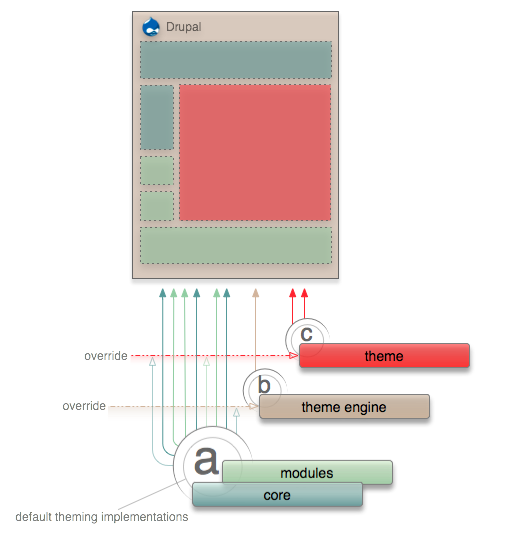
If you need more control beyond this convention of overrides, the theme registry can be manipulated for more control.
Note: Although it is still possible, PHPTemplate.engine in Drupal 6 no longer overrides theme functions. In 5, that is what allowed templates to be used for a handful of the theming hooks. It is no longer necessary.
-
Functions vs. templates
-
There are two ways of implementing a theming hook, either a function or a template. The type that is used should depend on what you're trying to achieve. Drupal core and modules can use either type to construct the output, and themes can use the same type or change it.

Links to PDF. Flow map for 5 also available for comparison.Functions are marginally faster than templates, but they can be difficult for designers who may be only familiar with XHTML. The speed depends on the nature of the hook multiplied by the number of times it is called on a page. For example, using templates for the theming hook "links" could cause a noticeable performance hit for complex and busy sites due to its repeated use.
Here are two examples on overriding with the help of devel themer.
-
Overriding functions
-
The theme function theme_menu_local_tasks is a simple function for outputting both primary and secondary tabs. The theming hook in this case is "menu_local_tasks". To override, the "theme" prefix in the function name needs to be changed to the name of your theme. (In Drupal 6 you could also use the name of the theme engine the theme is running under, but this was not a recommended practice. That option has been removed in Drupal 7.)
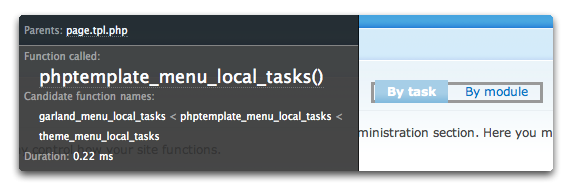
The example is from Drupal 6 and shows that Garland is using the name of the theme engine for the override. Again, in Drupal 6 it is recommended to use the theme name, and in Drupal 7 it is mandatory to use the theme name.
Placing the following in the theme's template.php file will override the default after clearing the theme registry. Change "mytheme" in the function name to the name of your theme.
function mytheme_menu_local_tasks() {
  $output = '';

  if (!empty($variables['primary'])) {
    $variables['primary']['#prefix'] = '<h2 class="element-invisible">' . t('Primary tabs') . '</h2>';
    $variables['primary']['#prefix'] .= '<ol class="tabs primary">';
    $variables['primary']['#suffix'] = '</ol>';
    $output .= drupal_render($variables['primary']);
  }
  if (!empty($variables['secondary'])) {
    $variables['secondary']['#prefix'] = '<h2 class="element-invisible">' . t('Secondary tabs') . '</h2>';
    $variables['secondary']['#prefix'] .= '<ol class="tabs secondary">';
    $variables['secondary']['#suffix'] = '</ol>';
    $output .= drupal_render($variables['secondary']);
  }

  return $output;
}
The only change here is the markup from an unordered list to an ordered list.
A listing of all the theme functions can be found on api.drupal.org.
-
Overriding templates
-
If the default implementation is done as a template, then simply copying the source template file into the theme will automatically override it after clearing the theme registry. Here is an example for search-theme-form.tpl.php. Note that the theming hook in this case is "search_theme_form" with the template using hyphens instead of underscores.

That is all you need to do. Open the copied template in your editor to make your alterations. All the core .tpl.php files are documented. It should give a good indication of what can be done with the output.
Templates can be placed in any directory within the theme. This allows for better management and less clutter in the base level of the theme directory.
Related pages
- To customize the variables inside templates, see the sub-page on Preprocess functions.
- A listing of all the theme templates can be found on the sub-page, Core templates and suggestions.
-
Converting from functions to templates
-
Converting a theme function into a template takes some initial work, but once it is done, it's easier to work with. If you are collaborating with a designer, the conversion will enable them to focus on designing, not coding. There are many templates already available in core and much more will be converted in future versions. Contributed modules that follow best practices should also have templates available. These instructions are provided for the theming hooks not already made available as templates.
Getting Drupal to recognize the theming hook as a template is automated. These are the only requirements to trigger this change:
- Name of the template must match the theming hook.
- The underscores in the hook must be changed to hyphens.
- The template name must have an extension of ".tpl.php". (It can vary based on the theme engine.)
Consider the theming function theme_user_signature. The theme hook here is "user_signature". Creating a file named "user-signature.tpl.php" will tell Drupal that the hook is now a template after clearing the registry. Any content in this file will now take the place of the function. The part that takes more work is setting up the variables to be used in this file and that is done through preprocess functions.
A few notes:
- While it is possible to code directly inside the template, it is not considered good practice. All the complex logic should be separated from the .tpl.php file and placed within preprocess functions. This keeps it clean and easy to manage.
- There is also the issue of security. The separation can minimize the chance of cross-site scripting attacks by cleaning out potentially malicious user generated content. When handing over template files to your designer, all the output should be clean so they do not have to concern themselves with security issues.
- If your theme implements both a theme function and a template for a given hook, the theme function will always be used.
- The auto discovery of theme overrides are done by PHPTemplate engine so make sure your theme has set the engine from the. info file.
- Compare the theming functions in 5 to the template conversions in 6 for forums. You can use that as an example for converting between the two types.
-
-
The theme registry
-
Drupal's theme registry maintains cached data on the available theming hooks and how to handle them.
For most theme developers, the registry does not have to be dealt with directly. Just remember to clear it when adding or removing theme functions and templates. Editing existing functions and templates does not require a registry rebuild.
To clear the theme registry, do one of the following things:
- On the Administration > Configuration > Development > Performance page, click on the Clear all caches button. In Drupal 6, navigate to the Administer > Site configuration > Performance page and click on the Clear cached data button.
- With the Devel block enabled, click the Empty cache link.
- Use drupal_rebuild_theme_registry() (Drupal 6) or drupal_theme_rebuild() (Drupal 7).
The theme registry is cached data, instructing Drupal on the available theming hooks and how to handle it by indicating its type. In previous versions all theming calls were handled on the fly. Since a lot more work is being done under the hood, the cached instructions speed up the process, especially for templates. The theme engine your theme is running under should automatically register all the theming hooks for you.
There are special cases where you may need to work with the theme registry directly. When your theme requires a new hook to be registered that was not already implemented on the layers below it (core, modules, engine). This includes some forms when they are not explicitly themed by core or modules, but instead rely on the default form presentation.
- More details can be found in the sub-page, The theme registry for special cases.
- Do not confuse the theme registry with the theme's .info file which is also cached. Points 1 and 2 for clearing the registry will clear both.
- Your theme must be using phptemplate engine for its templates and functions to be discovered. Other engines should behave the same way. For engineless themes, it must be done manually. See phptemplate_theme to see how it is done.
-
Don't forget to clear cache
- If you added new tpl.php files or override new theme functions or alter any theming related stuff you will need to Clear theme cache to get these changes active.
Help improve this page
You can:
- Log in, click Edit, and edit this page
- Log in, click Discuss, update the Page status value, and suggest an improvement
- Log in and create a Documentation issue with your suggestion
