Community Documentation

OG vocabulary

Last updated February 22, 2013. Created by Amitaibu on August 19, 2012.
Edited by Brian MacKinney, Sinan Erdem. Log in to edit this page.

OG-vocab module allows creating a relation between a taxonomy-vocabulary and a group.

Patches needed

Related patches (but not required)

Settings

  1. Create a new content type that is a group (e.g. “School”), and one that is a group-content (e.g. “Post” ) og1 3.37.05 PM.jpg
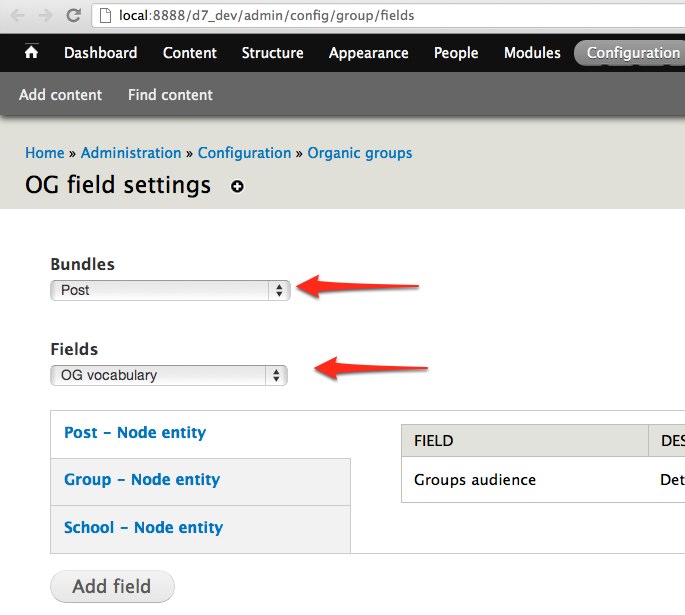
  2. Add the "OG vocabulary" field under admin/config/group/fields (select from bundles: Post, fields: OG vocabulary) og2 3.37.05 PM.jpg
  3. Create a new school node
  4. Under the “Group” tab, click on the new “Taxonomy” link og3 3.37.05 PM.jpg
  5. Add a new vocabulary. Note that OG-vocab scanned all the group-content that can reference our current group, showing you a checkbox next to each content type - in our case “Post”
  6. Enabling the checkbox reveals the configuration, which allows you to set the widget-type, whether the widget should be required, and the amount of items allowed og4 3.37.05 PM.jpg
  7. Add a few terms
  8. at admin/structure/types/manage/post/fields/og_vocabulary, change the OG Vocabulary field settings target type to Taxonomy Term from OG Vocabulary. Leave all target bundles unchecked.
  9. Create a new “Post” node (node/add/post) and notice the new widget(s) added og5 3.37.05 PM.jpg
AttachmentSize
og1 3.37.05 PM.jpg89.85 KB
og2 3.37.05 PM.jpg58.41 KB
og3 3.37.05 PM.jpg54.77 KB
og4 3.37.05 PM.jpg80.47 KB
og5 3.37.05 PM.jpg45.12 KB

About this page

Drupal version
Drupal 7.x
Level
Beginner
Audience
Site builders

Site Building Guide

Drupal’s online documentation is © 2000-2013 by the individual contributors and can be used in accordance with the Creative Commons License, Attribution-ShareAlike 2.0. PHP code is distributed under the GNU General Public License. Comments on documentation pages are used to improve content and then deleted.
nobody click here