

 Come together with the global Drupal community in Rotterdam, 28 Sept – 1 Oct 2026. Sessions, contribution, connection, and Early Bird savings until 8 June.
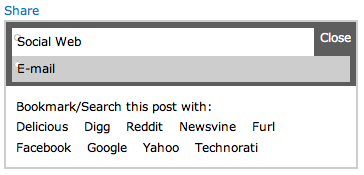
When both Service Links and Forward are enabled, Share would be much easier to use if it styled the "Social Web" and "E-mail" links as tabs. I would also like to be able to rename the "Social Web" and "E-mail" text to something else in the Share settings.
Very nice module. Thanks!
| Comment | File | Size | Author |
|---|---|---|---|
| #3 | share_tabs_safari.png | 12.96 KB | Christefano-oldaccount |
| #2 | share_tabs.png | 13.66 KB | Christefano-oldaccount |


Comments
Comment #1
snowball43 commentedI'm a little confused by 'Share would be much easier to use if it styled the "Social Web" and "E-mail" links as tabs.', share does this if in the Forward settings form type is set to share_form.
The ability to change the texts "Social Web" and "E-mail" is a good idea. I think they are wrapped in the t() function but I could be wrong. Having an option say on a Share settings page to set those probably is the best option that I can see.
Also, Forward form type 'link' does work with Share, it just puts the link in with the other links with no tabs. If form type is 'share_form', then the tabs are applied. Didn't think it made much sense to create a tab just for link, and if you turn off 'group' on the Forward settings page, the link is displayed next to the 'share' link.
Comment #2
Christefano-oldaccount commentedAttached is a cropped screenshot of what I see in Firefox. They remind me of what graphics looked like in MS-DOS, not Drupal $tabs or jQuery tabs.
Can you separate the styling to its own stylesheet?
Comment #3
Christefano-oldaccount commentedThis is how it looks in Safari.
Comment #4
snowball43 commentedInteresting, it must have to do with the theme.
http://beta.written.org/betterway/ is how it looks with the theme that the module was themed in. I'll theme it under Garland when I get a chance. Share module does use the theme function so you can theme the share popup. That demo site also has added jquery effects not found in the module.
Comment #5
Christefano-oldaccount commentedThe jQuery effects are nice. Do you need the jQuery Update module for that to work?
Yes, Garland is the theme I was using when I took those screenshots.
Comment #6
niklp commentedLooks freaking awesome on the written.org page - care to share the extras? I suppose the jQuery is very easy, but I haven't learnt it yet :)
Comment #7
greenskin commentedThe style should be better now.
You can also turn on the effects and set the tab names via Share settings page.
Comment #8
greenskin commentedComment #9
Christefano-oldaccount commentedThis is just about perfect now. Thanks!
Comment #10
greenskin commentedI haven't tested the module without the jQeury Update module. If you want to test this and let me know, that would be great. I just make it a habit to install the jQuery Update module.
Comment #11
greenskin commented