

 Come together with the global Drupal community in Rotterdam, 28 Sept – 1 Oct 2026. Sessions, contribution, connection, and Early Bird savings until 8 June.
In Administer > Site Configuration > LDAP Integration > System Wide Options
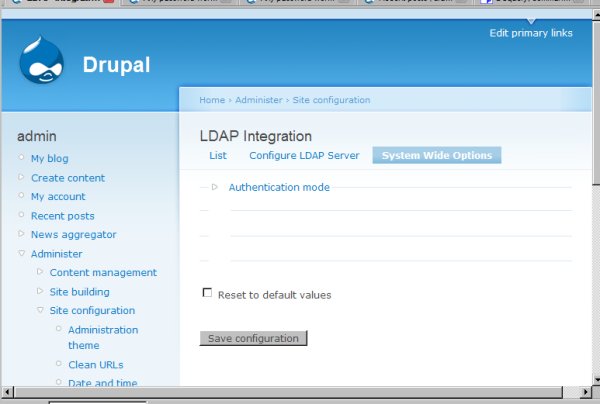
'Authentication mode' is there, which I have set to 'LDAP directory only', but 'Security options', 'Anonymous UI options', and 'LDAP UI options' are missing (or at least are not showing up with the default Garland theme... I tried a the Bluemarine theme as well, but same result).
I have disabled and removed this module and reinstalled it after downloading again, this solved a problem I had related to administrative authentication, but still have this issue.
I have enclosed a screen shot.
Thanks
| Comment | File | Size | Author |
|---|---|---|---|
| ldapIntegrationBug.jpg | 29.62 KB | kpm |

Comments
Comment #1
kpm commentedAfter viewing the source xhtml of the LDAP Integration System Wide Settings page, I see that these sections are being generated, but the browser is not displaying them. There must be a div out of line or something... searching now...
Comment #2
kpm commentedJust noticed that these sections ARE showing up in IE 7, but not in Firefox... dam I wish the browser makers could sort out there inconsistencies!
Comment #3
jwade commentedYou need to follow the instructions in this bug report: http://drupal.org/node/171440
Basically, you need to remove the extra
<strong>at the end of this line:'#description' => t('<p><strong>NOTE:</strong> These settings have no effect on Drupal user with uid 1. The admin account never uses LDAP.<strong></p>'),Comment #4
kpm commentedMuch appreciated. I searched and searched but couldn't find anything regarding this.
Comment #5
aclight commented