

Closed (won't fix)
Project:
MaxLength
Version:
7.x-3.x-dev
Component:
Code
Priority:
Normal
Category:
Feature request
Assigned:
Unassigned
Reporter:
Created:
29 Aug 2012 at 05:25 UTC
Updated:
2 Sep 2021 at 13:54 UTC
Jump to comment: Most recent, Most recent file



Comments
Comment #1
Xilis commentedHere's a patch that makes the warning configurable. The only requirement was to add this line
options['warning'] = $(this).attr('warning');in maxlength.jsIf you want to alter it for your element, add a 'warning' attribute to it:
$element['#attributes']['warning'] = 100;.The default warning is currently hardcoded to 10 in Maxlength module (in the defaults).
Comment #2
pmichelazzoXilis,
I tested your solution but, unfortunately is not working. Checking the field, the "warning" attribute is there (you can see on the screenshot attached) but nothing happens. If I print the value on the js, I just receive an "undefined" value.
Any clue?
Best
Comment #3
Xilis commentedAh yes, the patch makes it possible to use the "warning" attribute on a form element to affect when the class change occurs (shown as css change).
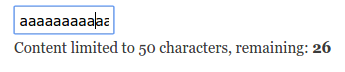
So this is before the warning css kicks in:

And after:
Comment #4
jenlamptonUpdating issue title
Comment #5
cedeweyWe are putting a feature freeze on the Drupal 7 version of the module, so I'm marking this Closed, won't fix. Thank you everyone for working on this issue. If you do want to maintain the Drupal 7 version, do reach out. We'd be happy to bring you on board as a maintainer.
Comment #6
pmichelazzoHi @cedewey
If you want, I can help with the project.
Comment #7
cedeweyHi pmichelazzo,
That's great to hear, we'd be happy to have your help.
I'll message you directly to coordinate further. Thanks!