

Closed (fixed)
Project:
Spark
Version:
7.x-1.x-dev
Component:
Design
Priority:
Major
Category:
Task
Assigned:
Issue tags:
Reporter:
Created:
29 Aug 2012 at 07:59 UTC
Updated:
13 Jan 2014 at 20:50 UTC
Jump to comment: Most recent, Most recent file

Comments
Comment #1
mustanggb commentedFirstly these should definitely be quick editable.
How about using the standard logic unless the the teaser is edited, i.e. first X number of characters. As soon as a teaser is clicked to be edited a pop-up is shown with text something like, "The contents of this field are generated dynamically, manually editing will disable dynamic content generation. Dynamic generation can be enabled again at any time by clicking Reset. ". The user edits and saves and everyone is happy.
This would additionally require a Reset button next to the field Save and Close(X) buttons. Clicking this would show a pop-up something like. "Resetting this field will re-enable dynamic content generation, this will remove any manual edits. ".
The first pop-up (disabling the dynamic generation) should not appear if the field is re-clicked after is has already been saved with manual content. i.e. It only appears when the field is in dynamic and not manual mode.
Comment #2
tkoleary commentedThat sounds like a good solution, I will work it in to the designs.
Thanks!
Comment #3
Bojhan commented@akamustang I don't see how that is in any way a pleasurable UX. You get a load of warnings, you click reset, which no user wants to click and then there is a possibility you accidently click reset when you are trying to save?
Shouldn't we simply allow you to edit the teaser, and restrict it to the amount of letters possible?
Comment #4
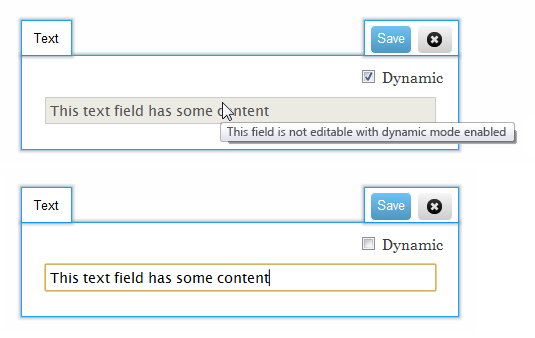
mustanggb commentedHow about this then, similar idea but no scary reset and warning pop-up is replaced with a tooltip.
Basically I think there should be an easy way to go back to the automatically generated version, hopefully this is a cleaner solution.
Comment #5
moshe weitzman commentedEven in a "full view", some fields can be removed and use odd formatters. Whats so special about teaser (implementation wise).
Comment #6
RobW commentedI think Webchick means field type long text with their display formatters set to truncated teaser, or whatever the "600 characters max" formatter is called. (And maybe she also means node view?) In that case, Akamustang's suggestion is on the right direction. Long text with summary fields should have their content grayed out until a user confirms, and long text without a summary should load the entire field content, maybe with a js highlight of the chars that will be used as a summary.
What needs to be avoided is a user editing the first 600 chars of a long text area without being able to reference the rest, and accidentally making the full view field/node body nonsensical.
Comment #7
webchickAdding to this sprint.
Comment #8
webchickComment #9
webchickWe ended up just making it totally "WYSIWIYG", which works for D8, so it works for us.