

Closed (fixed)
Project:
Responsive Bartik D7
Version:
7.x-1.x-dev
Component:
Code
Priority:
Critical
Category:
Bug report
Assigned:
Unassigned
Reporter:
Created:
31 Aug 2012 at 17:36 UTC
Updated:
5 Sep 2012 at 16:10 UTC
Jump to comment: Most recent file


Comments
Comment #1
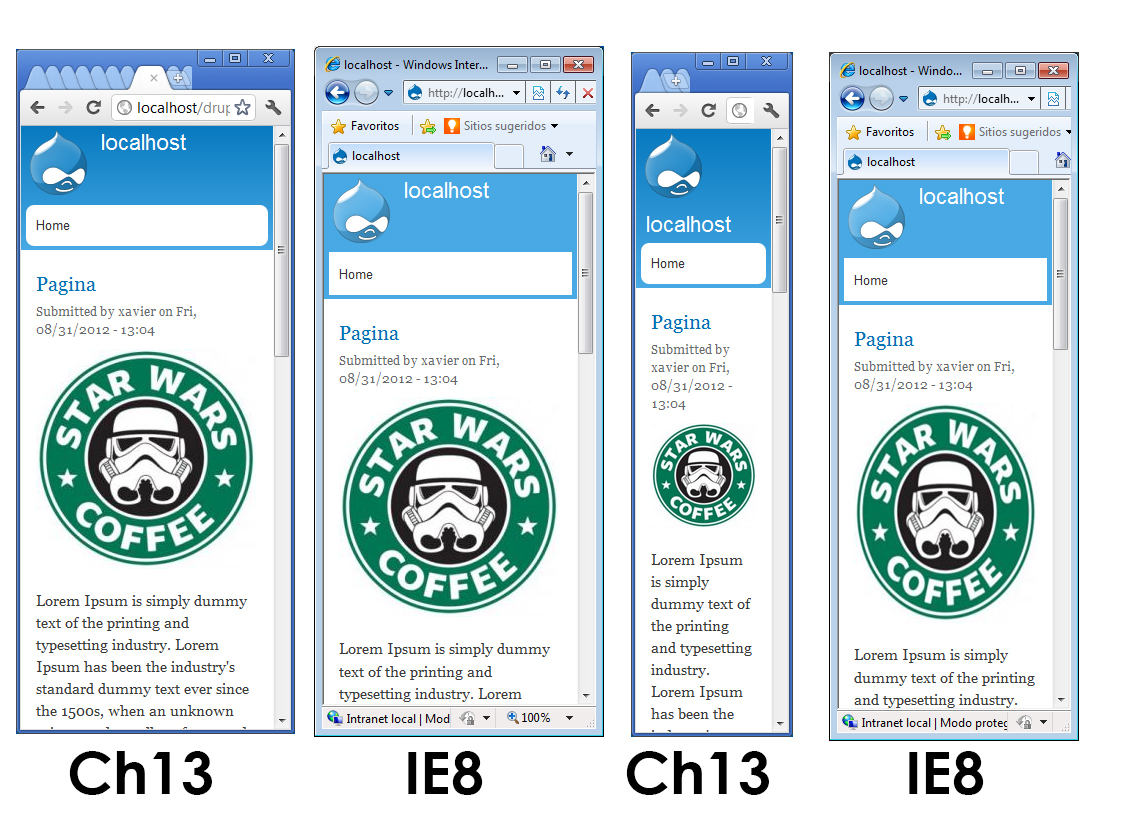
mjohnq3 commentedSorry about that. The effect you're seeing is due to an obscure bug in IE8 that occurs when the max-width property for images is set to 100%. The width property of the image element needs to have a value specified, which is best set to auto so that the images are scaled correctly and maintain their original aspect ratio.
The resulting CSS is:
The attached patch will fix the problem.
Comment #2
Rendergraf commentedGreetings.
I have also seen that the problem is solved with
The resulting CSS is:
is there any difference?
Comment #3
mjohnq3 commentedBoth fixes are recommended (based on search results) and both appear to work. I couldn't find any explanation of what the value auto\9 actually does or which might be a better fix.
Comment #4
Rendergraf commented