Closed (works as designed)
Project:
Colorbox Node
Version:
7.x-2.x-dev
Component:
Miscellaneous
Priority:
Major
Category:
Bug report
Assigned:
Unassigned
Reporter:
Created:
2 Sep 2012 at 18:55 UTC
Updated:
16 Nov 2012 at 22:06 UTC


Hello,
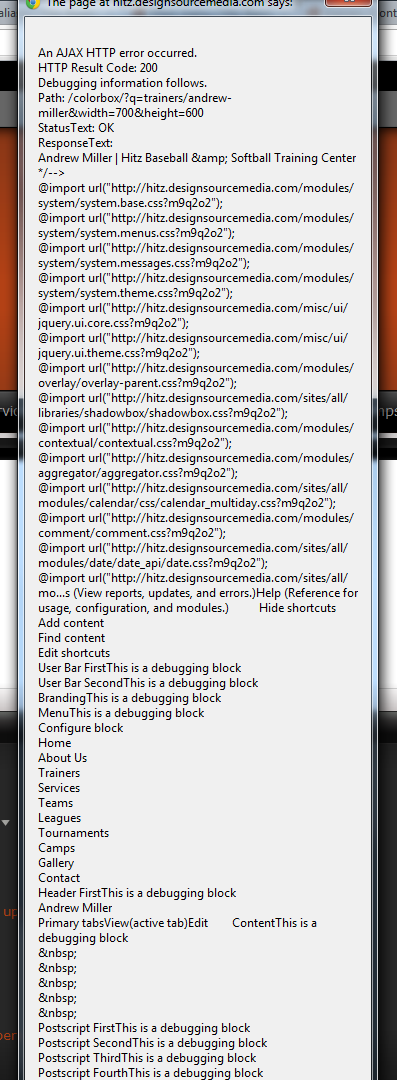
I am working with colorbox node, and first I love this module. However, there is an error that I am experiencing and I was wondering if there was a work around. I use URL aliases with my nodes for SEO sake, and when I create a colorbox-node link I have to use the node/##. This is not a problem when I am creating these links by hand, however I am using views to create a content type list page. When I set the content to display in colorbox it uses the URL alias, and that causes me to get an error (see attached image), is there a way using views or do I have a setting wrong with colorbox.
Any help would be appreciated.

Comments
Comment #1
iLLin commentedD/L the latest version and see if you stil have these issues. Your a few versions behind.
Comment #2
amiller86 commentedDownloaded the latest version. If you use URL aliases then colorbox-node will give the AJAX error i attached above.
Comment #3
amiller86 commentedupdate....
The url alias doesnt seem to be the problem, if i create the link by hand using the alias it works. However when I turn this feature on in views it outputs the wrong URL:
/?q=node/22&width700&height=600
when its suppose to be /?q=node/22?width700&height=600
Comment #4
iLLin commentedHmm, you have something setup wrong. The links are built with the l() function. It looks like you have mod rewrite turned off or something.
Comment #5
amiller86 commentedOk I don't really know where that is, but I could have clicked a setting I didn't mean to. Where would I find the mod rewrite option
Comment #6
iLLin commentedIts your server, but there maybe a problem when mod rewrite is turned off. Basically there is no more "q" action and your URL will look like this myserver.com/node/11 or myserver.com/content/my-title-here
I can look at turning off mod rewrite when I have time to test, but dunno why its not working with it turned off.
Comment #7
amiller86 commentedBut it works when I apply the colorbox-node class to a link by hand?
Comment #8
iLLin commentedThen do it by hand.
Comment #9
amiller86 commentedI am trying to use views to create a list page that will open up the content in the colorbox. I will just omit the page until I can figure something else out
Thanks for the help
Comment #10
iLLin commented