

Closed (cannot reproduce)
Project:
Views data export
Version:
7.x-3.0-beta6
Component:
Code
Priority:
Normal
Category:
Bug report
Assigned:
Unassigned
Reporter:
Created:
11 Sep 2012 at 12:51 UTC
Updated:
3 Jun 2015 at 21:52 UTC
Jump to comment: Most recent, Most recent file


Comments
Comment #1
steven jones commentedUse the override settings in each settings popup to apply different options to different displays, this is standard views stuff, nothing specific to VDE here.
Comment #2
saveriop commentedYeah...I know that...
The problem is ... do not works... Even if you override the settings, other displays will be modified!
Comment #3
steven jones commentedWhat versions of things are you running?
Comment #4
saveriop commentedI'm using
views data export: 7.x-3.0-beta6
views: 7.x-3.5
drupal: 7.15
Comment #5
steven jones commentedIs this issue specific to VDE displays, or does it affect other displays that come with views like the Page display?
Comment #6
steven jones commentedSorry, not had a response for a long time.
Comment #7
luketsimmonsHi saveriop/Steven,
Sorry to open this issue again, but I'm getting a similar problem.
Basically, I have a page view of a table display and an attached views data export CSV view of similar content. Within the access settings for each view I am trying to set the page to be accessible for 4 roles and then the CSV attachment link to be accessible for 3 roles.
The problem is that even when setting the VDE access settings to "override" as you would do for any number of page/block views, it's always picking up the page view settings, so not actually overriding.
With regards to fixes, I tried to spoof it by modifying my exported views code and adding in overridden access values, but these are just being ignored when it comes to checking it.
I believe it's similar to https://drupal.org/node/1985960 ? Although I thought it might be that the VDE view was sharing permissions because it's an attachment, but removing it as an attachment didn't resolve the issue, so I'd say there is an access callback being missed out.
That said the VDE views should use the standard access plugin that views provides?
Thoughts?
Thanks,
luke
Comment #8
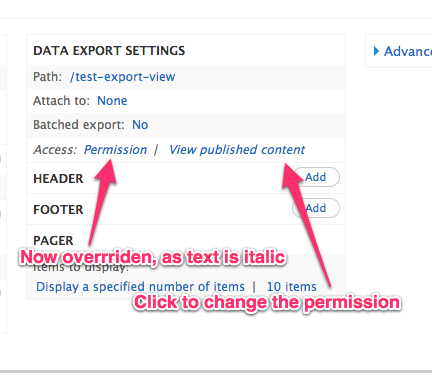
steven jones commentedSorry guys, but I've just added a new data export display to a page view, and then did the following:
then:
and then:
Now I can change the permission used and it all works as expected. This is just standard views stuff.
Comment #9
luketsimmonsHi Steven,
Thanks for looking into it and good work with the Skitch examples, it's a great app :-)
They are indeed the standard views access steps, it's just not working for an attached VDE CSV view for me, can you try it again but attach the VDE to the page view first please?
Also did you change the permission and jump back to the page view display to see if it had actually been overridden, as I had overridden the VDE access settings but they weren't kept.
I want to say it's another access related module that could be interfering but I am not using any for this implementation.
thanks again,
luke
Comment #10
steven jones commentedThe displays were indeed attached.
I changed the permission, and the saved the view, and checked to see if I could access the URLs to test.
Comment #11
spazfoxI'm running into this problem, as well, but it only seems to occur if I want to base access to the different displays on roles. Basing the access on permission, as in #8 above, does work. But it does not seem to work for role-based access.