

Closed (won't fix)
Project:
Drupal.org security advisory coverage applications
Component:
module
Priority:
Normal
Category:
Task
Assigned:
Unassigned
Reporter:
Created:
13 Sep 2012 at 15:16 UTC
Updated:
31 Aug 2018 at 17:52 UTC
Jump to comment: Most recent, Most recent file


Comments
Comment #1
mitchell commentedGreat project, ts145nera! Thank you for contributing it.
I only have a few simple things to point out, nothing major.
I recommend you submit it to http://ventral.org/pareview to carry out a more thorough review on your own.
* A 7.x-1.x-dev branch isn't necessary. Your latest code in 7.x-1.x can be made into a dev release using the project management release tools.
* The language on the project page could be reworked for greater readability. Also, Rules should be capitalized.
* A screenshot would help users quickly see what this does.
Comment #2
cubeinspire commentedGreat module !
I've been using auto node title before and this one doesn't force to give a pattern title, what can be very interesting in some situations.
works good on clean install.
Comment #3
moertle commentedI like the module.
I've tested the module and it works as expected.
Good work, clean code.
Comment #4
a_thakur commentedThe module works as desired. Since Drupal believes in "collaboration over competition" so you could request the maintainers of auto_nodetitle to merge the code into their's.
Comment #5
carwin commentedUsing http://groups.drupal.org/node/184389 and http://drupal.org/node/894256 as a template for this review.
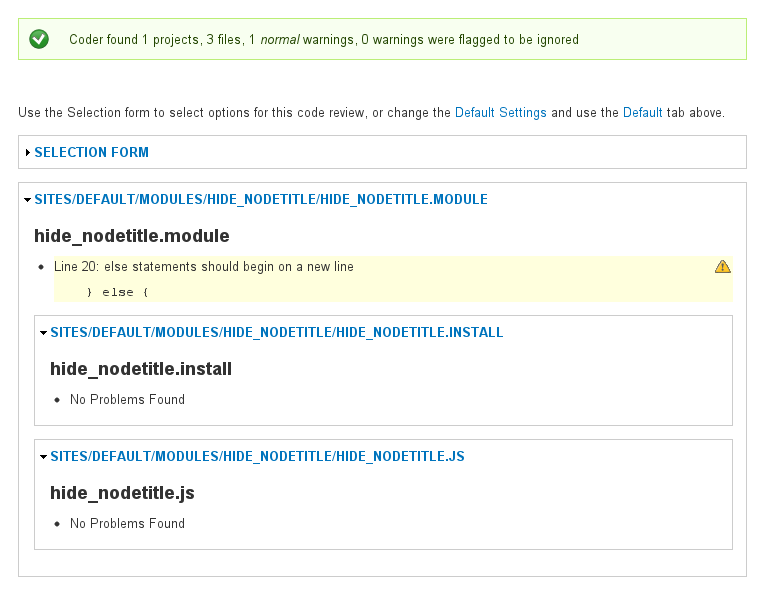
hide_nodetitle.module - Line 20: else statements should begin on a new lineSee 1st attachment.An automated review of your project using the PAReview.sh at ventral.org found multiple issues with your code
See 2nd attachment or look here: http://ventral.org/print/192
It is only necessary to declare files[] if they declare a class or interface.
If we count lines among all the files (excluding .info and README.txt) you are VERY close, about 106 lines.
Specified as a simplification of the Automatic Nodetitles module: http://drupal.org/sandbox/nico059/1741784
Personally, I would rather use this module to achieve the desired effect because of its simple implementation and Rules integration.
Comment #6
cubeinspire commentedThis module should go to the repository (even if it has less than 120 lines) or be merged with automatic Nodetitle !
As said before by others the way it works is much more clean than automatic Nodetitles...
Comment #7
ts145nera commentedI've fixed some code sytle problem using http://ventral.org/pareview
Now I've only 2 warning, but I don't understand how can I fix them.
I've removed master branch and I've moved 7.x-1.x-dev in 7.x-1.x as specified in http://drupal.org/node/1015226
Comment #8
ts145nera commentedI've added snapshot
Comment #9
d2ev commentedJust installed this module and the module works fine but the point raised by @carwin must also be taken into consideration.
Comment #10
cubeinspire commentedHi,
1. Concerning the warnings you should just remove the last 4 words " for the node form".
The comment line should be as follows:
* Implements hook_form_FORM_ID_alter().
2. Line 36. You use html inside a t() function. This should be done with placeholders as described on the API.
This:
t('Specify if node\'s title is visible or not during node insert. If <i>hide</i> is selected then title is <i>Undefined</i>. In this case you can use <a href="http://drupal.org/project/rules">Rules</a> project to generate it.'),Should be:
Concerning the italic <i> tag, it shouldn't be there neither (correct me if i'm wrong) as the t function is used to translate raw values only. Instead it is possible to concatenate multiple t functions and html tags.
3. line 8 & 9. Is this really necessary ?
4. Line 27 at .install. Is this function ever called ?
function hide_nodetitle_update_1()5. You said that this module can be used with Rules. That would be great, but when I try to set an automatic node title using Rules I see that there is no way to select the option "Hide Node title enabled".
Improving this 5th point would make your module be more than 120 lines.
Good job !
Hope it will be contributed soon :-)
Comment #11
cubeinspire commentedstatus change
Comment #12
cubeinspire commentedOh I've found a little annoying problem with the module.
When a content type has the "Hide title" checked is not possible anymore to add nodes of this content type to a menu checking "Provide a menu link" on the edit/create form.
Commenting line 24 solves the issue:
$form['title']['#type'] = 'value';But then the title appears on the edit/create form.
Not sure if that can be considered as a bug, in any case an idea to solve this would be to hide the field using css.
Comment #13
klausiClosing due to lack of activity. Feel free to reopen if you are still working on this application.
Comment #14
avpaderno