

 The 2026 Drupal Business Survey is open. Your response will help shape the future of the Drupal business ecosystem.
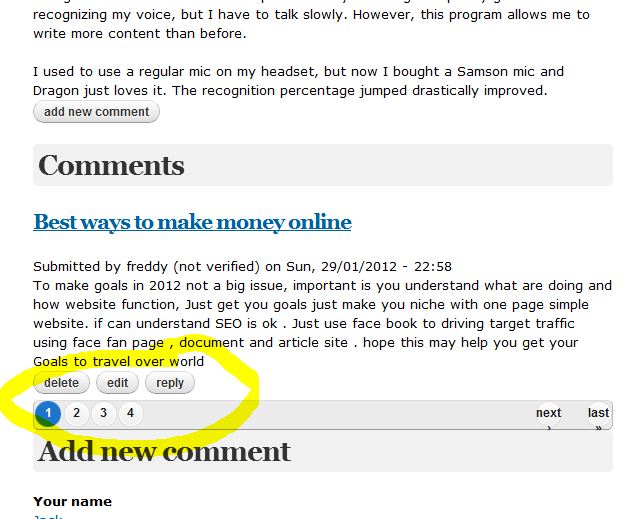
It always shows 4 pages, even when I open the article it show 4 pages, but the pager should not be there. There are in fact 8 pages of content. So that is like 80 articles.
If I open the article up, the pager with 4 pages is still there.
If I open category, it still shows 4 pages. Even though there is only 1 page, few articles for each category.
That is so weird
I switched the theme back to omega and the pager works fine.
I deleted all template files, uploaded template files from omega and kept only css files inside, still pager show 4 pages.
I copied my subtheme css files to original omega, pager looks fine.
Only my subtheme pager is out of whack.
Why it shows always 4 pages?
I tried everything, I changed all the folders in my subtheme, and still 4 pages total.
What do you recommend?

Comments
Comment #1
thaistore commentedattaching the screnshot
Comment #2
thaistore commentedthe block view was overriding the main pager, solved
Comment #3
dasjoplease don't forget to update the status
Comment #4
thaistore commented