

 The 2026 Drupal Business Survey is open. Your response will help shape the future of the Drupal business ecosystem.
Drush Make fails in Windows (Vista for us) using anything higher then Drush 5.4 (which works flawlessly).
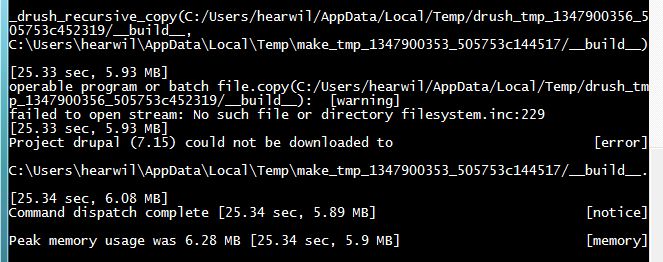
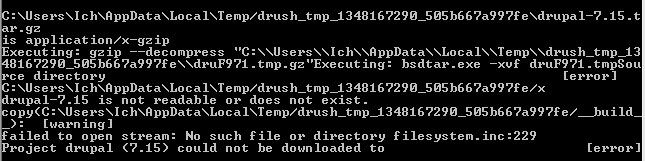
When running the following command I get errors related to drush_make_tmp_xxx being not readable or not existing. I have attached screenshots of my drush debug output.
This has been verified in other windows setup by myplanetdigital and a few other firms.
Oddly enough I have not found a related issue for this so curious if something is done wrong on our side(s).
The drush command we run is as follows:
drush make --prepare-install --no-gitinfofile --working-copy profiles/wetkit/build-wetkit.make --yes --debug
Would anyone have any advice or further debugging steps for this? ^_^ Appreciate any help as we would like to remain in sync with improvements from Drush.
| Comment | File | Size | Author |
|---|---|---|---|
| #2 | error_message.jpg | 48.02 KB | rmeissner |
| drupal_not_downloaded.JPG | 60.42 KB | sylus | |
| is_readable_fail.JPG | 158.45 KB | sylus |



Comments
Comment #1
sylus commentedForgot to add this command is being run from msysgit.
Comment #2
rmeissner commentedSame problem here. Drush has been installed with administrator rights and I startet the drush command promt also as administrator - nonetheless it seems there are problems with the rights or the filesystemaccess in one particular occasion and this produces some subsequent errors later on.
Comment #3
densolis commentedHi,
I'm in a Drupal class here in Central Florida. All of the Windows users in this class (12 out of 20 students) receive this same error when we try the following make file:
Everyone is running Windows 7. Once person had Virtual Box on his Mac with Windows running inside of VB. He ran the make file on the Mac and it worked fine. He then ran the same make file in Windows under VB and received the same error.
I've include the screen shot with just the basic info and with full debug info. It is not a permission error because I can cd to the specified directory and manually create a directory.
There are to many messages and they over flowed my bit bash / command window buffer. So I redirect the output to das.make.txt. There are three sets of text below:
"Normal" make message that appear on the screen
Below is the screen output when I entered the command "$ drush make das-D7.make das-test --debug > das.make.txt"
Re-directed output from the command "$ drush make das-D7.make das-test --debug > das.make.txt".
In other words, this is the text from das.make.txt file.
I don't know if this helps, but myself and 12 other people would love to make use of this make feature.
Dennis
Comment #4
sylus commentedI am moving this to major, I hope this is okay but definitely seems to be a major issue.
Comment #5
densolis commentedsylus,
Thanks, Oh, I should have caught that. I might even say it was critical as drush make is unusable for those of us window users on 5.7 who are salivating at the mouth to use it.
It should be noted that I can do the drush dl drupal and I have no problem. It download drupal core and puts it in the appropriate directory without any problems.
If there is anything I can do to help solve the issue, please let me know.
Dennis
Comment #6
moshe weitzman commentedWould be great if someone tried with very latest code in 7.x-5.x branch or master branch. We might have fixed this since last release. There has been work on untar and mime detection.
Comment #7
sylus commentedHey @moshe weitzman I have tried 6.0-dev and you are correct I no longer have a problem.
I hate to be a bother but would you have an estimated timeline on when a Windows Install could be made available for newer version.
I know some other people will have problems without that.
Greatly appreciate your time and love that a fix is in place!
Comment #8
densolis commentedmoshe weitzman,
I've download drush from the main branch and will test it. Let me ask, I've read article that said the next version of drush was not quite stable. Is this true? Or should it be stable enough to switch to?
will try to get to it tonight.
Dennis
Comment #9
densolis commentedsylus, moshe weitzman
I have download drush 6 using the git command:
I look at the resulting directory, but I'm not quite sure what do with it. The readme file say run the windows installer, but I don't believe there is an installer for Drush 6. I compared the programs / directory to the directories on my computer:
and they do not have the same directory structure.
So how do I manually install drush 6 on Windows 7?
Comment #10
sylus commentedSteps to install dev version:
1) Install drush 5.7 using MSI installer on drush.ws
2) Replace contents of drush directory in C:/Program Data/Drush with dev release of drush
3) Test out using new version of drush with: drush version
Comment #11
densolis commentedStylus,
It worked great with the simple file. Now I going to add some other modules to the make and see how it does.
One other thing. At first I was a little confused because there was no C:/Program Data directory. I then realized that I needed to show the hidden directories and files.
For those who don't know, Microsoft has instructions for displaying hidden files and folders for Windows XP. This link contains the instructions for instructions for Vista / Windows 7.
If you are not a fan of Microsoft instructions, you can google either "display hidden files in windows xp" or "display hidden files in windows 7". You will find plenty of instructions.
Dennis
Comment #12
densolis commentedStylus, moshe weitzman,
Thanks for your assistance. I documented how to do a manual install of of Drush 6 and posted it to groups.drupal.org/drush.
I will also publish this article on Drush - Drupal Shell Utility.
Dennis
Comment #13
greg.1.anderson commentedThis issue was marked
closed (won't fix)because Drush has moved to Github.If desired, you may copy this bug to our Github project and then post a link here to the new issue. Please also change the status of this issue to
closed (duplicate).Please ask support questions on Drupal Answers.