

Needs work
Project:
Views Dependent Filters
Version:
7.x-1.x-dev
Component:
Code
Priority:
Normal
Category:
Bug report
Assigned:
Unassigned
Reporter:
Created:
22 Sep 2012 at 13:26 UTC
Updated:
5 Jul 2014 at 03:08 UTC
Jump to comment: Most recent, Most recent file


Comments
Comment #1
joachim commentedI can't find that string anywhere in the code.
Could you explain more what you mean?
Comment #2
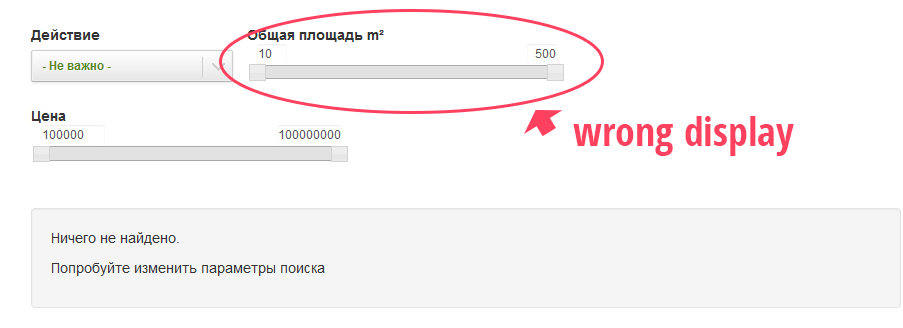
Stan.Ezersky commentedI've got a «select #1» with options (Global: Dependent filter). If i choose option from «select #1» I must see «select #2». But i see «select #2» always
Comment #3
joachim commentedSorry, still don'tget it.
could you post a screenshot, and also reproduce this with standard components and export the view?
Comment #4
Stan.Ezersky commentedStandard components work
Comment #5
joachim commentedBy 'standard components', I meant fields that are in Drupal OOTB, that I will have on my test install.
If you need to, you can create a feature with these fields and your view.
You also should be using standard field *types*. I don't recognize where that slider widget comes from.
Comment #6
Anonymous (not verified) commentedHas this been resolved yet? This module does a great job with all Operators minus the "is between".
Comment #7
nikit commentedQuick patch that solve this between filter element problem.
Sponsored by superdorx.com
Comment #8
joachim commentedThanks for the patch!
Indentation and spacing needs a bit of tweaking though.
Comment #9
nikit commentedSorry, forgot to renew settings after setup my development environment.
Refixed tabs to spaces:
Comment #10
Bacem commentedThank you Nikit but i have another problem . even my between filter is hidden by the view exposed filter it generates me a query with a left join! I d'on't know why. do you have an idea how to resolve this issue?Thank you
Comment #11
nikit commented2 Bacem: sorry, I don't understand what link between joins and this module issue. I assume it's issue for Views, not for this module.
Comment #12
Bacem commented2 NIKI :of course there is a relation between the generated query and the module.
here is the generated query when my field_data_field_annee_modele is hidden(by the module)
SELECT node.created AS node_created, node.nid AS nid
FROM
{node} node
LEFT JOIN {field_data_field_annee_modele} field_data_field_annee_modele ON node.nid = field_data_field_annee_modele.entity_id AND (field_data_field_annee_modele.entity_type = 'node' AND field_data_field_annee_modele.deleted = '0')
WHERE (( (node.status = '1') AND (node.type IN ('classified')) AND (field_data_field_annee_modele.field_annee_modele_value BETWEEN '' AND '') ))
ORDER BY node_created DESC
LIMIT 12 OFFSET 0
field_data_field_annee_modele is hidden(that's ok for me after i applied your patch and thanks a lot for that) but in the query i have a left join . do you know how to resolve this problem ? thank you Niki
Comment #13
nikit commented2 Bacem: Your issue is off-topic.
But I answer: left join used for joining content and it's field, because, some field of some node may be empty. In inner join case, you lost this node. Left join allow see all appropriate nodes (with empty fields of course). For showing only filled fields content, use views filters (empty/not empty/or comparing).
Programmatically you can use hhook_views_query_alter.
Comment #14
Bacem commented2 Nikit: Thank you !! I will follow your advice. :-)
Comment #15
lukasss commented#9 I do not work...please help
Comment #16
nikit commentedThis is old time patch, I assume it should be renewed to current dev version.