

Closed (fixed)
Project:
Webform Localization
Version:
7.x-4.x-dev
Component:
User interface
Priority:
Normal
Category:
Support request
Assigned:
Unassigned
Reporter:
Created:
24 Sep 2012 at 09:11 UTC
Updated:
18 Jul 2016 at 21:04 UTC
Jump to comment: Most recent, Most recent file




Comments
Comment #1
GDrupal commented@anz We need a little more information about the issue to help you. For example... what are you trying to achieve.. what kind of translation option are you using.. what step are you following... etc etc
Comment #2
daniel.cannon commentedI also have the same issue where I have configured my webform to use string translation but when viewing the block in my desire
language the form labels are not translated.
Here is my webform localization configuration:
LOCALIZATION BY STRING TRANSLATION
Expose webform component strings suitable for translation. - Enabled
Keep a single webform across a translation set. - Enabled
After configuring these settings I:
Comment #3
GDrupal commented@daniel.cannon what you are saying seems to be right the only thing missing there is to follow this:
Sadly it's not the same as clearing the cache. If that does not work..
are you using some field translation for the node title or other property to discard language routing malfunction?
Comment #4
daniel.cannon commentedI have completed Refreshing the Strings for the Webform Localization text group. I then also disabled Translation for the Webform content type just in case it was conflicting with the Webform Translation settings (which are still enabled after making this change).
I have primarily been using German as the Translation language for Testing, and upon testing other languages today they appear to display correctly (except German).
Here is one of the lines in the list of translations for Webform Localization:
TEXT GROUP: Webform Localization
STRING: Phone webform:2:4:#title
CONTEXT: 2:4:#title
LANGUAGES: nl fr de en-US
It appears that there is a translation for German but it is not being used, I have had a look through the Language configuration and cannot find anything that screams out at me. Any suggestions?
Comment #5
lucascaro commented* Created a webform
* Set Expose webform component strings suitable for translation and Keep a single webform across a translation set. to: Enabled
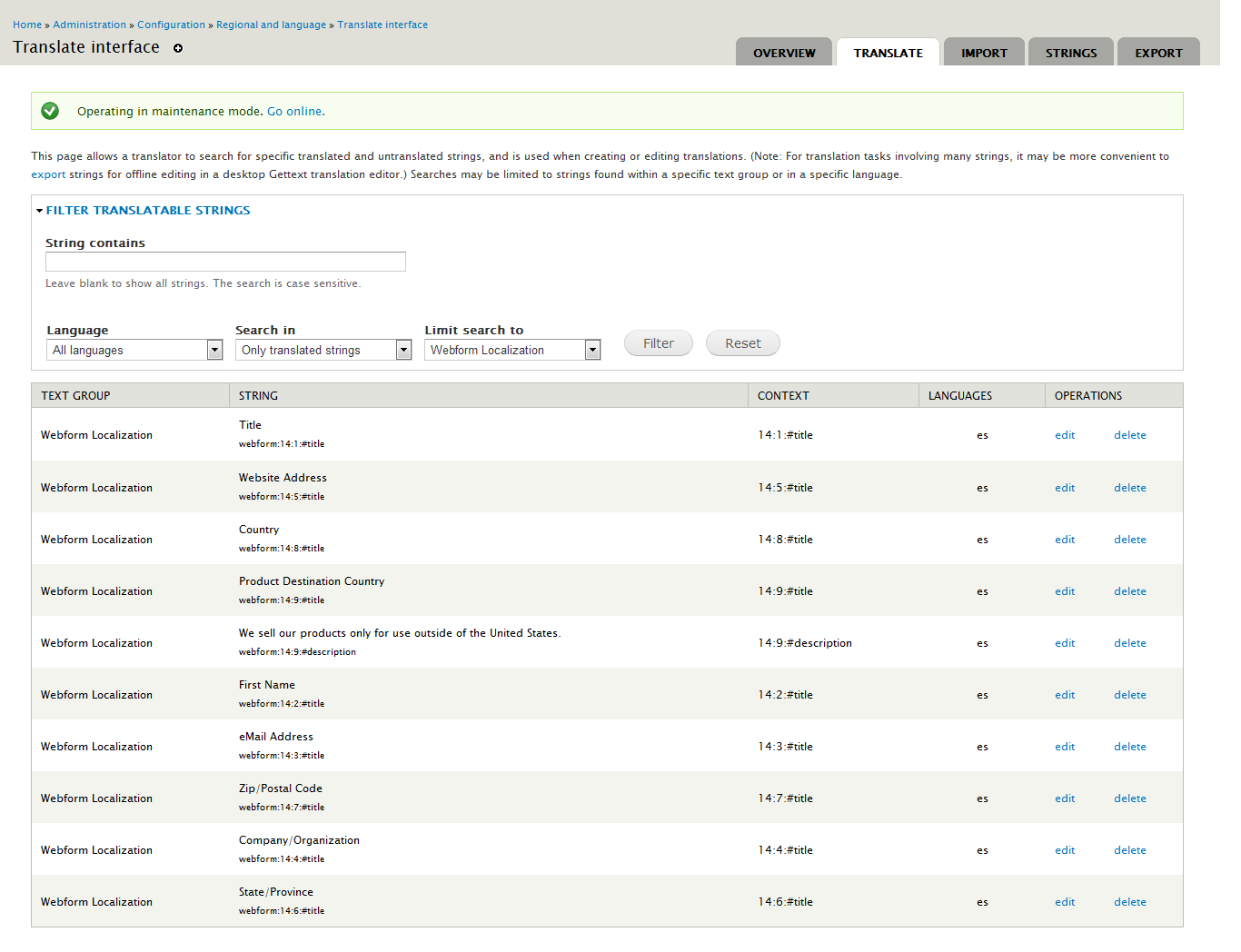
* Went to Configuration -> Regional and Language -> Translate Interface -> Translate
* Limited search to Webform Localization
* Click edit next to the form labels I wanted to translated and after entering the translations clicked Save Translations
Went to the webform, switched to Spanish and the label was still showing in English.
* Clearing the cache did nothing.
* Went to admin/config/regional/translate/i18n_string, clicked on refresh strings, and it worked.
The key was to check the box next to Webform localization under "SELECT TEXT GROUPS" which is disabled by default. @daniel.cannon, can you please double check you selected that when refreshing strings?
Comment #6
daniel.cannon commentedPlease see attached screen shot of the options I have selected while refreshing strings.
The website I am currently working on uses of the Domains Module, further testing has revealed that this issue only occurs when selecting the same language as the domain's default language.
Comment #7
attisanperhaps this has something to do with domain access as I'm having the same issues daniel.cannon has.
greets
Comment #8
plunden commentedHi
We are having a similar issue with the webform_localization module working with the translation interface.
Seems that the default language is having an effect here. I am able to create translations from the default language to another language, but not the other way around.
For example, if English is the default language, I have to create an English Webform first (remembering to check the two options under Localization by String Translation). Then I am able to create Finnish translations at the Translate interface.
We however switched the default language to Finnish and, all of sudden, I could not create Finnish translations from the English Webform strings anymore.
Everything at the interface seems right, with one exception - when you are at the Edit string page:
(for this example, the default language is Finnish, I have created an English webform first, then I have translated the webform to Finnish, and finally I am now at the Translate interface translating the webform strings from English to Finnish)
Header: Edit string
Fields: Original text(locked), Context(locked), English(editable)
Clearly, that English field title is not right, as I was going to write a Finnish translation of the string.
Inputting the Finnish translation anyway seems to have no other effect than breaking the original (English) string, by replacing it with the translated (Finnish) string. Curiously enough, the original (English) Webform is not affected by that broken should-be-English string.
Comment #9
Anonymous (not verified) commentedhaving the same issue as daniel.cannon. Have tried all of the things recommended in this thread to no avail. Has anyone had any luck with getting this to work correctly?
Comment #10
Anonymous (not verified) commentedSame issue here. Can't translate field labels.
When I ran a string refresh with only Webform Localization selected, only 1 string was being refreshed but 5 strings were deleted. I couldn't find any strings at all to translate. The default language of the page is english.
-- ed.:
The message, which is displayed on submit, can be translated just fine btw.
Workaround: For now I'll simply replace field label strings on theme level by search/replace with jQuery on certain form IDs. Collecting webform data in one "pot" for all languages and avoiding having to keep multiple forms for multiple languages itself is a huge timesaver.
Comment #11
chefnelone commentedSame problem here, I can't translate label.
Comment #12
GDrupal commentedComment #13
GDrupal commentedComment #14
nithinkolekar commentedhaving same problem with spanish translation
Modules
Webform 7.x-3.20
Webform Localization 7.x-1.x-dev
Method: Localization by String Translation
Configurations
site language : degault: english, additional language:spanish(Español) screenshot#1
webform content type settings: screenshot#2,screenshot#3 is it required?
translating string : done screenshot#4 and also string refreshed selecting webform localization.
webform settings: done screenshot#5
is Content translation module required for this to work?
In readme.txt file of this module it is only specified in Example B section step 7
, is this required to Example A also? because I don't see node/{webform_node_id}/translate link unless Content translation is enabled. Am I missing something?
For Localization by String Translation method after step 6 of readme.txt it is not mentioned how we can access webform in other languages.
I assumed "Content translation" is required for Example A also and enabled it and translated to Spanish(screenshot#6-01,02,03) but when navigated to link all labels are still showing English only(screenshot#7).
If I specify es in path like example.com/es/node/32 where 32 is webform translated node then whole website is translating including menu items(inserting es in link) that I don't want(screenshot#8). The thing is only webform should available in English and Spanish.
Comment #15
hwasem commentedI am not using the Domain module and am having the same problem with field labels not translating in my Webform - even after I translated them in /admin/config/regional/translate/translate. I had an existing webform and turned on Webform Localzation to get the fields translated.
I have my Webform's Form Settings (node/3082/webform/configure) Localization by String Translation enabled for "Expose webform compoent strings suitable for translation" and "Keep a single webform across a translation set".
My primary language is English and my secondary is Spanish.
I noticed in #GDrupal's comment
I was indeed translating the Title and Body field with Field Translation per my Webform content type's Pubishing Options setting. I did the following:
Next problem is, how do I translate the Webform title and Body fields? I can't find them in admin/config/regional/translate/translate at all.
The only way I could see was to add the Field translation back for the content type.
I'm not sure if this will last forever or why turning on content type field translation after the Webform Localization would matter. Perhaps it was a problem to have the node's Title/Body translated before my webform/node was set to use Webform Localization???
If I'm doing something totally wrong, please also advise. I just couldn't figure out any other way after reading through this issue. Hopefully this will help someone else struggling with this issue.
Heidi
Comment #16
joseph.olstadThe 1.x branch is no longer supported
Please upgrade to webform 4.12 or higher and webform_localization 4.1 or higher
Comment #17
mjwright commentedI use the same configuration as hwasem and run webform 4.12/webform_localization 4.2, and field labels are not translating. I simplified the procedure taken by hwasem to get it working with the following steps:
Now, field labels, title, and body are all translated properly.
Comment #18
mjwright commentedComment #19
Stevel commentedBack to active since there is no patch here. Also, it looks like a bug report rather than a feature request.
Comment #20
krlucas commentedI don't know if it's the same issue as everyone else but I also encountered issues with webform field labels not being translated. In my case they were blank for some languages.
I found that I needed to provide "translations" for the "!title !required" string in string translation (just copy and paste the same text into every language).
Deleting the "!title !required" string also seemed to solve my issue but I was concerned it would re-appear when strings were refreshed.
Comment #21
nil.ned commentedDear developer,
I've same problem... can't translate label!
I tried also upgrade webform translation latest version 7x 4.5 but issue can't solve, I've tried to #15 #17 #20 but nothing happen...
I'm frustrated...
I using drupal 7.39, Webform 7X 4.12, Webform translation 7x 4.5 + Domain + Entity translation, some month ago I worked well I trnslated the strings but now when I try to refresh the system write me "2 string are updated" but when I try to find it nothing found.
Please help me ! :(
Comment #22
joseph.olstadHello Nil.Ned, please see the explanation by @mjright in comment #17
Looks like a documentation opportunity or an admin interface opportunity for improvement, perhaps we could add some helpers to the admin interface to make this more obvious. For now, follow the above steps please.
Comment #23
joseph.olstadComment #24
joseph.olstadComment #25
nil.ned commentedDear joseph.olstad,
thank you for your support...
I can translate the title and body but I have the problem with custom fields, for example:
1) create a webform from content type
2) create new fields about it (example name_2 and name_3
3) click on "view2 and front end appear with new fields
4) go to translation interface and refresh string using webform tool
5) search name_2 in translation interface nothing results, incredible is not found
I try to follow your suggestion but in my case it would seem doesn't work...
aghh ... bad/big issue...
I post my screen shoot
https://www.drupal.org/files/issues/Immagine_4.png
Comment #26
joel_osc commentedCan I get a clarification here? Are you creating fields on the content-type or components on the webform? Terminology is key here... thx. We use this module on daily basis and it works perfectly - so we will likely need a bit more information from you about your configs. We'll start with my first question - thx!
Comment #27
nil.ned commentedDear joel_osc and joseph.olstad thanks you for your support,
I created components on the webform, have less sense create fields in a content type... anyware,
I found the solution about my problem.... Was not short and I don't know why but the check that before was to "checked" now is "unchecked" under link:
www.mydomain/en/node/15233/webform/configure >>WEBFORM >> Form settings and then
LOCALIZATION BY STRING TRANSLATION >> Expose webform component strings suitable for translation. (WAS UNCHECKED)
For me the solution is check it!
For me is solved!
Comment #28
joseph.olstadExcellent followup