Closed (fixed)
Project:
Wysiwyg
Version:
7.x-2.1
Component:
Editor - CKEditor
Priority:
Normal
Category:
Support request
Assigned:
Unassigned
Reporter:
Created:
28 Sep 2012 at 20:42 UTC
Updated:
1 Nov 2012 at 17:51 UTC


I am using CKEditor 3.6.3 in Drupal 7.15 with WYSIWYG module 7.x-2.1. I also have the patch from this post (http://drupal.org/node/746524#comment-4730732) applied to the WYSIWYG module to enable styles to be passed to the CKEditor style drop down.
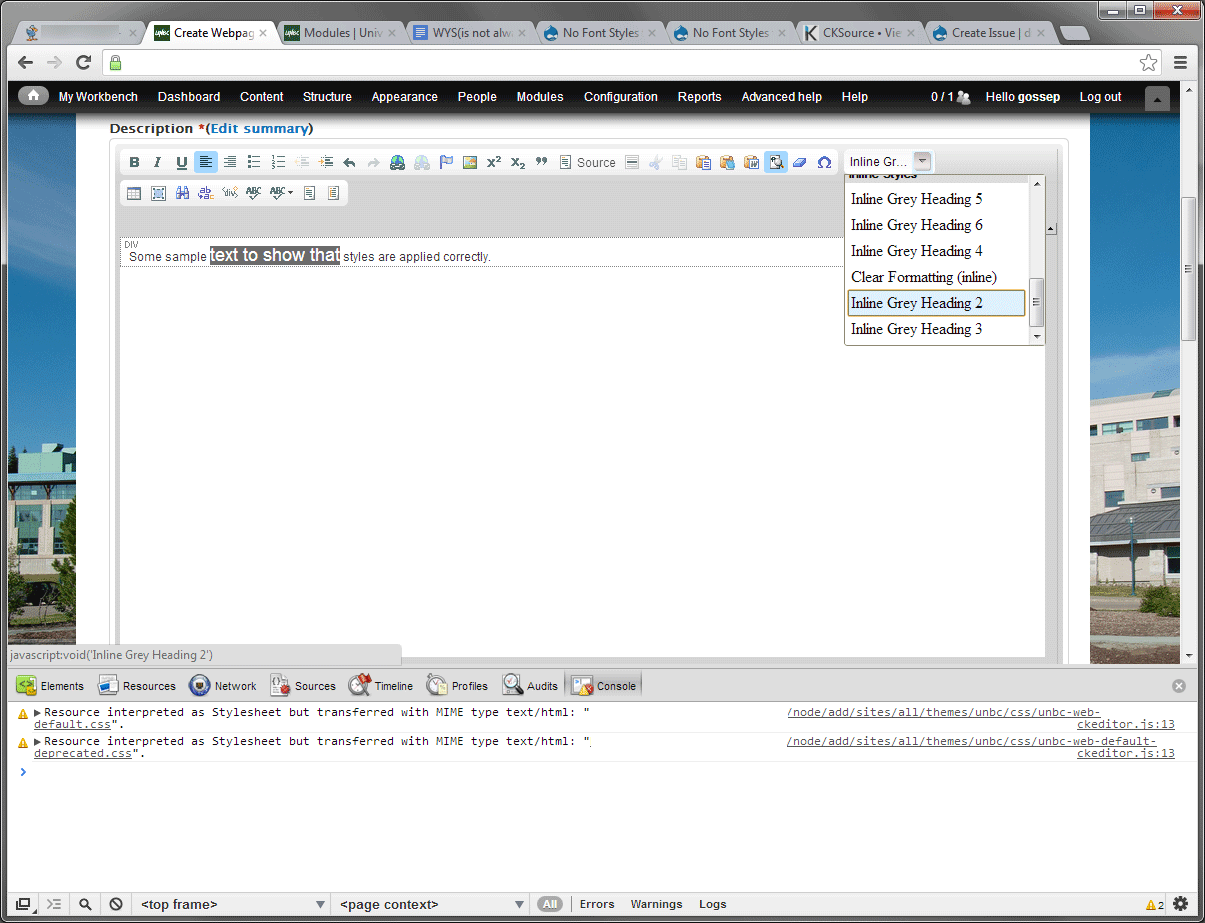
The problem I am facing is that while the styles are passed to the editor and are applied correctly within the editor when selected, they are not actually rendered in the drop-down list, nor are they displayed in the order in which they are defined in my WYSIWYG profile in Drupal.
As you can see from the attached image the styles are applied in the editor when I select them, but they are not rendered in the style drop-down list and are also out of order. In the WYSIWYG profile and the associated stylesheet the styles are defined sequentially.
Also there is an error displayed in firebug when the style drop down appears, stating that the resource is being read as HTML instead of CSS. Not sure if this is somehow related
If anyone has any ideas as to how this can be addressed I would appreciate it.
Thanks,
Pablo
| Comment | File | Size | Author |
|---|---|---|---|
| ckeditor-css-problem.png | 94.56 KB | Pablo Gosse |

Comments
Comment #1
twodPlease update to 7.x-2.2, the patch you are using is old in comparison to the one which finally made it into 7.x-2.2.
(Note the syntax used may have changed a little.)
The CSS warnings are not caused by Wysiwyg but by the stylesheets not being loaded correctly.
It's trying to load them from
/node/add/sites/all...., which doesn't look right.I'm assuming you're using the "Define CSS" option and the file paths defined in the "CSS path" box begin with something like
%sites/all/..., instead of%bsites/all/.... That would make Drupal return a 404 page instead of the expected stylesheet, which explains the incorrect mime type and why the effect of the classes aren't applied inside the editor.Comment #2
Pablo Gosse commentedUpgraded and changed the css path to prefix %t with %b and it works perfectly.
Thanks TwoD!
Cheers,
Pablo