

Active
Project:
Commerce Core
Version:
7.x-1.3
Component:
Product reference
Priority:
Normal
Category:
Support request
Assigned:
Unassigned
Reporter:
Created:
6 Oct 2012 at 01:04 UTC
Updated:
23 Jan 2016 at 01:14 UTC
Jump to comment: Most recent, Most recent file




Comments
Comment #1
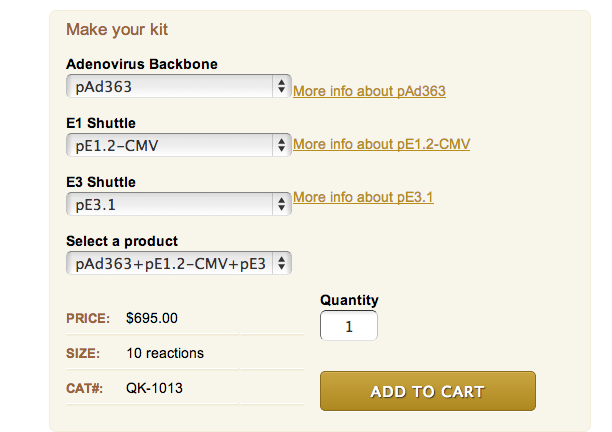
rszrama commentedIt's just showing up because you have multiple products on the form that share the same attribute field values. It lets you drill down a single product from that set of matching products to add to the cart. It doesn't show up for other combinations because there's only one matching product.
Comment #2
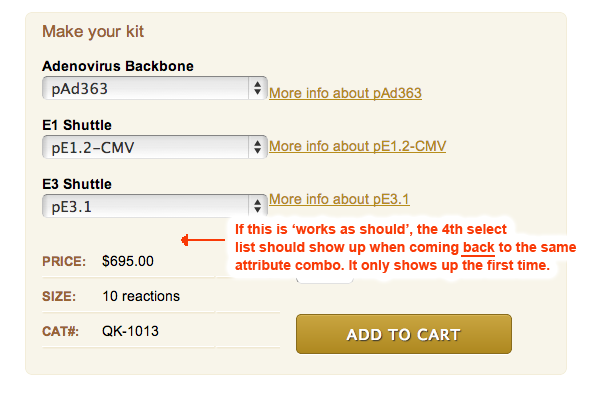
nelslynn commentedThese are all unique products. None share all 3 of the same attributes. I don't need the "Select a product" to select a unique product. Plus the 'select a product' only shows up the first time when selecting this certain combo of three attributes. When I select another set of attributes, then come back to the same combo causing the "Select a product" to show, it doesn't show up.
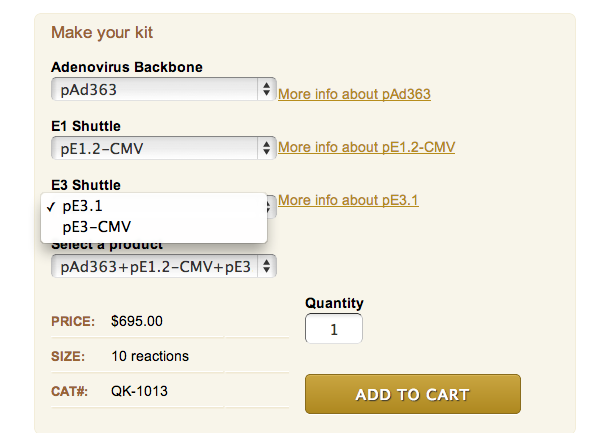
See the series of screenshots as to how the "Select a product" shows up, and then doesn't.
Thanks,
Comment #3
nelslynn commentedforgot to change status.
Comment #4
nelslynn commentedComment #5
rszrama commentedSo there's only one option in the "Select a product" list?
Comment #6
nelslynn commentedNo, there are two options in the 'select a product' list, however, I can select the same products in the 4th select list by selecting options in the 3rd select list. The 'select a product' list is therefore un-necessary and confusing to the end user.
Here's a link to the product page:
http://goo.gl/WKKuJ
Here's how to trigger/not trigger the 'select a product' list:
How to trigger the 'select a product' list:
- From page load, select pAd288 as the first option… two attribute options appear (all okay, no 'select a Product' select list). Now select pAd363 or pAd292 (products that have 3 attribute options), 'select a product' list shows.
[edit], AND from here, when you select the bottom option (pAd363+pE1.2-CMV+pE3-CMV) from the 'select a product' dropdown, the WRONG sku is selected (CAT#: QK-1013). I should be CAT#: QK-1012, which you can now select correctly from the 3rd dropdown.
When the 'select a product' list is not triggered (same products as above):
- On page load, where first select list option = pAd363… no 'Select a product' option. Try to select any other option from only the 2nd and 3rd select lists…. no 'Select a product' option.
- Select another product where there are 3 attribute options, pAd328 from the first select box… no 'Select a Product' option (note you have to be coming from a product with 3 attribute options). Select anything else from the 2nd and 3rd select boxes…. no 'select a product' select box.
- Only when you go to a 2-attribute product (1st select list = pAd288 for example) then back to a 3-attribute product does the 'select a product' list show again.
Comment #7
nelslynn commentedHas anyone come across this issue? This is still an issue with all modules updated to their most resent version.
Am I to conclude that Drupal Commerce will display an irrelevant select box (confusing to the user) of product variations when there are product variations that have a mixed number of attributes?
Here's a URL where you can see the issue. Read the previous post about how to trigger the issue.
http://goo.gl/KO6R5m
Comment #8
nithinkolekar commented@rszrama
I am facing same problem when product(variation) having the same attribute , which could/should be avoided by admins but for the commerce module why would it treat it as same product when they have unique SKU.
Is there anything that has to be done, to avoid duplicate products by applying unique field on product title or some other field?
Comment #9
cedric_aSame problem on a fresh installation. It seems to happen only when using multiple attributes based on term reference fields.
Here is my use case :
- product 1 : Size=L / Material=wood
- product 2 : Size=L / Material=metal
- product 3 : Size=XL / Material=
When the display product page load, I have 2 select inputs (Size / Material) = OK
If I select Size=XL --> I have just one select input (Size) and the price is updated = OK
If I select Size=L --> I get 3 select inputs (Size / Material / Select a product) = KO
In the "Select a product" list there is 2 options :
- product 1 (L, wood)
- product 2 (L, metal)
If I select Material=metal (default is wood) --> "Select a product" disappear
Hope this description can help
Comment #10
mmtt commentedSame here
Edit: It hapens only if you same sku's
Comment #11
Marko B commentedHaving the same problem. Both "size" and product select selects get rendered. This is happening on AJAX call only, when page is loaded by default it does not. Also when I use select and ajax refreshes this "select a product" goes away.
Here is html I get on Ajax call.
Comment #12
jonofthedead commentedCorrect Cedric_a, I can confirm your case as well though mine with 3 attributes.
1: size: L, color: Black, Clip-material: plastic
2: size: L, color: Gray, Clip-material: metal
3: size: XL, Color: Black, Clip-material: NULL/Blank (as product 3 doesn't have a clip)
Starts on product 1 so attributes are on Size: L, Color: Black, Clip-Material: Plastic
If you select Gray you get product 2.
Then you select XL, Color auto chooses black, and Clip-material disappears, you get product 3.
Then select L and you get the "Select a Product" attribute at this point and it stays on Product 3. This is a problem as by selecting Large since the color was still selected as "Black" I should have gotten product 1 but I did not.
This is caused (from what I see at least) from selecting a product field as an attribute that is not a required field and therefore will be blank in some cases. When you select the attributes to pick that product with a "blank" attribute, when you try to go to any other product that has that attribute filled in you automatically get the "select a product" attribute.
I don't know if this was by design (and if so I think you should not allow us to select the field as an attribute if it isn't a required field) but my work around was to give product 3 a Clip-Material of "No Clip". Now it all works fine.
Comment #13
bensey commentedHey all,
OMG this was an infuriating issue for me, and the kind of things DC continually throws at you whenever you want to create slightly more complex setups.
In my case however it was easily solved in the end with a hook form alter. I initially thought about unsetting the form element completely, but decided to leave it there just in case but change it from select to hidden as follows.
Comment #14
nelslynn commentedI hired someone to fix this for me. See below for the function to place in a custom model. This issue is only evident with specific product configurations (SKUs), but hopefully this gets addressed, as it presents a very unprofessional looking product page and functionality. Maybe if we get feedback on the function below, as it if it works and it a good solution, someone commit a fix?