Closed (fixed)
Project:
Shiny (Administration theme)
Version:
7.x-1.x-dev
Component:
User interface
Priority:
Normal
Category:
Bug report
Assigned:
Reporter:
Created:
8 Oct 2012 at 16:36 UTC
Updated:
23 Oct 2012 at 13:31 UTC


How to reproduce:
Create a new view. Add a field.
Click on "Rewrite"
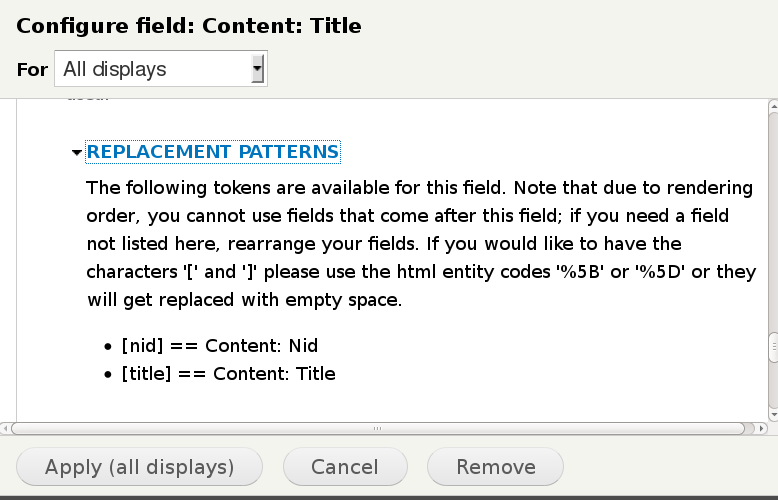
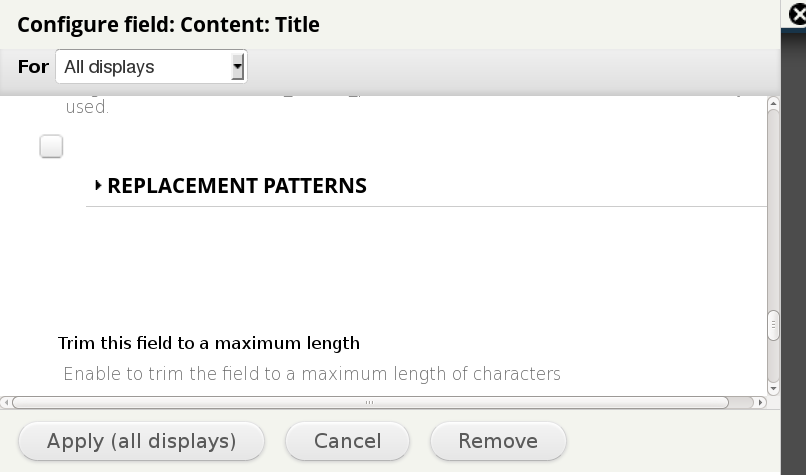
Page down and attempt to click open "Replacement Patterns". You can't. Also, strangely, the "Trim this field" checkbox shows above the "Replacement Patterns" link.
Note: issue exists in both a non-demo, localized installation and a default demo store installation.
The issue does not exist if you set Seven to be the admin theme. See screenshots.
| Comment | File | Size | Author |
|---|---|---|---|
| seven-replacementpatterns.png | 36.82 KB | electricdot | |
| kickstartadmin-replacementpatterns.png | 28.48 KB | electricdot |

Comments
Comment #1
bojanz commentedAssigning to dudenhofer.
Comment #2
dudenhofer commentedI'm glad you noticed that! It was just a clearing issue on those fields, I have committed a fix here http://drupalcode.org/project/shiny.git/commit/0312dc7