I have recently installed Administration Views on a Drupal 7 site. When I select any refinement filters and click Apply I receive the following error:
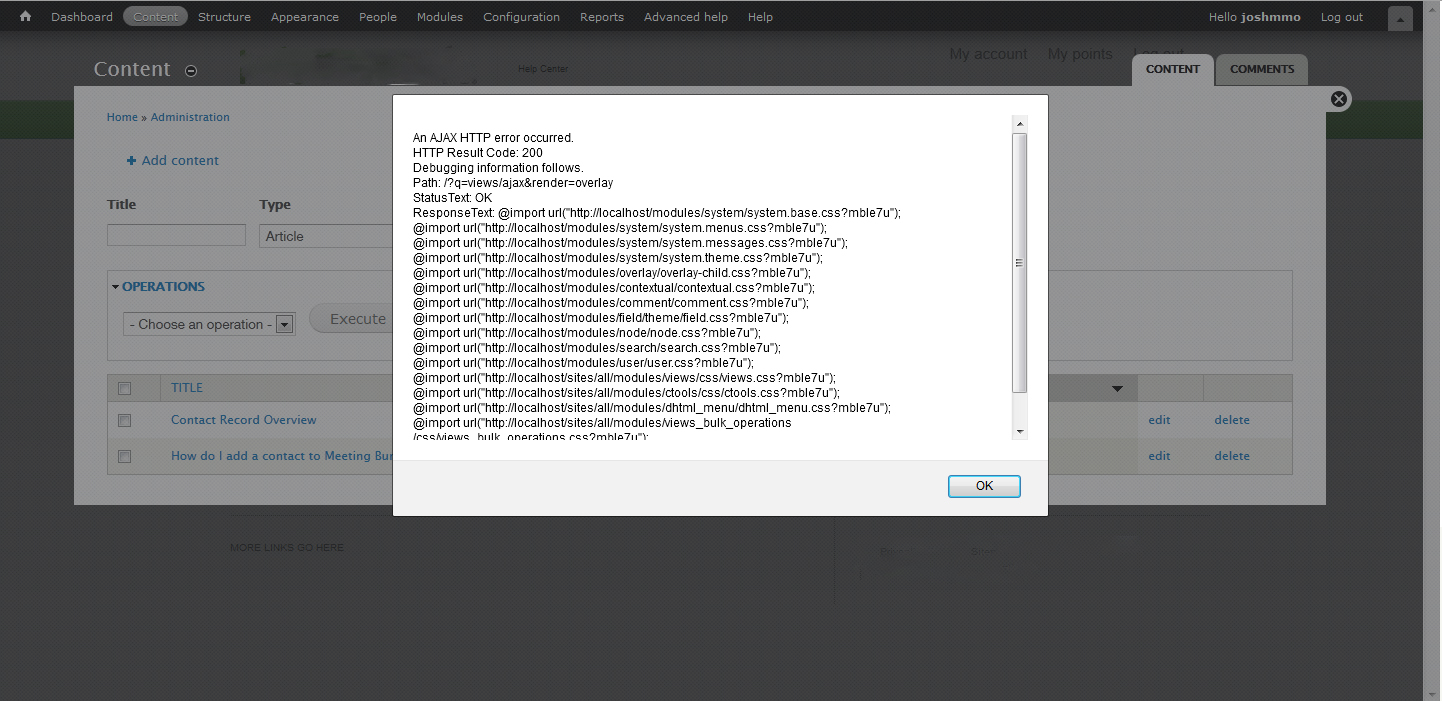
An AJAX HTTP error occurred.
HTTP Result Code: 200
Debugging information follows.
Path: /?q=views/ajax&render=overlay
StatusText: OK
ResponseText: @import url("http://localhost/modules/system/system.base.css?mble7u");
@import url("http://localhost/modules/system/system.menus.css?mble7u");
@import url("http://localhost/modules/system/system.messages.css?mble7u");
@import url("http://localhost/modules/system/system.theme.css?mble7u");
@import url("http://localhost/modules/overlay/overlay-child.css?mble7u");
@import url("http://localhost/modules/contextual/contextual.css?mble7u");
@import url("http://localhost/modules/comment/comment.css?mble7u");
@import url("http://localhost/modules/field/theme/field.css?mble7u");
@import url("http://localhost/modules/node/node.css?mble7u");
@import url("http://localhost/modules/search/search.css?mble7u");
@import url("http://localhost/modules/user/user.css?mble7u");
@import url("http://localhost/sites/all/modules/views/css/views.css?mble7u");
@import url("http://localhost/sites/all/modules/ctools/css/ctools.css?mble7u");
@import url("http://localhost/sites/all/modules/dhtml_menu/dhtml_menu.css?mble7u");
@import url("http://localhost/sites/all/modules/views_bulk_operations/css/views_bulk_operations.css?mble7u");
@import url("http://localhost/themes/seven/reset.css?mble7u");
@import url("http://localhost/themes/seven/style.css?mble7u");
Duplication Steps:
-Setup Drupal 7.15
-Install Dependiency modules for Administration Views
-Install Administration Views
-Goto Content of Admin section
-Change type to filter content view
-Click Apply
Attempt at fix:
-Change Admin theme
-Clear Caches
-Change to dev version of module
-Cleared caches again.
Browser: Firefox 9.0.1
OS: Windows 7 using wamp.


Comments
Comment #1
alanosman commentedHi there. Yes I get something similar to this also. Same environment. my code is a bit different though. The error appears when I select APPLY in the Content view. I was all excited to use it too! It actually does produce the right view after you close the error window and refresh the page. Obviously not desirable for production use.
I could not extract the text from the error to paste here as it is in an alert window but I have attached the error dialog.
Along the lines of (and "openexchange" is the project name)
An AJAX HTTP error occurred.
HTTP Result Code: 200
Debugging information follows.
Path:/openexchange/?q=views/ajax&render=overlay
StatusText: parseerror
ResponseText: @import url("http://localhost/openexchange/modules/system.base/css?mbnnvs");
@import url and so on.. repeats (see attachment)
Any wisdom here would be helpful.
Comment #2
joshmmo commentedThat's actually the exact same issue I noticed after a while as well.
Comment #3
damiankloip commented@alanosman: 4 weeks is not a massively long time to not have a commit for... Heard of Drupal 8 ;) these are busy times.
Also, you only posted your issue here 1 day before sending me a personal message. That's hardly a fair amount of time, and will also not get your query dealt with any quicker.
I am certainly not getting this issue. Are you using the default themes? i.e. Bartik and Seven for the admin theme? It may be an issue with your custom themes. Do you get the same issue if you try this on a vanilla installation? I think someone else had a similar problem before, and it turned out to be another contrib module js script conflicting.
Comment #4
alanosman commentedDamain - sorry, had no idea. I never really posted here before, but its good to know you guys are listening and are doing great things. You guys are so way ahead of us when it comes to Drupal 8 and what you are building. We're just mere themer's with PHP tweaks.
The theme I am using for admin is Seven and haven't mucked with it in any way. I am using a heavily modified Boron theme for the content user's see.
Keep doing your thing, I can live without this for now.
thx.
Comment #5
damiankloip commentedSo, do you have this issue with any other views that have ajax enabled? Also, please switch you themes back to Bartik/Seven for default and admin themes respectively and see if you still have this issue.
Comment #6
joshmmo commentedI switched my base/admin theme back to defaults and still get the error
What else should I do to debug? Just start uninstalling each module one by one and test?
Comment #7
flock commentedI just updated to Drupal 7.16 and get the following error when attempting to view my Blog page:
An AJAX HTTP error occurred.
HTTP Result Code: 500
Debugging information follows.
Path: /2012/admin/structure/views/view/news/preview/page/ajax
StatusText: error
ResponseText: EntityMalformedException: Missing bundle property on entity of type taxonomy_term. in entity_extract_ids() (line 7562 of /home/content/b/1/9/b19842723/html/2012/includes/common.inc).
It was working perfectly fine prior.
--------solved---------
Intalled: http://drupal.org/project/taxonomy_orphanage
Ran it through the admin pages and it solved my troubles.
Comment #8
joshmmo commentedflock,
Does this have anything to do with the administration views error we are having? It does not look like you even got the same error we did.
Comment #9
alanosman commentedAny progress here on this one? I'd like to ship a product that uses this filter, but does not show this problem. Should I muck with the view and ajax? seems like this is where its complaining.
Comment #10
alanosman commentedI solved this problem by disabling AJAX in the content filter view.
Comment #11
damiankloip commented@alanosman, that is not solving a problem, but just sidestepping it... ;)
This seems to be a duplicate of #1650420: Ajax error after editing content navigated to after an ajax content search search.. Views issue, not admin_views.
Comment #12
back from 7 commentedFor what it is worth I had the same issue. I noticed that Theme Key was the culprit. Disable Themekey UI module (part of Themekey module package)
The ajax error went away on my admin content view. I also disabled ajax in the actual view settings.
Hope this helps someone!!
Comment #13
dibyadel commentedit worked for me.I disabled ajax in the views.
Comment #14
jrdixey commentedI'm getting this error as well. Can someone explain how to disable AJAX in the views?
Comment #15
chandeepkhosa commentedThis might not be the right place to post, and may not be the fault of Administration Views but I also get the same problem.
I changed the admin theme to Seven and it still appeared.
Advanced > Ajax = no
My error results show as follows in a modal, after I attempt a bulk operation to change a user field on a list of 10 users.
Comment #16
chandeepkhosa commentedHere is a screenshot, thanks!
Comment #17
back from 7 commentedTry to simply save the view again (without filters) then apply the filters saving again and see if that helps.
Comment #18
noymen commentedUsing PHP 5.6+ resolved it.