During the drupal installation, after requirements check some messages are shown. They can be status message indicating that a particular thing is ok or error messages containing information to fix the problem.
At this time, a blind user must ensure that everything is ok browsing all them.
My proposal is to group these messages in a table, maybe with these columns:
1. "Status": it should indicate "ok" or "error";
2. "requirement": it should indicate the requirement the message refers to;
3. Message: the content of the message.
In addition to this, I think we could place error messages in the first rows of the table, so that it can be really easier and faster to find them!
What do you think about this?




Comments
Comment #1
falcon03 commentedThis is to clarify that this issue is an accessibility enhancement request, not a bug...
Comment #2
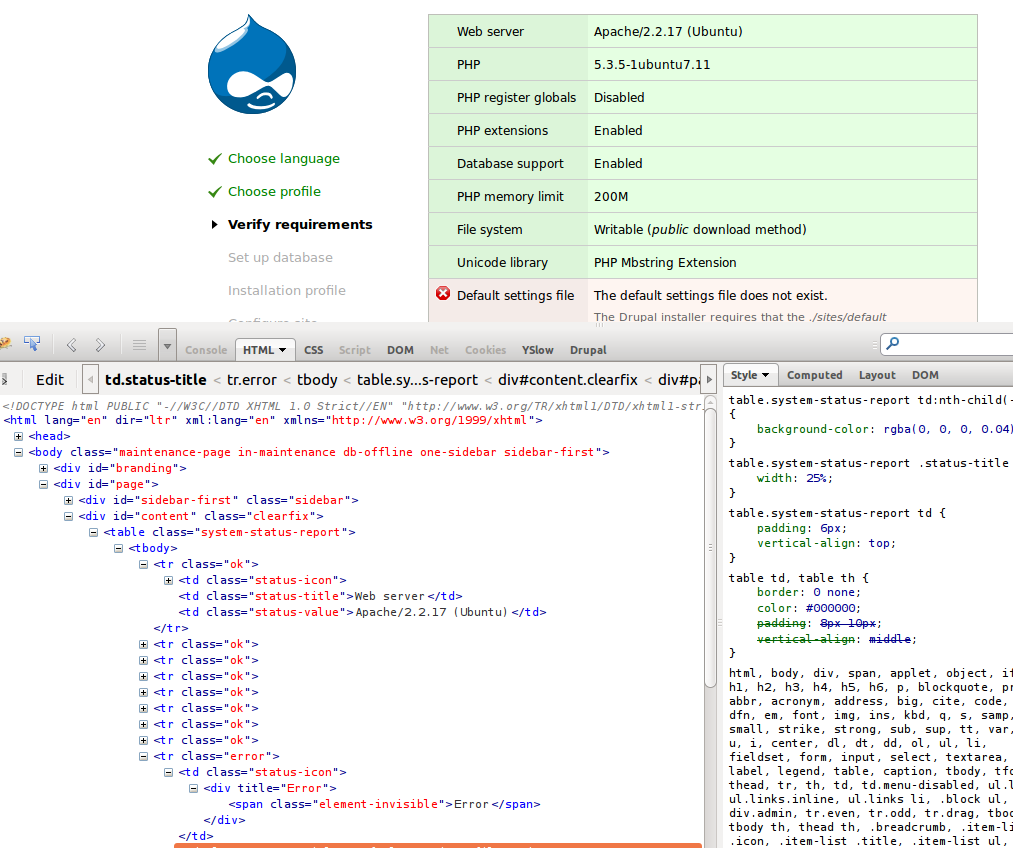
mgiffordYes, having table headers here would sure be useful. Currently there's 3 columns. 1) Status Icon, 2) Requirement title, 3) Requirement description.
So you'd like the order of these items to be restructured so that the outstanding items are more readily available.
Visually each row with an error message is red if it has an error. Furthermore there's an icon in the first column that is provided with an alternate text for the screen reader user. It's obvious to a sighted user (I think) what the problems are. I'm not sure how to best give an equivalent experience to a blind user.
Comment #3
falcon03 commentedHi mgifford,
so, you're saying that there is a table in that page?
I must say that, using a screen reader, I didn't think it at all!
So, in my opinion, the solution is more easier to find than waht I thought:
1. Use appropriate headers for cells;
2. Show error messages before the remaining ones (maybe adding a little description to let users know this facility).
I didn't look at source code at all... I'm sorry! :(
Comment #4
mgiffordReporting the error is the first start. I'm changing the title so that it's clear what needs to happen.
I think there might be some UX issues in changing the order of the the messages. I also think that the new TH's will also be visible by default which will change the UI, so tagging accordingly.
Comment #5
Bojhan commentedSeems like this is just a bug. There is no table header, and there is no clear reason why we don't have them here.
I am not really excited about moving errors on top. People debugging, will refresh the page and fixate on the location where they previously saw the bug. If that location is variable, as errors move down and up from the top it will be hard to quickly scan this table if you resolved the bug.
Comment #7
mgiffordPotentially we could use a status box for this, but for sighted users this would be a pain as it would just push the content they want down below the screen.
However, I suppose we could have an error that's available on focus to allow folks to jump right to the row with the error.
Comment #8
mgiffordOk, so here's a patch & a screen shot.
Comment #9
falcon03 commentedHi mgifford,
thank you very much! This patch is amazing and makes installing drupal easier for blind people...
To hide table headers from sighted users (if we really need to do it), could we apply to them the "element-invisible" css class? This should solve the problem, if we do not want to change the current UI...
For prioritizing errors, instead, I think we have two choices:
Comment #10
Bojhan commentedCould you expand on those suggestions, I don't really understand what they mean in actual changes to the UI.
Comment #11
falcon03 commentedHi Bojhan,
what should I clarify?
The problem with table headers or with error prioritizing?
Comment #12
Bojhan commented@falcon03 Both :D. 1. Does that mean we change the position of the rows, depending on if its an error or not? 2. Like an actual drupal error message.
Don't we have a solution for this, in all tables?
Comment #13
mgifford#8: system-requirements-headers-1811128-8.patch queued for re-testing.
Comment #14
mgiffordComment #15
falcon03 commented@mgifford. I was wondering: if we split the "prioritizing errors" from the "table headers" one, committing this patch will be a piece of cache... Won't it?
We can always discuss prioritizing errors in another issue!
Any thoughts?
Comment #16
sebsebseb123 commentedHi All,
So, the patch works.
Unfortunately, it adds a visible header to the table... which would make this a UI change. So, we've added the "element-invisible" class to hide it from visibility, while keeping this accessible.
Sadly, this results in webkit rendering the table incorrectly. So, CSS has been modified in the "Seven" theme. This renders the border around the table in a slightly different way. In fact, "Seven" theme makes reference to a known issue with webkit rendering tables incorrectly:
/**
* Exception for webkit bug with the right border of the last cell
* in some tables, since it's webkit only, we can use :last-child
*/
tr td:last-child {
border-right: 1px solid #bebfb9; /* LTR */
}
...this patch removes the need for that.
Comment #17
mparker17Lol @sebsebseb123, I created a patch almost exactly the same at the same time. :P
Does it make sense to use Status, Component, and Details as the table header text? I feel like those describe the contents of the table a bit better than Status, Title, and Description. Thoughts?
Comment #19
mparker17That was weird... re-testing.
Comment #20
mparker17#16: system-requirements-headers-1811128-16.patch queued for re-testing.
Comment #21
falcon03 commented@mparker17#17: Yes, I agree with you.
If someone could update the patch and give a feedback from a sighted point-of-view, I'll review it later this morning...
Comment #22
mparker17Re-rolled with new column headers.
Comment #23
falcon03 commentedOK, something crazy is happening.
After applying the patch, Voiceover "thinks" that the table has only a column (with 12 rows).
I tried reviewing the markup, but everything looks god. I validated it with achecker.ca against WCAG 2.0 AAA and it didn't fail.
But this is not a mac os X bug: the example at
http://www.w3schools.com/tags/tryit.asp?filename=tryhtml_tbody
works as expected.
I have to admit that I've seen no line endings between table cells and rows (but I don't know what is our code standard for this) (maybe they were deleted by Safari).
Any idea on what the problem is?
Comment #24
falcon03 commented#22: statusreport_headers-1811128-22.patch queued for re-testing.
Comment #25
mgifford@falcon03 do you have access to a Windows box where you could test this for NVDA or something like that?
Would like to have some other folks look over this and see if we can figure out what the issue is. Hopefully it was just a glitch somewhere.
EDIT - I did try this in a fresh install and VO gave me the required headings without difficulty. Status, Components & Details were read to me no problem.
Comment #26
mgifford#22: statusreport_headers-1811128-22.patch queued for re-testing.
Comment #27
mgifford@falcon03 I'm marking this RTBC as it is at least a semantic improvement. With my testing with VoiceOver (both in November & today), I had no trouble seeing the headers. I've got a very basic use of VoiceOver, so perhaps I'm missing something.
Anyways, I'm attaching an image with the visuals that VoiceOver provides of the headings. When we can replicate the problem, I hope we can re-address it. Might just be a ghost in the machine though.
The code here is better semantically and works for me.
Comment #28
catchLooks sensible. Committed/pushed to 8.x.
Comment #29
mgiffordexcellent! Thanks @catch
Comment #30
mparker17Woot, my second Drupal core patch! Thanks everyone!
Comment #31
echoz commentedRemoving the top border on the table element is too generic, needs to target only where needed. Where the patch does this:
is on the element selector "table". Screenshot attached of an effected table (configure format filter) and it likely effected others.
Comment #32
mgiffordThink someone fixed that already in the latest git:
Comment #33
echoz commented#mgifford that is from the patch here from #22 that was just committed, that I am reporting about in #31, quoting the diff from the patch that *removed* the border-top, which I found to break at least the table in my screenshot.
Comment #34
mgiffordCan you write a patch to fix it?
Comment #35
echoz commentedThe only reason I just reported and did not write a patch, is I figured you guys who had worked on it were already familiar with the issue details, and I would have to spend time discovering what you already had been through, so I assumed it might be easier for the original author. It's not just put the border back, it's make it work for the original issue and not step on tables unseen from that screen.
Comment #36
mparker17I'm spinning up a Drupal 8 site now... I'll see if I can come up with a patch to fix that.
Comment #37
echoz commentedYay, thanks mparker17. Just from looking at the previous patch, it seems just keep the original border on the generic table element and isolate all the border changes to table.system-status-report
Comment #38
mparker17Hmm... that CSS was written to get rid of a double-border at the top of the table. The table header row is invisible except to screen-readers, but there's a border on both the top of the table and the top of each regular row in the table: hence the double-border. See @sebsebseb123's comments in #16.
I'm too tired to come up with an effective solution right now, but I'll endevour to tackle this in the morning.
Comment #39
mparker17So, on my local D8 install, I reverted all the CSS changes in the patch from #22 and I get something that looks like the attached screenshot in Chromium 24 and Opera 12.13. It works fine in Firefox 19; haven't tested in IE 9 or 10 yet.
I don't know why the border shows up on the first column and not any other.
I tried a number of things... moving the
element-invisibleclass to thetheadelement, moving it to thetdelements, no change.Deleting the table header entirely makes it work, but the whole point of this issue is to add a table header to make the table more accessible to users of screen readers, so that's not acceptable.
I could get the border to reappear around the whole table again by adding
table.system-status-report { border-collapse: separate; }, but that removes the lines between rows in the table in all browsers.It seems implausible that we've found a bug because it happens in two rendering engines (Webkit and Presto).
Any suggestions would be greatly appreciated!
Comment #40
falcon03 commentedYAY, I found what makes Voiceover go crazy (see comment#23 for details).
We shouldn't assign the element-invisible class to the row containing the headings (just like the patch does now) nor to each table heading (each
Could this be a solution for the border problems too?
Can we apply the needed changes in this issue or do we need to open a follow-up? Let me know; I can write the needed patch :-)
Comment #41
mgifford#22: statusreport_headers-1811128-22.patch queued for re-testing.
Comment #43
falcon03 commented@mgifford: Tests fail because the patch was committed in #28. Re-rolling to apply my suggestions right now.
Comment #44
falcon03 commentedHere's the patch. Unfortunately I don't have my mac to test it right now, but it seems that headings are not working on a Windows + Firefox + NVDA environment.
However, I am just wondering: why don't we use theme_table() to theme the status report?
Comment #45
mgiffordOften with the installation is kept pretty light so that it doesn't depend on leveraging the rest of Drupal. I'm assuming that the theme_table() just hasn't been loaded in the installation.
Unfortunately the
<tr>row is visible. That might need to be<tr class="element-invisible">so that the row doesn't display.Comment #46
falcon03 commented@mgifford: looking at various issues in the issue queue, I can notice that we need a reliable way to hide borders visually. I am not a CSS expert, but maybe the element-invisible class is not the proper way. What about a "no-border" class, something like:
Something like that shouldn't make screen readers go crazy, I hope...
What do you think?
Comment #47
mgiffordI could get this to read out in VO, but if that works, then we can probably remove some of the others:
$output .= '<thead class="element-invisible"><tr>';Comment #48
mgifford#47: statusreport-fix_tableheader-46.patch queued for re-testing.
Comment #49
mgifford#47: statusreport-fix_tableheader-46.patch queued for re-testing.
Comment #50
falcon03 commentedI think this issue is postponed on
#2002336: Introduce a CSS class to hide borders of fieldset elements
. The CSS class could help us hiding borders from the headings without making screen readers go crazy.
Comment #51
mgiffordRelated link in problems with VoiceOver:
http://www.accessibleculture.org/articles/2010/10/voiceover-and-tables-w...
Comment #52
mgiffordfixing element-invisible in last patch.
Comment #53
mparker17We'll have to mark it as "needs review" in order for Testbot to notice it.
Comment #54
mgiffordTrue, but that's waiting on #2002336-14: Introduce a CSS class to hide borders of fieldset elements
If you have a chance, please review that patch.
Comment #55
mgifford#52: statusreport-fix_tableheader-52.patch queued for re-testing.
Comment #57
mgiffordIn #2099761: Introduce a class to hide borders for tables I proposed adding a .table-unboxed class that emulated what was done in #2002336: Introduce a CSS class to hide borders of fieldset elements.
It's also worth noting the move to this twig file:
/core/modules/system/templates/status-report.html.twig
But this still needs testing to verify that it is an improvement for screen readers.
Comment #58
mgiffordPatch needs re-roll.
Comment #63
BarisW commentedThis can be closed
Comment #64
BarisW commentedMy fault, the commits were not related to the patch.
Comment #65
BarisW commentedComment #66
BarisW commentedComment #69
mgiffordComment #70
mgifford@BarisW I took a look at this and the whole structure of the status-report.html.twig seems to have changed to:
I suspect that this would override any heading information for that table related to the columns below.
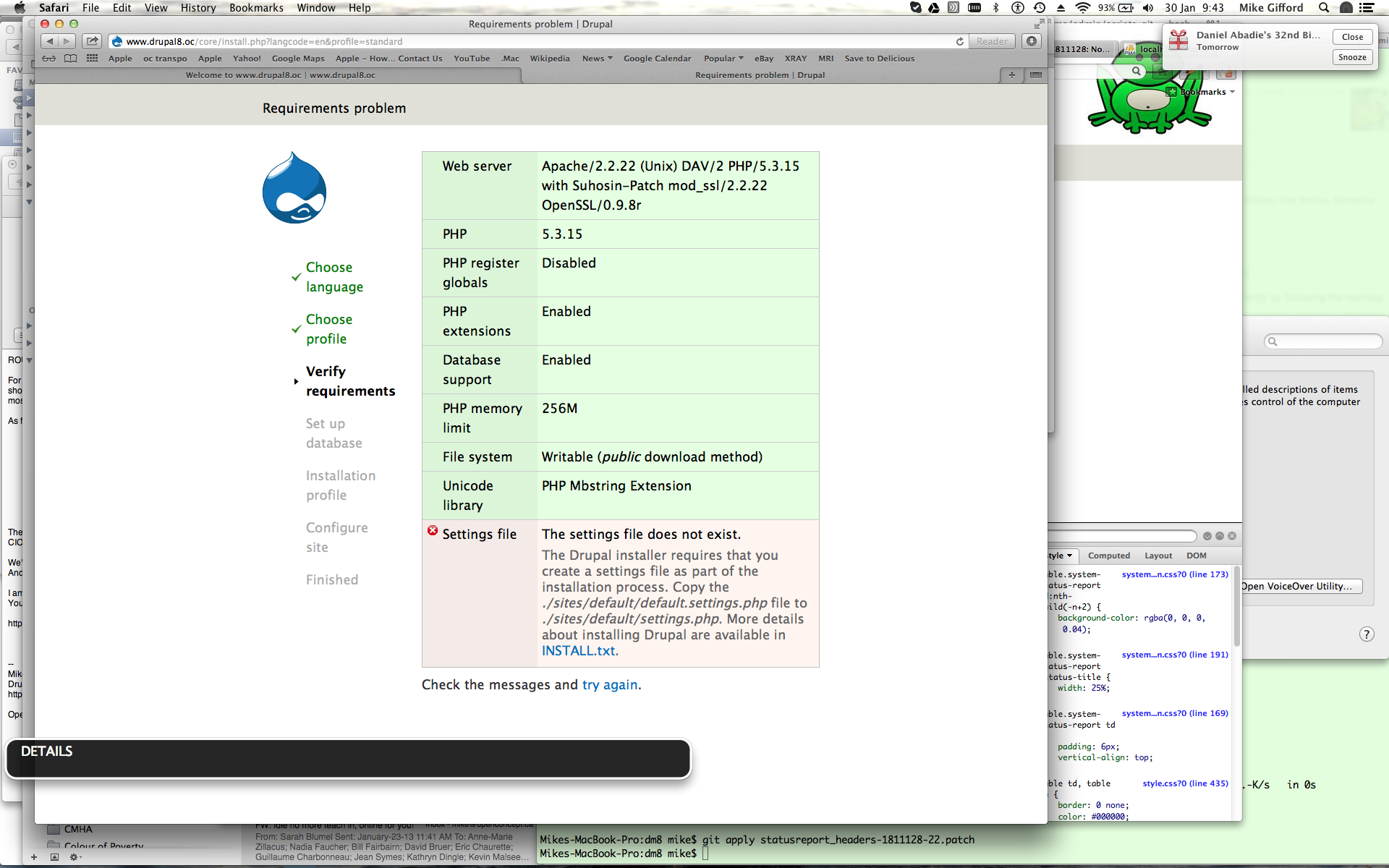
This is an old screenshot, but helps focus on what we're trying to address in this long thread.
Comment #75
ultrabob commentedI had a look at this just now, and it appears that the structure has changed yet again, and no longer uses tables. @mgifford are the issues in this ticket still relevant given the current state of the template?
Here is a screenshot:
Comment #76
ultrabob commentedComment #77
mgiffordThanks @ultrabob - it is nice to be able to close this issue.
Removing the tables fixes the accessibility problem here.
Thanks for checking the latest code.