Using Panelizer 7.x-3.0-rc1+6-dev with Panels 7.x-3.3 and ctools 7.x-1.2 on Drupal 7.15. I get this when I go to Context, Layout or Content for a Panelizer instance:
"You are not authorized to access this page."
It happens with any content type. Note that I'm logged in as UID 1. I'm actually not sure if this has more to do with Chaos Tools' Page Manager since it appears to be utilised here, but Panelizer seems to be the driving force at least. If it's not clear which part of the module I'm talking about, it's this:
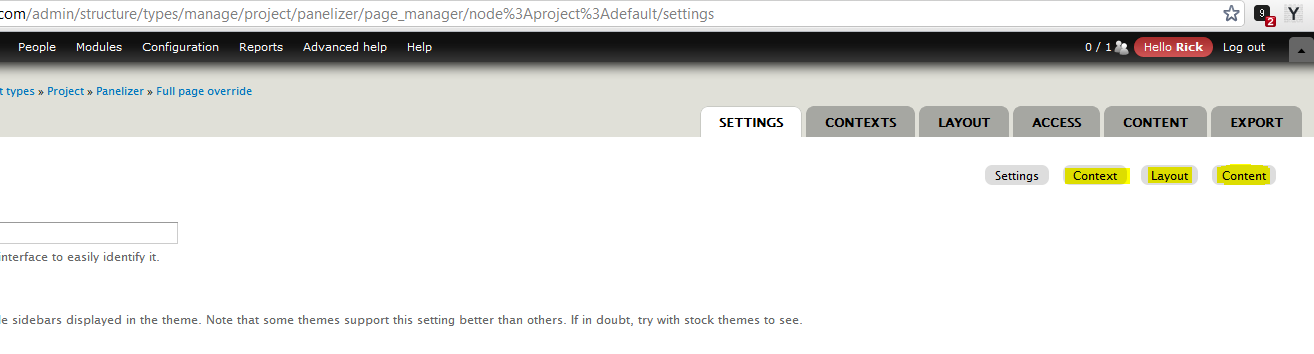
(I can get to the Settings page, but those three are inaccessible)
P.S. also had the same issue using Panelizer 7.x-3.0-rc1


Comments
Comment #1
merlinofchaos commentedWhat is the actual panelizer configuration for that content type? Is it panelized? Has a default? Has a panel choice?
Comment #2
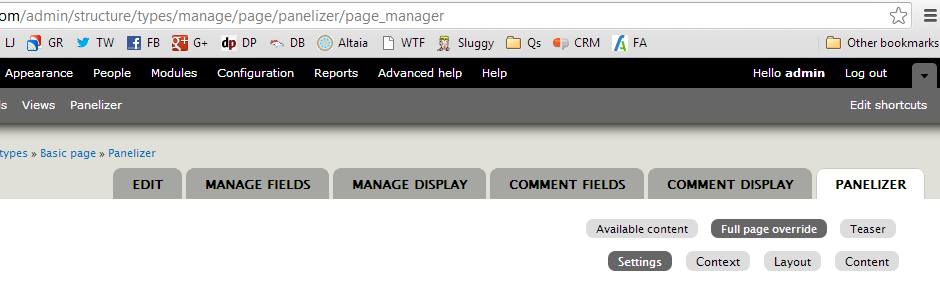
merlinofchaos commentedOne thing I will say -- you have a totally weird set of tabs there. On a similar, functioning page, I have *completely* different tabs.
Comment #3
Riari commentedOK, that's odd. I have a few other sites using Panelizer that don't have this issue and the tabs on those are the same as the ones in my screenshot. I suppose it's a separate issue though, and it doesn't seem to cause any trouble in my case.
To answer your first question, yes, it's panelized, provides a default panel and allows panel choice. Since I can get to the "Settings" tab, I was able to set the renderer to the IPE. If I go to a node of the same content type, the IPE shows up and works as normal. I just can't set the default layout and content due to this access control problem.
Comment #4
merlinofchaos commentedThe UI you're looking at is an alternative version of the UI you will find at admin/config/content/panelizer which should also let you get to those screens.
I can't come up with any explanation of why it might be working wrong/differently on one site than others, though. Or why your tabs are so different. Though that part might be explainable by Drupal itself, which can hold onto old menu data rather fiercely at times making it difficult to make changes properly.
Comment #5
Riari commentedI see what you're saying about the alternative UIs. From what I can see, there are two routes to the section where my issue is, right? I can get to it through either of these routes:
Structure > Content types > [whatever] > Panelizer > Full page override > Settings
Configuration > Content authoring > Panelizer > List > Settings
Would clearing all caches affect old menu data at all (although I have cleared them a few times already) - and is there anything I can change directly in the DB to troubleshoot? A fix is not urgent in regards to this particular site, I'm just trying to think of ways to help identify the cause.
Comment #6
merlinofchaos commentedIf you've already cleared caches, then probably not. It's possible wiping the menu_links table of all paths with '%panelizer%' in them and then doing a menu cache clear might help (warning: only do this with drush!) reset things, but I'm not sure.
It might be interesting to get a look at what's in the menu_router and menu_links table for the paths for admin/structure/types/%
Comment #7
Riari commentedI did as you suggested and found 180 records in menu_links where link_path matched '%panelizer%' - wiped and cleared the menu cache via drush. The table had one less record, oddly - no luck though. The issue is still there.
If it's any help, I can provide dumps of menu_router and menu_links for admin/structure/types/% paths in CSV format.
Comment #8
kenianbei commentedSame issue here, it started occurring when I switched from the 2.x branch to the 3.x branch. I also have no access to the node panelizer tab, panelizer #access on node form is always set to FALSE.
I've tried deleting all menu items and clearing the cache, but no go. This is on a development site, so I'm going to try to uninstall panelizer completely and reinstall to see if it solves this problem.
Comment #9
kenianbei commentedOkay, I've reproduced on a clean install:
1) Install drupal
2) drush @dpl dl panelizer-7.x-3.x-dev
3) drush @dpl dl panels-7.x-3.x-dev
4) drush @dpl en panelizer
5) Go to admin/structure/pages and enable Node Template.
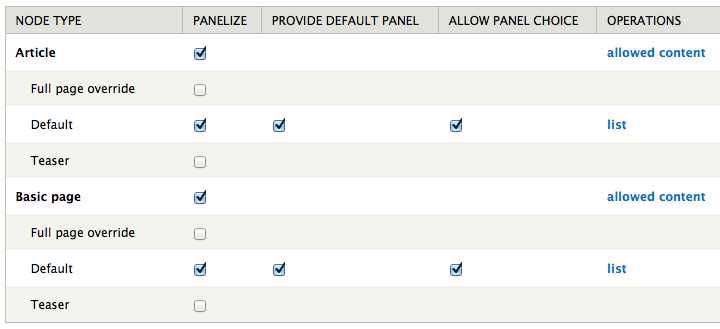
6) Go to admin/config/content/panelizer and enable 'Default' view mode for Article and Page.
7) Go to admin/structure/types/manage/page/panelizer/default/node%253Apage%253Adefault%253Adefault/settings (click 'list' then click 'Settings').
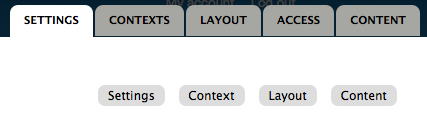
I now get sub tabs but cannot access 'Context', 'Layout', or 'Content':
Comment #10
kenianbei commentedAlso, with the same steps above, I have the following issues:
#1) When viewing the 'Add a new panelizer default', for example at admin/config/content/panelizer/node/page.default/list/add, I get this error:
After adding the panelizer template, I get an error: You are not authorized to access this page.
I posted an issue here earlier: http://drupal.org/node/1772508
#2) The 'allow panel choice' setting doesn't effect the node edit form... the $form['panelizer']['#access'] = FALSE.
Comment #11
Riari commentedThe access issue seems to occur with 7.x-3.0-rc1 as well. I upgraded to that from 7.x-2.0 on another site (fresh install), this issue appeared, then I downgraded to 7.x-2.0 again and it resumed working as normal.
Comment #12
twistor commentedIt seems pretty simple what's happening here, you can't have a default panel and panel choice.
This is the access callback for settings, context, layout, and content.
Comment #13
merlinofchaos commentedYou CAN have a choice and a default (that means that the default is the one chosen at the beginning but can be later changed). However, the menu locations are different if there is a choice, since we have to add list management.
Comment #14
merlinofchaos commentedI've fixed the duplicate tabs, some of which were invalid. I think that was the problem here.
Comment #16
marcvangendIn case it helps someone who arrives here in the future: I ran into the above error today, but it couldn't be the same bug since this was fixed a long time ago.
I was trying to enable panelizer for the 'event' bundle and wanted to access http://example.dev/admin/structure/panelizer/node/event.page_manager/set.... As it turned out, during development a variable called
panelizer_node:event:page_manager_selectionhad already been set to0. I don't know why or when that happened, but it did. This variable is retrieved and checked (if === FALSE) in PanelizerEntityDefault::get_default_display_name() which is called indirectly by the page's access callback panelizer_has_no_choice_callback(). Obviously the integer 0 is not identical to the boolean FALSE, so the access was denied. A simpledrush vdel panelizer_node:event:page_manager_selectionsolved my problem.Comment #17
damienmckenna@marcvangend: Please open a new issue so your scenario can be looked into. Thanks.
Comment #18
tisteegz commentedI have created a new issue for this here: https://www.drupal.org/node/2421321
I tried the above solution of removing the variable but it didn't work for me.